Merging two firms 2026

Get Form
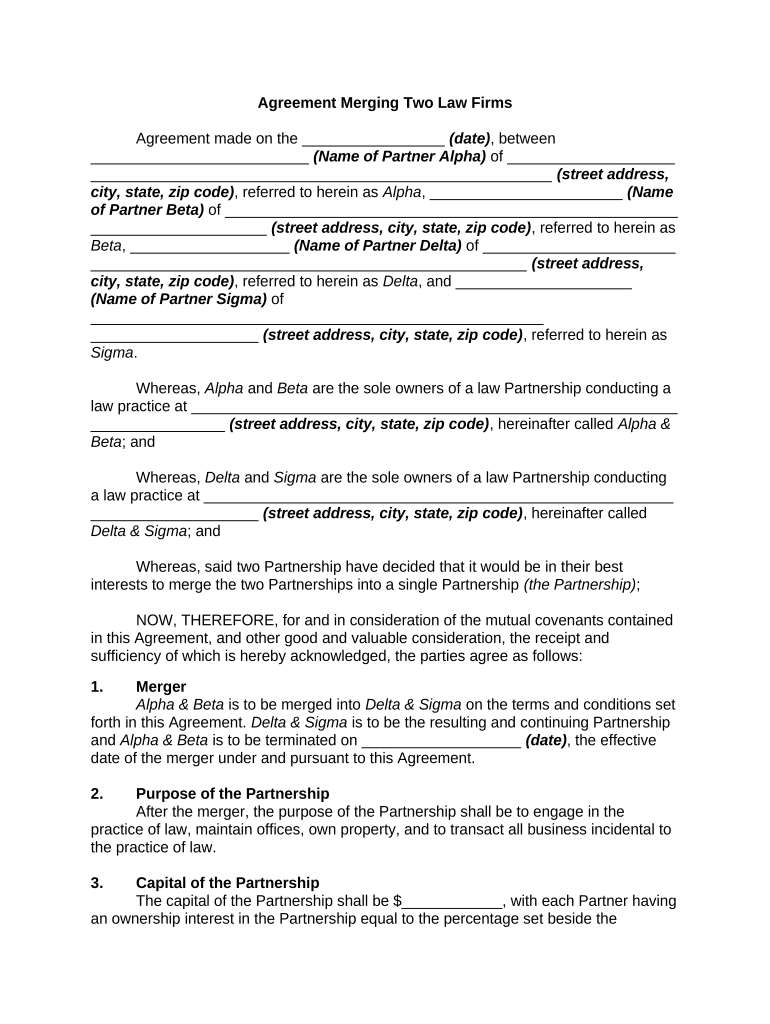
merging two firms Preview on Page 1

Here's how it works

01. Edit your form online
Type text, add images, blackout confidential details, add comments, highlights and more.
02. Sign it in a few clicks
Draw your signature, type it, upload its image, or use your mobile device as a signature pad.
03. Share your form with others
Send it via email, link, or fax. You can also download it, export it or print it out.

How to use or fill out merging two firms with our platform

Form edit decoration
9.5
Ease of Setup
DocHub User Ratings on G2
9.0
Ease of Use
DocHub User Ratings on G2
  1. Click ‘Get Form’ to open the merging two firms document in the editor.
  2. Begin by entering the date of the agreement at the top of the form. This is crucial for establishing the timeline of the merger.
  3. Fill in the names and addresses of each partner involved in the merger. Ensure accuracy as this information is vital for legal identification.
  4. In Section 1, specify the effective date of the merger. This marks when Alpha & Beta will officially merge into Delta & Sigma.
  5. Complete Section 3 by detailing each partner's ownership percentage in the new partnership. This ensures clarity on profit sharing and responsibilities.
  6. Review Sections 5 through 13 carefully, filling out any necessary details regarding profits, liabilities, and management structure to reflect your partnership's agreements.
  7. Finally, ensure all partners sign and print their names at the end of the document to validate the agreement legally.

Start using our platform today to streamline your document editing and signing process for free!

be ready to get more

Complete this form in 5 minutes or less

Get form

Got questions?

We have answers to the most popular questions from our customers. If you can't find an answer to your question, please contact us.
Contact us
Mergers combine two separate businesses into a single new legal entity. True mergers are uncommon because its rare for two equal companies to mutually benefit from combining resources and staff, including their CEOs. Unlike mergers, acquisitions do not result in the formation of a new company.
Depending on the structure of the deal, typically if its an all cash buyout, once the final merger is approved and the transaction is completed, your shares are exchanged by your broker for the equivalent cash value and its deposited into your account. You dont do anything.
A merger is the voluntary fusion of two companies on broadly equal terms into one new legal entity. The firms that agree to merge are roughly equal in terms of size, customers, and scale of operations. For this reason, the term merger of equals is sometimes used.
By merging with another company in the same or a complementary space, you can reduce your competition. Instead of competing against each other, youll work together to further grow the business and strengthen the docHub of the brand.
Merger definition, business context: The process by which two or more companies consolidate to create a new legal entity, often to achieve a strategic advantage, enter new markets, or increase scale.

Security and compliance

At DocHub, your data security is our priority. We follow HIPAA, SOC2, GDPR, and other standards, so you can work on your documents with confidence.

Learn more
ccpa2
pci-dss
gdpr-compliance
hipaa
soc-compliance

People also ask

Major benefits of mergers and acquisitions include: Market expansion. Economies of scale. Economies of scope. Diversification. Enhanced talent and expertise. Financial gains. Tax benefits. Increased valuation.

Related links