Type text, add images, blackout confidential details, add comments, highlights and more.
02. Sign it in a few clicks
Draw your signature, type it, upload its image, or use your mobile device as a signature pad.
03. Share your form with others
Send it via email, link, or fax. You can also download it, export it or print it out.
How to use or fill out trust trustees with our platform
Ease of Setup
DocHub User Ratings on G2
Ease of Use
DocHub User Ratings on G2
Click ‘Get Form’ to open the trust trustees document in the editor.
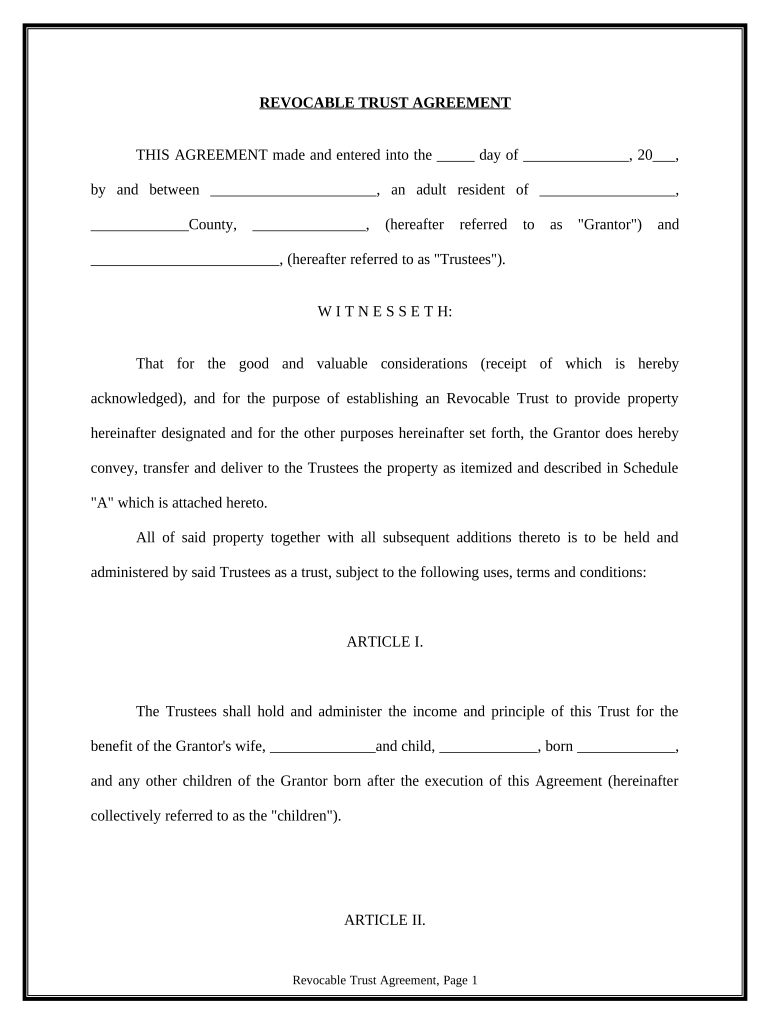
Begin by filling in the date and names of the Grantor and Trustees at the top of the form. Ensure all names are spelled correctly for legal accuracy.
In Article I, specify the beneficiaries, including the Grantor's wife and children. Fill in their names and birth dates as required.
Proceed to Article II, where you will outline how income and principal will be distributed among beneficiaries. Clearly indicate any percentages or conditions for distributions.
Complete Articles III through XVII by following prompts for each section, ensuring that all necessary details about trustee powers, beneficiary rights, and administrative procedures are accurately filled out.
Finally, review your entries for completeness and accuracy before saving or printing the document directly from our platform.
Start using our platform today to easily fill out your trust trustees document for free!
Trust trustees responsibilitiesTrust trustees listWho can be a trustee of an irrevocable trustTrustee vs executor of a trustIs the trustee the owner of the trustTrustee and beneficiaryWho is the successor trustee of a trustTrustee vs grantor of trust
Security and compliance
At DocHub, your data security is our priority. We follow HIPAA, SOC2, GDPR, and other standards, so you can work on your documents with confidence.
A trustee may: 1. Collect trust property and accept or reject additions to the trust property from a settlor or any other person. 2. Acquire or sell property.Read more
Cookie consent notice
This site uses cookies to enhance site navigation and personalize your experience.
By using this site you agree to our use of cookies as described in our Privacy Notice.
You can modify your selections by visiting our Cookie and Advertising Notice.