Type text, add images, blackout confidential details, add comments, highlights and more.
02. Sign it in a few clicks
Draw your signature, type it, upload its image, or use your mobile device as a signature pad.
03. Share your form with others
Send it via email, link, or fax. You can also download it, export it or print it out.
How to use or fill out Texas Statement with our platform
Ease of Setup
DocHub User Ratings on G2
Ease of Use
DocHub User Ratings on G2
Click ‘Get Form’ to open the Texas Statement in the editor.
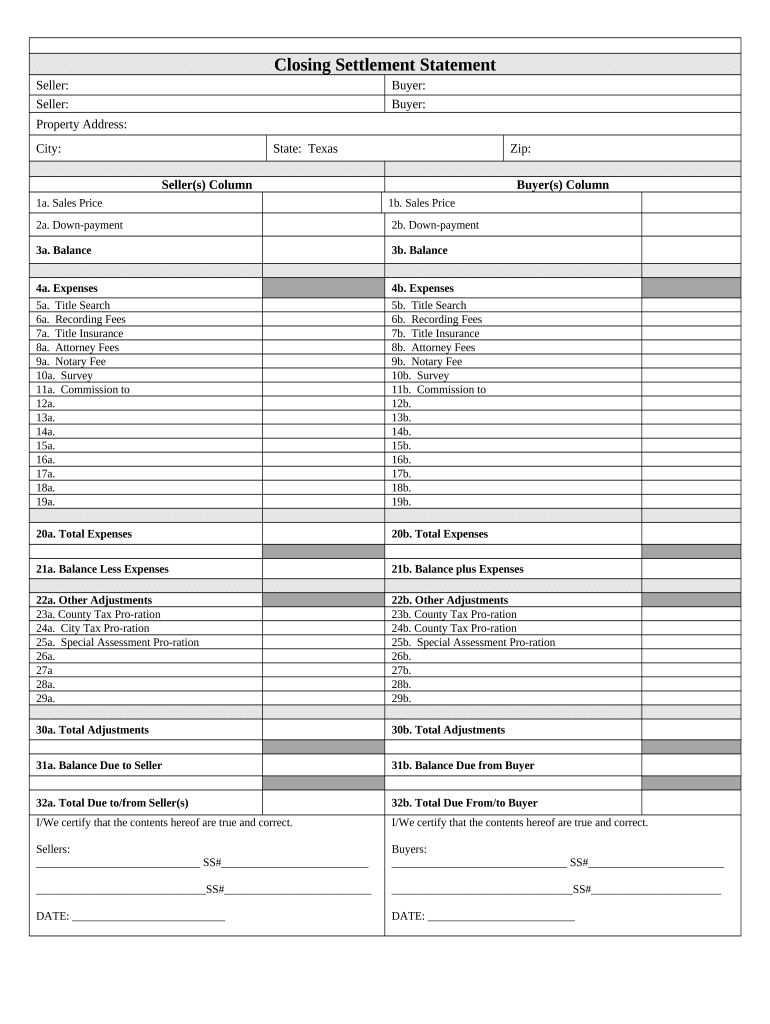
Begin by entering the Seller and Buyer information in the designated fields. Ensure that all names are spelled correctly for accuracy.
Fill in the Property Address, City, State (Texas), and Zip Code to specify the location of the transaction.
In the Seller(s) Column, input the Sales Price, Down-payment, and Balance. Repeat this for the Buyer(s) Column to maintain clarity between both parties.
Detail all Expenses under both columns, including Title Search, Recording Fees, Title Insurance, Attorney Fees, Notary Fee, Survey, and Commission. This ensures transparency in costs associated with the transaction.
Calculate Total Expenses and Balances Less/Plus Expenses for both Seller and Buyer to finalize financial details.
Complete any Other Adjustments such as County Tax Pro-ration or Special Assessments as necessary.
Finally, certify that all information is true by signing in the designated areas for Sellers and Buyers before saving your document.
Start using our platform today to fill out your Texas Statement online for free!
The Texas Statement on Academic Integrity affirms that The University of Texas at Austin values honesty, responsibility and respect in all scholarly work.
Governor Abbott Statement On House Democratic Quorum
Aug 3, 2025 The Governors full statement is as follows: Real Texans do not run from a fight. But thats exactly what most of the Texas House Democrats justRead more
Cookie consent notice
This site uses cookies to enhance site navigation and personalize your experience.
By using this site you agree to our use of cookies as described in our Privacy Notice.
You can modify your selections by visiting our Cookie and Advertising Notice.