Release house form 2026

Get Form
dgnm transfer form pdf Preview on Page 1

Here's how it works

01. Edit your dgnm transfer form pdf online
Type text, add images, blackout confidential details, add comments, highlights and more.
02. Sign it in a few clicks
Draw your signature, type it, upload its image, or use your mobile device as a signature pad.
03. Share your form with others
Send it via email, link, or fax. You can also download it, export it or print it out.

How to use or fill out release house form with our platform

Form edit decoration
9.5
Ease of Setup
DocHub User Ratings on G2
9.0
Ease of Use
DocHub User Ratings on G2
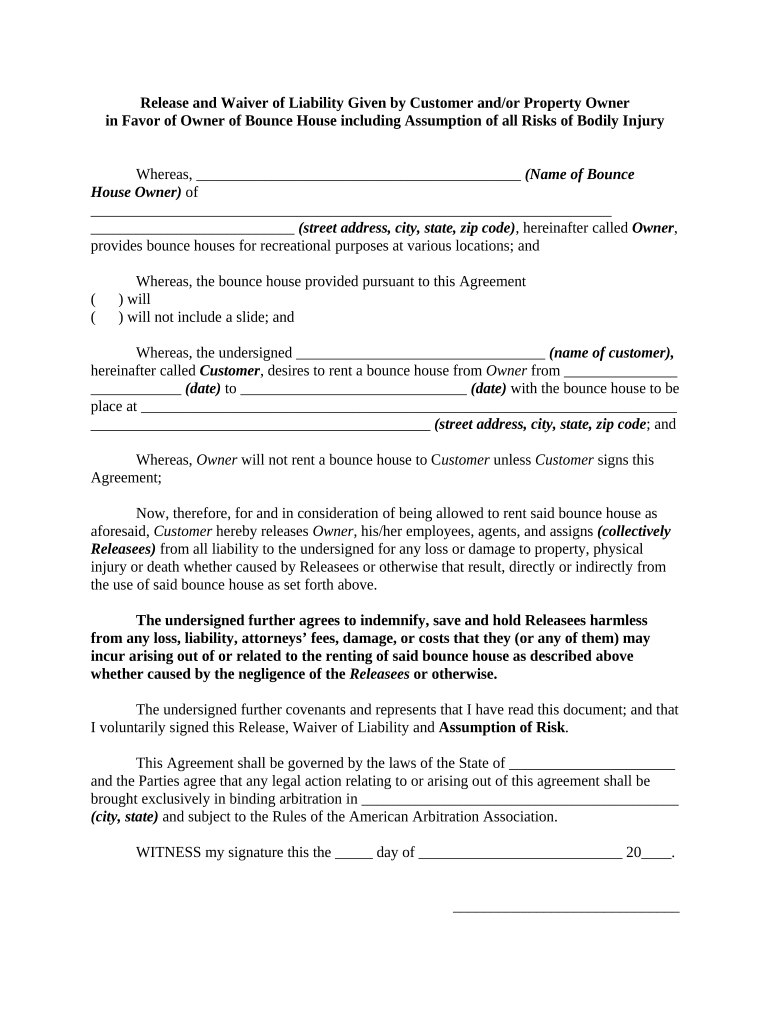
  1. Click ‘Get Form’ to open the release house form in the editor.
  2. Begin by entering the name of the Bounce House Owner in the designated field. Ensure accuracy as this identifies the party providing the bounce house.
  3. Fill in the complete address of the Bounce House Owner, including street address, city, state, and zip code.
  4. Indicate whether the bounce house will include a slide by checking the appropriate box.
  5. Enter your name as the Customer in the specified field. This is crucial for identifying who is renting the bounce house.
  6. Provide rental dates by filling in both start and end dates clearly to avoid any confusion regarding your reservation.
  7. Complete the address where the bounce house will be placed, ensuring it matches your rental location.
  8. Review all entered information for accuracy before signing at the bottom of the form. Your signature confirms your agreement to all terms outlined.

Start using our platform today to easily fill out and manage your release house form for free!

be ready to get more

Complete this form in 5 minutes or less

Get form

Got questions?

We have answers to the most popular questions from our customers. If you can't find an answer to your question, please contact us.
Contact us
Easily create, share, and sign digital waivers and release forms, directly from your mobile device or computer. Accelerate the completion of digital waivers and release forms with form sharing and electronic signature capture.
A property release is a legal agreement between you and the property owner or a corporate representative if the property is owned by a company. By signing a property release, that person gives you permission to use the image for commercial purposes.
Some of the crucial information in a release includes: Name of the parties involved, i.e., releasor and releasee. Detailed information about the project. Explicit information of the permissions granted. Any special considerations, including payment obligations or credit, if any. A space for all parties to sign.
A release form, or general release form, is a legal document that serves as consent in writing to release the legal liability of a releasee by a releasor. The document is a formal acknowledgment that, once signed, is a legal release of all a releasee obligations within an agreement.
Heres how you can create release notes that effectively describe your products features, bug fixes and offerings: Plan your content. Write a heading. Include a product overview. Talk about upgraded features in more detail. Address changes. Explain user impacts. Include additional notes. Conclude with your information.

Security and compliance

At DocHub, your data security is our priority. We follow HIPAA, SOC2, GDPR, and other standards, so you can work on your documents with confidence.

Learn more
ccpa2
pci-dss
gdpr-compliance
hipaa
soc-compliance

People also ask

How Do You Write a Release Form? The first step in writing is identifying all parties involved, including the releaser and the release. Specify the activity or event in detail, such as a photo shoot, a video production, or a performance. Clearly specify what is being released, whether liability, claims, or damages.
Release forms serve as a crucial legal agreement, securing consent for the use of an individuals image, likeness, or property. These forms not only evidence agreement but also shield both the user and the subject from possible legal conflicts, ensuring a mutual safeguard against potential disputes.

Related links