Type text, add images, blackout confidential details, add comments, highlights and more.
02. Sign it in a few clicks
Draw your signature, type it, upload its image, or use your mobile device as a signature pad.
03. Share your form with others
Send affidavit of death form via email, link, or fax. You can also download it, export it or print it out.
How to use or fill out affidavit death with our platform
Ease of Setup
DocHub User Ratings on G2
Ease of Use
DocHub User Ratings on G2
Click ‘Get Form’ to open the affidavit of death in the editor.
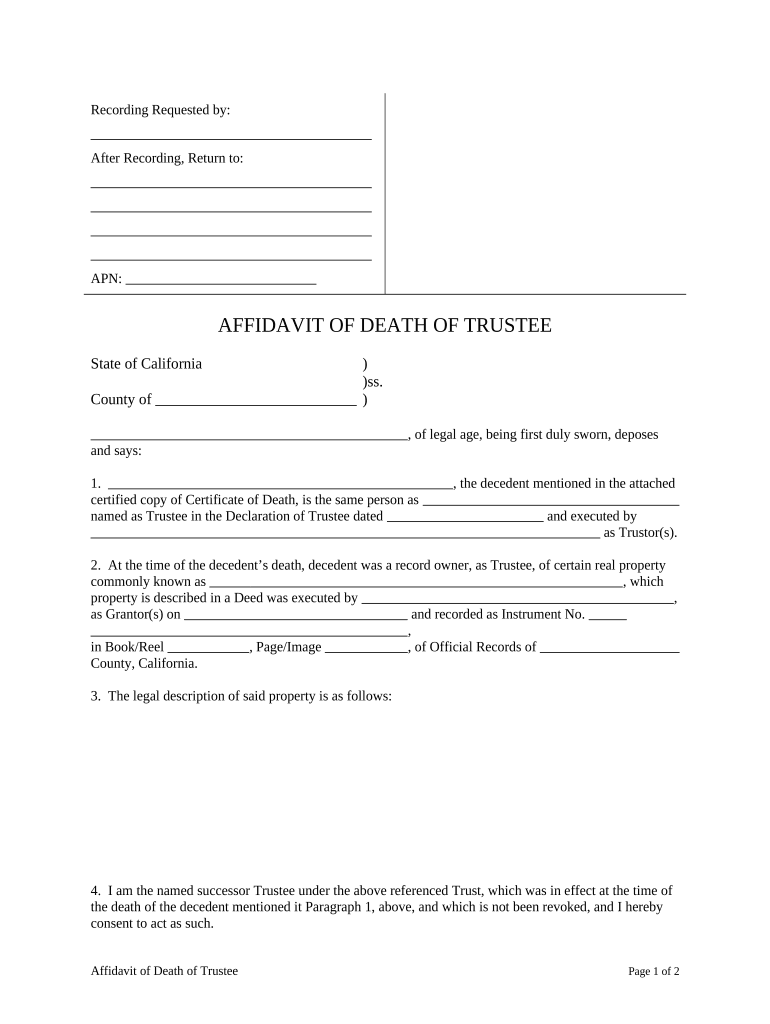
Begin by entering the 'Recording Requested by' and 'After Recording, Return to' sections with the appropriate names and addresses.
Fill in the APN (Assessor's Parcel Number) for accurate property identification.
In Section 1, provide a certified copy of the Certificate of Death and confirm that the decedent is the same person named as Trustee in the Declaration of Trustee.
Complete Section 2 by detailing the real property owned by the decedent, including its common name and relevant deed information.
In Section 3, input the legal description of said property accurately to avoid any discrepancies.
As a successor Trustee, affirm your consent to act in this capacity in Section 4.
Confirm there is no federal estate tax due in Section 5 and sign and date at the bottom of the form.
Start using our platform today for free to streamline your affidavit completion process!
Affidavit death templateAffidavit death sampleAffidavit death formAffidavit of Death of Trustee instructionsAffidavit death exampleCalifornia affidavit deathHow to fill out Affidavit Death of joint tenantAffidavit of death PDF
Security and compliance
At DocHub, your data security is our priority. We follow HIPAA, SOC2, GDPR, and other standards, so you can work on your documents with confidence.
If parties hold title as joint tenants and one is deceased, the survivor may file an Affidavit of Death of Joint Tenant. It may be advisable to consult anRead more
Affidavit of Common Law Marriage/Domestic Partner Status
Neither of us is currently married to another person (which means that any prior marriage, including common law, has been terminated by death or divorce).Read more
Cookie consent notice
This site uses cookies to enhance site navigation and personalize your experience.
By using this site you agree to our use of cookies as described in our Privacy Notice.
You can modify your selections by visiting our Cookie and Advertising Notice.