Type text, add images, blackout confidential details, add comments, highlights and more.
02. Sign it in a few clicks
Draw your signature, type it, upload its image, or use your mobile device as a signature pad.
03. Share your form with others
Send fda 2877 via email, link, or fax. You can also download it, export it or print it out.
How to use or fill out FDA 2877 with our platform
Ease of Setup
DocHub User Ratings on G2
Ease of Use
DocHub User Ratings on G2
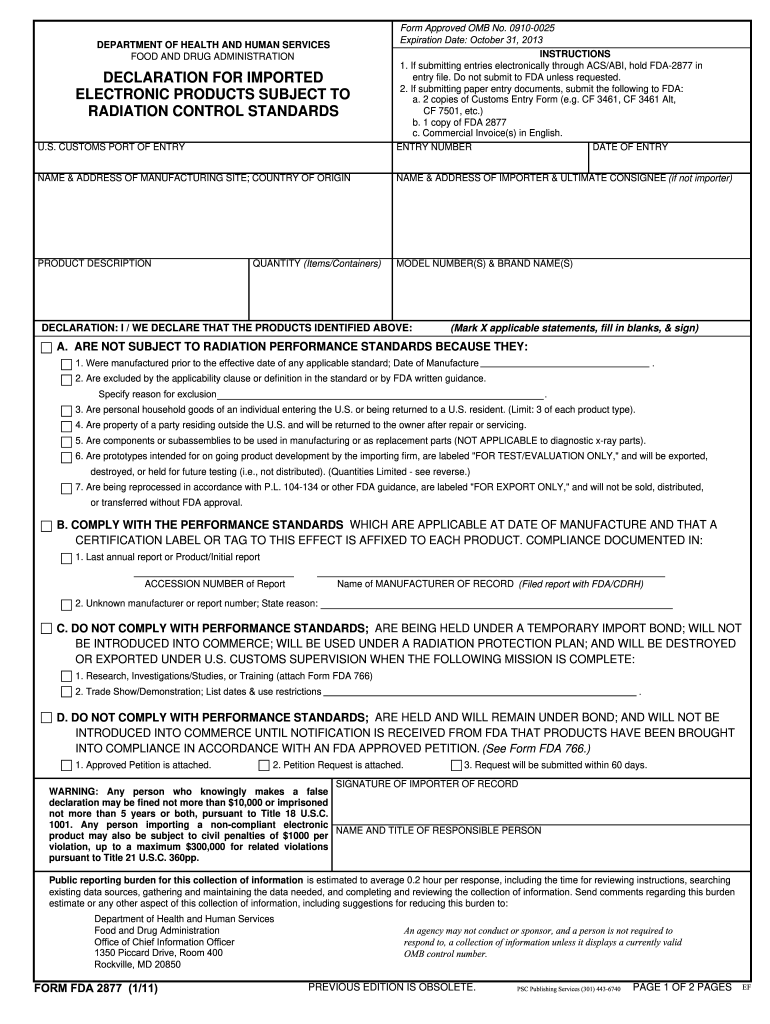
Click ‘Get Form’ to open the FDA 2877 in the editor.
Begin by entering the ENTRY NUMBER and DATE OF ENTRY at the top of the form. This information is crucial for tracking your submission.
Fill in the NAME & ADDRESS OF MANUFACTURING SITE and COUNTRY OF ORIGIN. Ensure that this information is accurate to avoid delays.
Provide the NAME & ADDRESS OF IMPORTER & ULTIMATE CONSIGNEE if they differ from the importer. This section helps clarify who will receive the products.
In the PRODUCT DESCRIPTION section, clearly describe each product being imported, including MODEL NUMBER(S) & BRAND NAME(S).
Select one of the declarations (A, B, C, or D) that applies to your products and fill in any required details. Make sure to mark applicable statements and provide necessary signatures.
Finally, review all entries for accuracy before signing as the IMPORTER OF RECORD. This step is essential to ensure compliance with FDA regulations.
Start using our platform today for free to streamline your FDA 2877 form completion!
Fda 2877 instructionsFda 2877 templateWhen is FDA-2877 requiredFDA Form 2877 PDFFDA Form 2877 downloadFda form 2877 fedexFDA FormsFDA Form for U.S. Customs
Security and compliance
At DocHub, your data security is our priority. We follow HIPAA, SOC2, GDPR, and other standards, so you can work on your documents with confidence.
declaration for imported electronic products subject to radiation control standards
a quantitative assessment of the net effects on fetal
SECTION III: Identification of Health Effects. 32. (a) Prenatal Exposure: Research on Associations Between. Fish Consumption and/or Exposure toRead more
An ACE filer must submit all of the declarations required in Form FDA 2877 electronically in ACE at the time of filing entry for products subject to theRead more
Cookie consent notice
This site uses cookies to enhance site navigation and personalize your experience.
By using this site you agree to our use of cookies as described in our Privacy Notice.
You can modify your selections by visiting our Cookie and Advertising Notice.