Type text, add images, blackout confidential details, add comments, highlights and more.
02. Sign it in a few clicks
Draw your signature, type it, upload its image, or use your mobile device as a signature pad.
03. Share your form with others
Send it via email, link, or fax. You can also download it, export it or print it out.
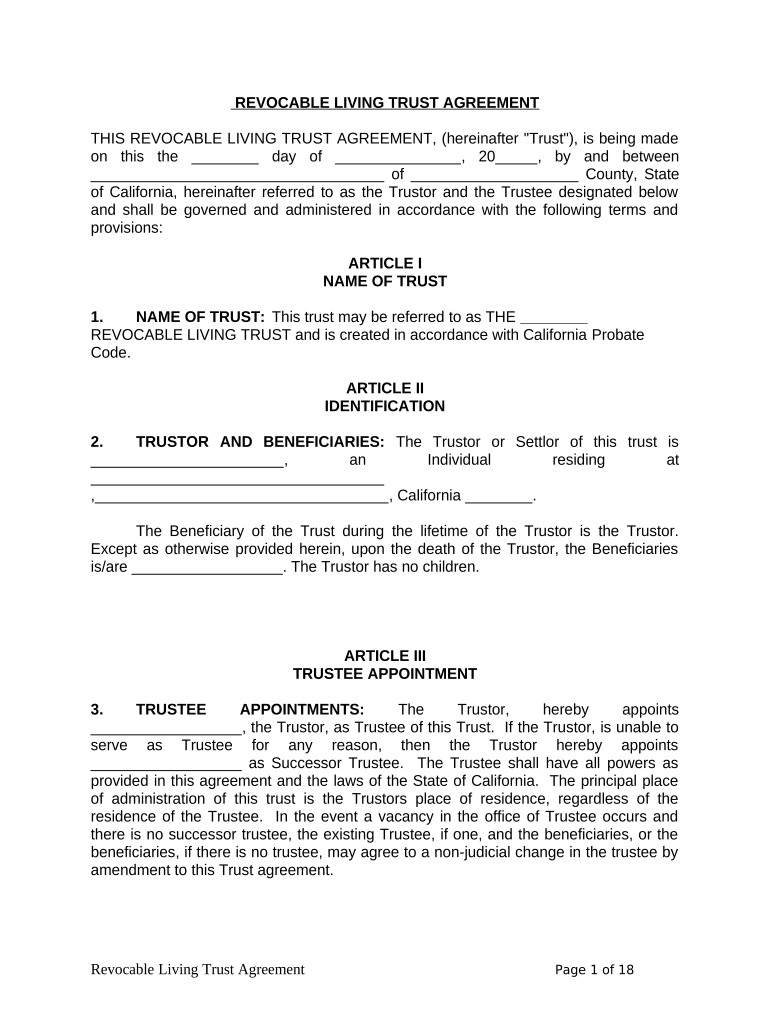
How to use or fill out Living Trust for Individual as Single, Divorced or Widow (or Widower) with No Children - California
Ease of Setup
DocHub User Ratings on G2
Ease of Use
DocHub User Ratings on G2
Click ‘Get Form’ to open it in the editor.
Begin by entering the name of the Trust on the designated line. This should reflect your chosen title for the trust, such as 'The [Your Name] Revocable Living Trust'.
In the identification section, fill in your full name and address as the Trustor. Ensure that you specify that you have no children.
Designate yourself as the Trustee. If applicable, appoint a Successor Trustee by providing their name in the appropriate field.
List all assets intended to be included in the trust under the Assets of Trust section. Attach any additional documentation if necessary.
Review each section carefully, ensuring all information is accurate and complete before saving your document.
Start using our platform today to easily create and manage your Living Trust for free!
Fill out Living Trust for Individual as Single, Divorced or Widow (or Widower) with No Children - California online It's free
Best living trust for individual as single divorced or widow or widower with no children californiaLiving trust California do it yourselfLiving trust vs will in CaliforniaCalifornia living trustDoes a living trust need to be recorded in CaliforniaRevocable living trust CaliforniaInheritance trusts and divorceWhat happens to a revocable trust in a divorce
Security and compliance
At DocHub, your data security is our priority. We follow HIPAA, SOC2, GDPR, and other standards, so you can work on your documents with confidence.
no children. (He had been married before and divorced.) She left a small bequest to her brother and others including John, but the major portion of herRead more
1. What is a Living Trust? 2. What are the advantages of a Living Trust? 3. How do I set up a Living Trust? 4. Is my Living Trust revocable can I cancelRead more
Cookie consent notice
This site uses cookies to enhance site navigation and personalize your experience.
By using this site you agree to our use of cookies as described in our Privacy Notice.
You can modify your selections by visiting our Cookie and Advertising Notice.