Type text, add images, blackout confidential details, add comments, highlights and more.
02. Sign it in a few clicks
Draw your signature, type it, upload its image, or use your mobile device as a signature pad.
03. Share your form with others
Send it via email, link, or fax. You can also download it, export it or print it out.
How to use or fill out rental rules tenant with our platform
Ease of Setup
DocHub User Ratings on G2
Ease of Use
DocHub User Ratings on G2
Click ‘Get Form’ to open the rental rules tenant document in the editor.
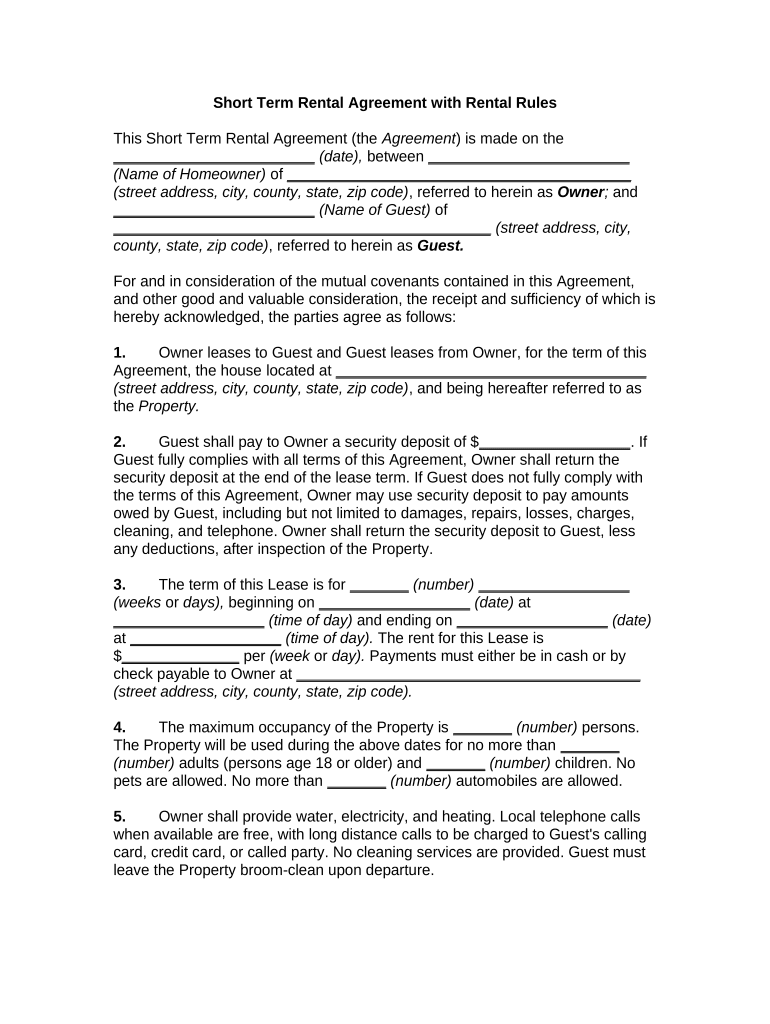
Begin by entering the date of the agreement at the top of the form. This sets a clear timeline for your rental arrangement.
Fill in the names and addresses of both the homeowner (Owner) and guest (Guest). Ensure accuracy to avoid any future disputes.
Specify the property address where the rental will take place, along with details about security deposits, payment terms, and occupancy limits.
Review and complete each section regarding responsibilities, such as maintenance obligations and rules for using appliances. Pay special attention to the Rental Rules attached as Exhibit A.
Finally, ensure all parties sign and print their names at the bottom of the document to validate the agreement.
Start using our platform today to streamline your rental agreements for free!
What rights do tenants have without a leaseFlorida landlord-tenant handbookRenters rights in Florida without leaseFl landlord tenant lawCalifornia renters rights moving outTenant Protection ActWho is exempt from Tenant Protection Act of 2019Wisconsin landlord tenant Law repairs
Security and compliance
At DocHub, your data security is our priority. We follow HIPAA, SOC2, GDPR, and other standards, so you can work on your documents with confidence.
Mar 30, 2026 As a landlord, there are laws that protect your rights, like the right to collect rent, withhold a security deposit in case of property damage, and evictRead more
The tenant agrees that the space is not to be used as living quarters or for any illegal activity whatsoever. Rent is due on the first. There is a 5 day graceRead more
A tenant is an equal party with the landlord. You never have to agree to any rental arrangement. Before you sign, make sure you thoroughly understand the termsRead more
Cookie consent notice
This site uses cookies to enhance site navigation and personalize your experience.
By using this site you agree to our use of cookies as described in our Privacy Notice.
You can modify your selections by visiting our Cookie and Advertising Notice.