Type text, add images, blackout confidential details, add comments, highlights and more.
02. Sign it in a few clicks
Draw your signature, type it, upload its image, or use your mobile device as a signature pad.
03. Share your form with others
Send it via email, link, or fax. You can also download it, export it or print it out.
How to use or fill out equipment purchase with our platform
Ease of Setup
DocHub User Ratings on G2
Ease of Use
DocHub User Ratings on G2
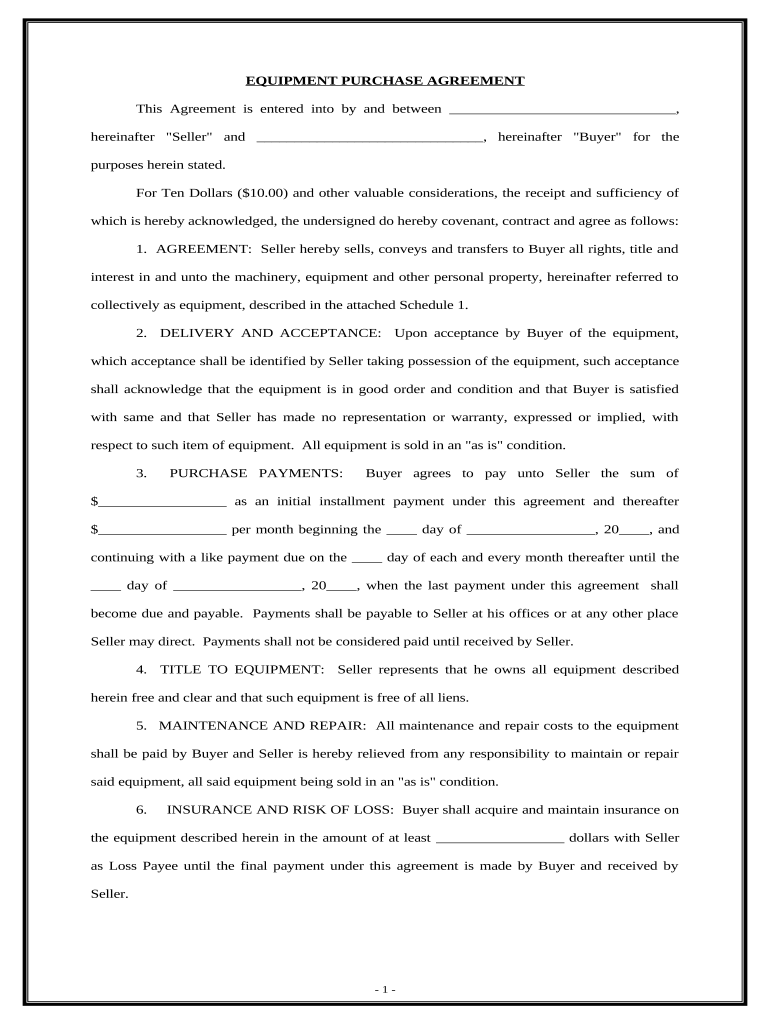
Click ‘Get Form’ to open the Equipment Purchase Agreement in the editor.
In the first section, fill in the names of the Seller and Buyer where indicated. This establishes the parties involved in the agreement.
Next, specify the initial payment amount and monthly installment amounts in the Purchase Payments section. Ensure you also indicate the due dates for these payments.
Review and complete sections regarding maintenance, insurance, and risk of loss. It's crucial to understand your responsibilities as a Buyer regarding these aspects.
Finally, sign and date the document at the bottom. If required, include notary information to validate your agreement.
Start using our platform today to streamline your equipment purchase process for free!
Equipment purchase exampleEquipment purchase templateHeavy equipment purchaseEquipment purchase meaningEquipment purchase sampleBuying equipment for LLCHow to buy equipment for new businessBuying assets for beginners
Security and compliance
At DocHub, your data security is our priority. We follow HIPAA, SOC2, GDPR, and other standards, so you can work on your documents with confidence.
Mar 2, 2026 Equipment can be purchased, fabricated, leased, loaned or donated. Sponsor-owned or sponsor-provided equipment (regardless of cost), as well as vehicles, areRead more
A lottery system will be used to determine who has the opportunity to purchase available equipment. All equipment purchases must go through the lottery process.Read more
Nov 4, 2024 Your business will need special assets and equipment to succeed. Figure out which assets you need, how to pay for them, and whether you should buy governmentRead more
Cookie consent notice
This site uses cookies to enhance site navigation and personalize your experience.
By using this site you agree to our use of cookies as described in our Privacy Notice.
You can modify your selections by visiting our Cookie and Advertising Notice.