Type text, add images, blackout confidential details, add comments, highlights and more.
02. Sign it in a few clicks
Draw your signature, type it, upload its image, or use your mobile device as a signature pad.
03. Share your form with others
Send it via email, link, or fax. You can also download it, export it or print it out.
How to use or fill out wi tod with our platform
Ease of Setup
DocHub User Ratings on G2
Ease of Use
DocHub User Ratings on G2
Click ‘Get Form’ to open the wi tod document in the editor.
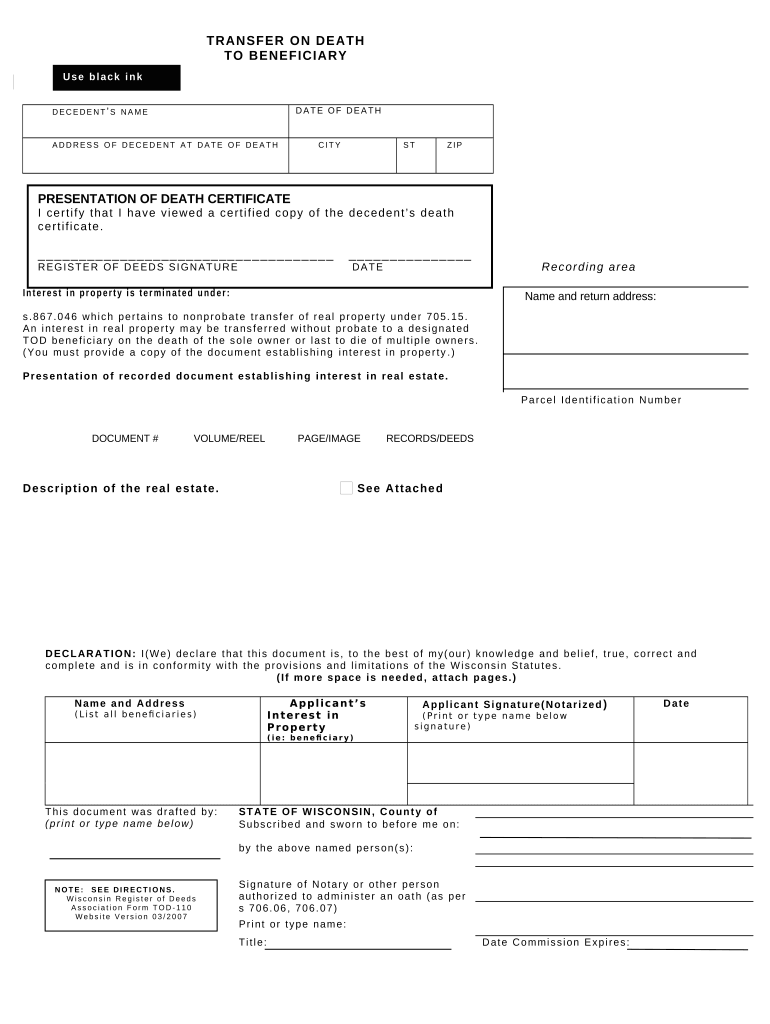
Begin by filling in the decedent’s name, date of death, and their address at the time of death. Ensure all information is accurate and complete.
In the section for the presentation of the death certificate, certify that you have viewed a certified copy by checking the appropriate box.
Provide your signature as the Register of Deeds along with the date. This confirms your acknowledgment of the document.
Fill in details regarding interest in property, including parcel identification number and description of real estate. Attach any necessary documents establishing interest.
Complete the declaration section by confirming that all information is true and correct. Include names and addresses of all beneficiaries.
Sign as an applicant (notarized) and print or type your name below your signature. Ensure that this is done correctly to avoid delays.
Start using our platform today to easily fill out your wi tod form for free!
Wi tod formTransfer on death deed Wisconsin costTOD-110 Form WisconsinDesignation of TOD beneficiary WisconsinWi tod beneficiaryTransfer on death (TOD deed)Designation of transfer on death (TOD beneficiary form)TOD form
Security and compliance
At DocHub, your data security is our priority. We follow HIPAA, SOC2, GDPR, and other standards, so you can work on your documents with confidence.
The sole purpose of this instrument is to revoke all previous TOD beneficiary designations. State Bar of Wisconsin Form 9-2009. DESIGNATION OF TOD BENEFICIARY.Read more
Epistle of Jude. The Epistle of Jude is the 65th book of the Protestant Bible. This page shows a translation from Greek undertaken with the help of anRead more
Cookie consent notice
This site uses cookies to enhance site navigation and personalize your experience.
By using this site you agree to our use of cookies as described in our Privacy Notice.
You can modify your selections by visiting our Cookie and Advertising Notice.