Type text, add images, blackout confidential details, add comments, highlights and more.
02. Sign it in a few clicks
Draw your signature, type it, upload its image, or use your mobile device as a signature pad.
03. Share your form with others
Send signature bond meaning via email, link, or fax. You can also download it, export it or print it out.
How to use or fill out signature bond form with our platform
Ease of Setup
DocHub User Ratings on G2
Ease of Use
DocHub User Ratings on G2
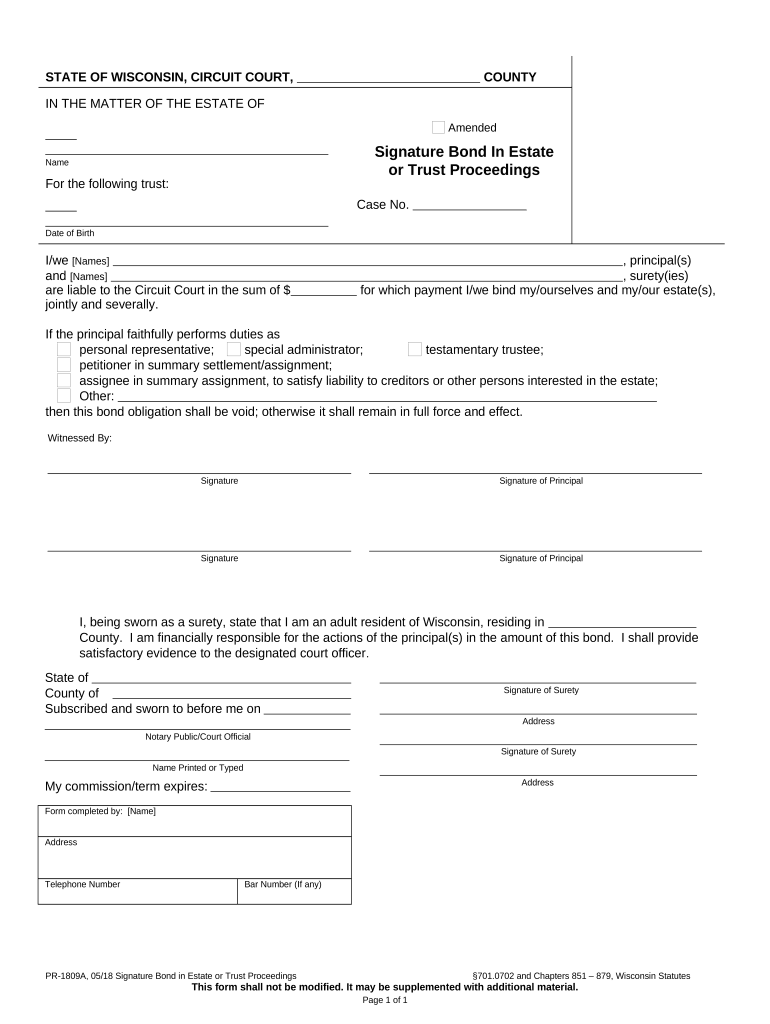
Click ‘Get Form’ to open the signature bond form in the editor.
Begin by entering the names of the principal(s) and surety(ies) in the designated fields. Ensure that all names are spelled correctly to avoid any legal issues.
Fill in the case number and date of birth for each principal. This information is crucial for identifying the specific estate or trust proceedings.
Specify the amount for which you are liable to the Circuit Court. This should reflect the total sum agreed upon by all parties involved.
Review and select the appropriate duties of the principal, such as personal representative or testamentary trustee, ensuring clarity on responsibilities.
Have all parties sign where indicated, including witnesses if required. Use our platform’s signature feature for a seamless signing experience.
Finally, ensure that a notary public or court official signs and stamps where necessary to validate the document before submission.
Start using our platform today to fill out your signature bond form online for free!
Signature bond form templatePrintable signature bond formSignature bond form pdfFree signature bond formSignature bond form onlineSignature bond form californiaPR-1801: Application for informal AdministrationWaiver and consent form probate
Security and compliance
At DocHub, your data security is our priority. We follow HIPAA, SOC2, GDPR, and other standards, so you can work on your documents with confidence.
I, the undersigned, being duly sworn, depose and say that I am: (1) the surety to the attached bond(s); (2) a citizen of the United States; and of full ageRead more
By signature hereon, if the amount of this bond exceeds $100,000, then the Surety attests that at the time the bond was executed (and Surety shall provideRead more
Oct 12, 2021 A bond is a contract, between an entity taking the loan (issuing the bond) and another entity providing the loan. It denotes the indebtedness.Read more
Cookie consent notice
This site uses cookies to enhance site navigation and personalize your experience.
By using this site you agree to our use of cookies as described in our Privacy Notice.
You can modify your selections by visiting our Cookie and Advertising Notice.