Buyer acceptance 2026

Get Form
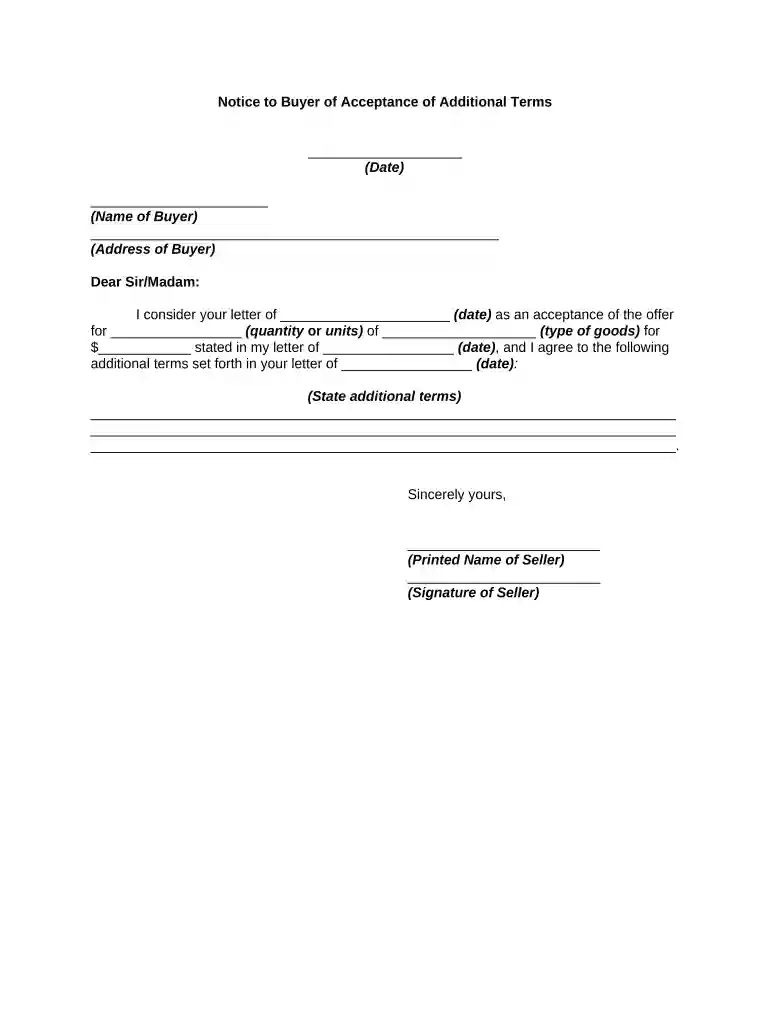
buyer acceptance letter Preview on Page 1

Here's how it works

01. Edit your buyer acceptance letter online
Type text, add images, blackout confidential details, add comments, highlights and more.

02. Sign it in a few clicks
Draw your signature, type it, upload its image, or use your mobile device as a signature pad.

03. Share your form with others
Send buyer accepted program via email, link, or fax. You can also download it, export it or print it out.

How to use or fill out buyer acceptance with our platform

Form edit decoration
9.5
Ease of Setup
DocHub User Ratings on G2
9.0
Ease of Use
DocHub User Ratings on G2
  1. Click ‘Get Form’ to open the buyer acceptance document in the editor.
  2. Enter the date at the top of the form where indicated. This should reflect the current date or the date of acceptance.
  3. Fill in the name of the buyer in the designated field, ensuring it matches their official documentation.
  4. Provide the address of the buyer accurately to avoid any miscommunication regarding delivery or correspondence.
  5. In the body of the letter, specify the date of your initial offer and detail the quantity and type of goods being accepted.
  6. Clearly state any additional terms that were agreed upon in your correspondence, ensuring all parties are aware of these conditions.
  7. Finally, sign off with your printed name and signature as the seller to validate this acceptance.

Start using our platform today for free to streamline your document editing and signing process!

be ready to get more

Complete this form in 5 minutes or less

Get form

Got questions?

We have answers to the most popular questions from our customers. If you can't find an answer to your question, please contact us.
Contact us
An acceptance is a contractual agreement by an importer to pay the amount due for receiving goods at a specified date in the future. Documents are presented for acceptance in international trade. The buyer of the goods or importer agrees to pay the draft and writes accepted, or similar wording indicating acceptance.
An acceptance is a manifestation of assent to the terms [of the offer] made by the offeree in the manner invited or required by the offer. In determining if an offeree accepted an offer and created a contract, a court will look for evidence of three factors: (1) the offeree intended to enter the contract, (2) the
ACCEPTANCE OF PURCHASE ORDER. A Purchase Order is given for immediate acceptance by the Seller. Unless promptly notified to the contrary, the City will assume the Seller accepts the order as written and will make delivery as specified on the document.
A buyers acceptance of goods generally occurs in any of the following circumstances: (1) after a reasonable opportunity to inspect the goods, the buyer signifies to the seller that the goods are conforming or that the buyer will keep the goods in spite of the non-conformity; (2) the buyer fails to make an effective
There are three types of acceptance: Empress acceptance. Implied acceptance. Conditional acceptance.

Security and compliance

At DocHub, your data security is our priority. We follow HIPAA, SOC2, GDPR, and other standards, so you can work on your documents with confidence.
Learn more
ccpa2
pci-dss
gdpr-compliance
hipaa
soc-compliance

People also ask

Under this Article acceptance as applied to goods means that the buyer, pursuant to the contract, takes particular goods which have been appropriated to the contract as his own, whether or not he is obligated to do so, and whether he does so by words, action, or silence when it is time to speak.
The buyer may accept goods by words, silence, or action. Section 2-606(1) of the UCC defines acceptance as occurring in any one of three circumstances: Words. The buyer, after a reasonable opportunity to inspect, tells the seller either that the goods conform or that he will keep them despite any nonconformity.
Valid acceptance is acceptance that is made by the specified offeree and that meets the conditions of mutual assent (both parties agree to the arrangement), adequate consideration (each party receives a benefit for the promised goods or services of the other party), capacity (both parties are legally capable of

Related links