Type text, add images, blackout confidential details, add comments, highlights and more.
02. Sign it in a few clicks
Draw your signature, type it, upload its image, or use your mobile device as a signature pad.
03. Share your form with others
Send ca form 587 via email, link, or fax. You can also download it, export it or print it out.
How to use or fill out ca587 with our platform
Ease of Setup
DocHub User Ratings on G2
Ease of Use
DocHub User Ratings on G2
Click ‘Get Form’ to open the ca587 in the editor.
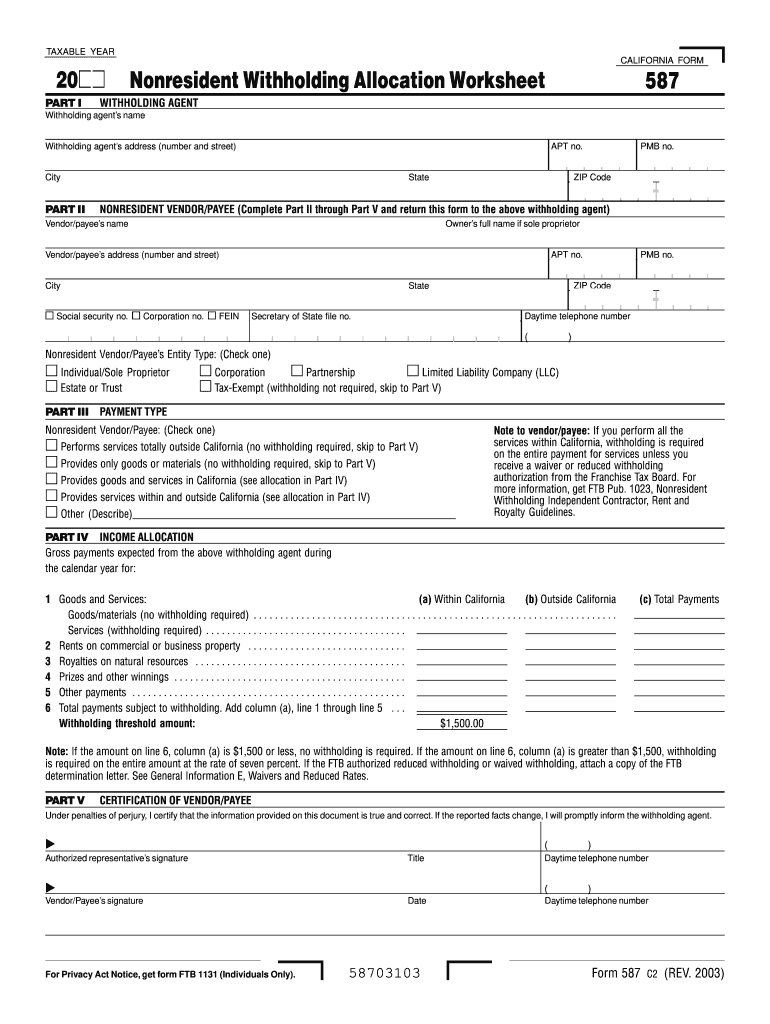
In Part I, enter the withholding agent's name and address, including city, state, and ZIP code.
Proceed to Part II and fill in the nonresident vendor/payee's details, including their name, address, and entity type. Ensure you include the social security number or FEIN.
In Part III, check the appropriate box for the payment type being received by the vendor/payee.
For Part IV, allocate income by specifying gross payments expected from the withholding agent for services within and outside California.
Finally, in Part V, certify your information by signing and dating the form before returning it to the withholding agent.
Start using our platform today to streamline your form completion process for free!
CA 587 vs 590Ca form 587 instructionsCA 590 Form 2025Ca587 2025Withholding services and compliance ms f182 addressCA 590 instructionsCalifornia Form 588CA form 590 2026
Security and compliance
At DocHub, your data security is our priority. We follow HIPAA, SOC2, GDPR, and other standards, so you can work on your documents with confidence.
2025 Form 587 Nonresident Withholding Allocation Worksheet
If the nonresident payee performs all the services within California, withholding is required on the entire payment for services unless the payee is grantedRead more
For more information, go to edd.ca.gov or call 888.745.3886. B When to Complete. The withholding agent requests that the nonresident payee completes, signs, and.Read more
Cookie consent notice
This site uses cookies to enhance site navigation and personalize your experience.
By using this site you agree to our use of cookies as described in our Privacy Notice.
You can modify your selections by visiting our Cookie and Advertising Notice.