Proof service mail 2026

Get Form
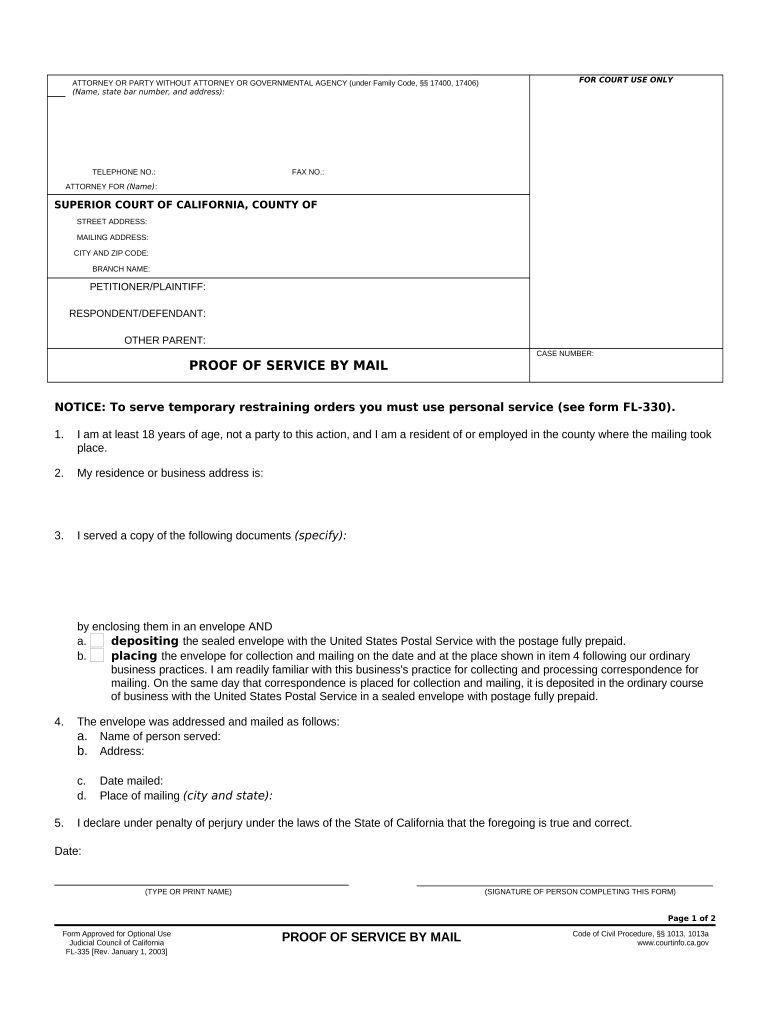
proof service mail Preview on Page 1

Here's how it works

01. Edit your form online
Type text, add images, blackout confidential details, add comments, highlights and more.
02. Sign it in a few clicks
Draw your signature, type it, upload its image, or use your mobile device as a signature pad.
03. Share your form with others
Send it via email, link, or fax. You can also download it, export it or print it out.

How to use or fill out proof service mail with our platform

Form edit decoration
9.5
Ease of Setup
DocHub User Ratings on G2
9.0
Ease of Use
DocHub User Ratings on G2
  1. Click ‘Get Form’ to open the Proof of Service by Mail in the editor.
  2. Begin by filling out the top section. Enter your name, address, and phone number in the designated fields for the person serving the documents.
  3. In the next box, input the name of the county where the legal action is filed along with the court's address as stated on your documents.
  4. List the names of all parties involved: Petitioner/Plaintiff, Respondent/Defendant, and Other Parent in their respective fields.
  5. Leave the court use box blank and enter the case number in its designated field.
  6. Confirm you are at least 18 years old and not a party to this action by checking the appropriate box.
  7. Provide your home or business address in section two.
  8. Specify which documents you mailed by listing their exact names and indicating whether they were sent via regular U.S. mail or from your workplace.
  9. Fill out details about where you addressed and mailed the envelope, including recipient's name, address, date of mailing, and city/state.
  10. Finally, declare under penalty of perjury that your information is accurate by typing your name, signing, and dating the form.

Start using our platform today to streamline your document editing and form completion for free!

be ready to get more

Complete this form in 5 minutes or less

Get form

Got questions?

We have answers to the most popular questions from our customers. If you can't find an answer to your question, please contact us.
Contact us
For utmost security, consider using the USPSs Certified Mail or Registered Mail services. Certified Mail provides proof of mailing and delivery and status information. Registered Mail takes it a step further by offering secured transport and detailed tracking, making it ideal for highly valuable or critical documents.
Certified Mail is best used for important pieces that dont have a high dollar value. Think tax info, license plates, and legal documents. Its important to note that Certified Mail doesnt automatically include insurance, and because of this, its also a lot cheaper than Registered Mail (usually 25% less).
One of the most reliable and secure methods is to use a trusted courier service. These services offer tracking features and insurance options, giving you peace of mind knowing that your documents are in safe hands.
Certified Mail through the United States Postal Service (USPS) provides a more secure way to send important documents. Heres how it enhances security: Tracking: Certified Mail includes tracking, allowing the sender and recipient to monitor the mails journey.
What mailing methods are best for court documents? Certified Mail is ideal for proof of mailing. Priority Mail Express is best for overnight delivery.

Security and compliance

At DocHub, your data security is our priority. We follow HIPAA, SOC2, GDPR, and other standards, so you can work on your documents with confidence.

Learn more
ccpa2
pci-dss
gdpr-compliance
hipaa
soc-compliance