Type text, add images, blackout confidential details, add comments, highlights and more.
02. Sign it in a few clicks
Draw your signature, type it, upload its image, or use your mobile device as a signature pad.
03. Share your form with others
Send it via email, link, or fax. You can also download it, export it or print it out.
How to use or fill out UCC1 with our platform
Ease of Setup
DocHub User Ratings on G2
Ease of Use
DocHub User Ratings on G2
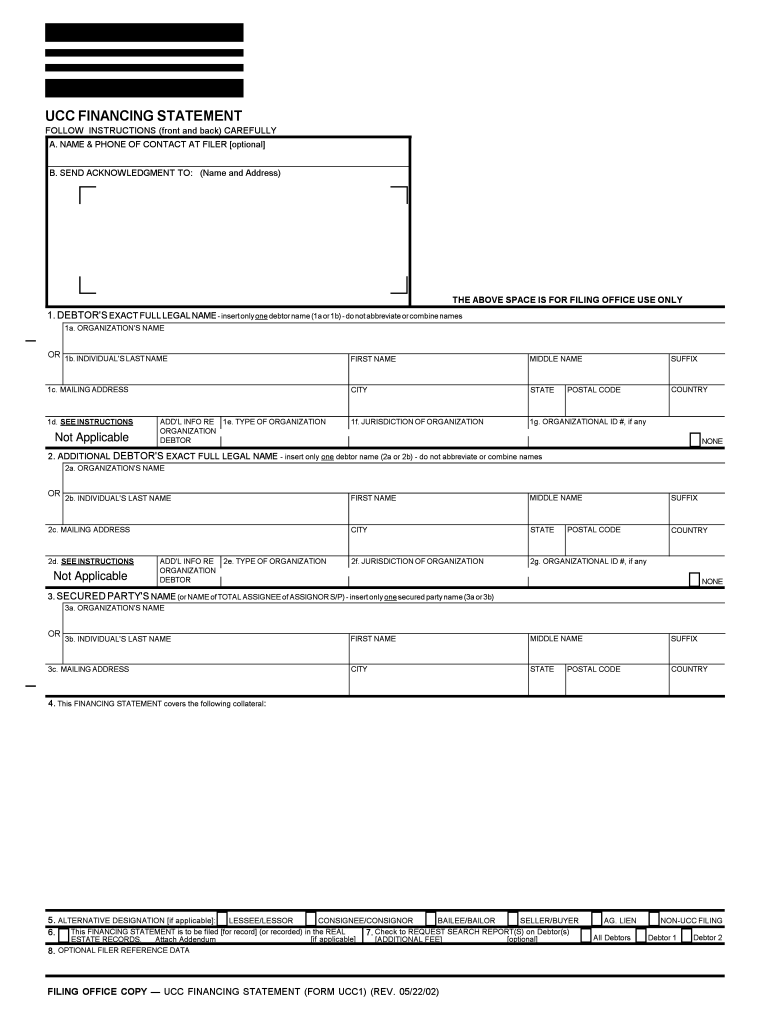
Click ‘Get Form’ to open the UCC1 Financing Statement in the editor.
Begin by entering the Debtor's exact full legal name in section 1. Choose either 1a for an organization or 1b for an individual, ensuring no abbreviations are used.
Fill in the mailing address for the Debtor in section 1c, including city, state, postal code, and country.
If applicable, complete section 2 for any additional Debtors using the same format as step 2.
In section 3, provide the Secured Party's name and address. Again, choose between an organization or individual format.
Describe the collateral covered by this Financing Statement in section 4. If more space is needed, attach an Addendum.
Optionally check box in section 5 if you wish to designate roles like lessee/lessor or seller/buyer.
Complete any optional sections as needed and review all entries for accuracy before submitting your form.
Start using our platform today to fill out your UCC1 form online for free!
La partie infrieure du chargeur UCC V3 (Mobile) est pourvue de pices mtalliques qui en permettent le montage dans un vhicule. Approbations. Le chargeur UCCRead more
1-201. General Definitions. | Uniform Commercial Code
A buyer in ordinary course of business may buy for cash, by exchange of other property, or on secured or unsecured credit, and may acquire goods or documents ofRead more
INSTRUCTIONS FOR LOUISIANA UCC FINANCING STATEMENT (FORM UCC 1). Please type or laser print this form. Be sure it is completely legible. Read allRead more
Cookie consent notice
This site uses cookies to enhance site navigation and personalize your experience.
By using this site you agree to our use of cookies as described in our Privacy Notice.
You can modify your selections by visiting our Cookie and Advertising Notice.