01. Edit your kentucky state police self accident report online
Type text, add images, blackout confidential details, add comments, highlights and more.
02. Sign it in a few clicks
Draw your signature, type it, upload its image, or use your mobile device as a signature pad.
03. Share your form with others
Send accident report georgia via email, link, or fax. You can also download it, export it or print it out.
How to use or fill out accident report georgia with our platform
Ease of Setup
DocHub User Ratings on G2
Ease of Use
DocHub User Ratings on G2
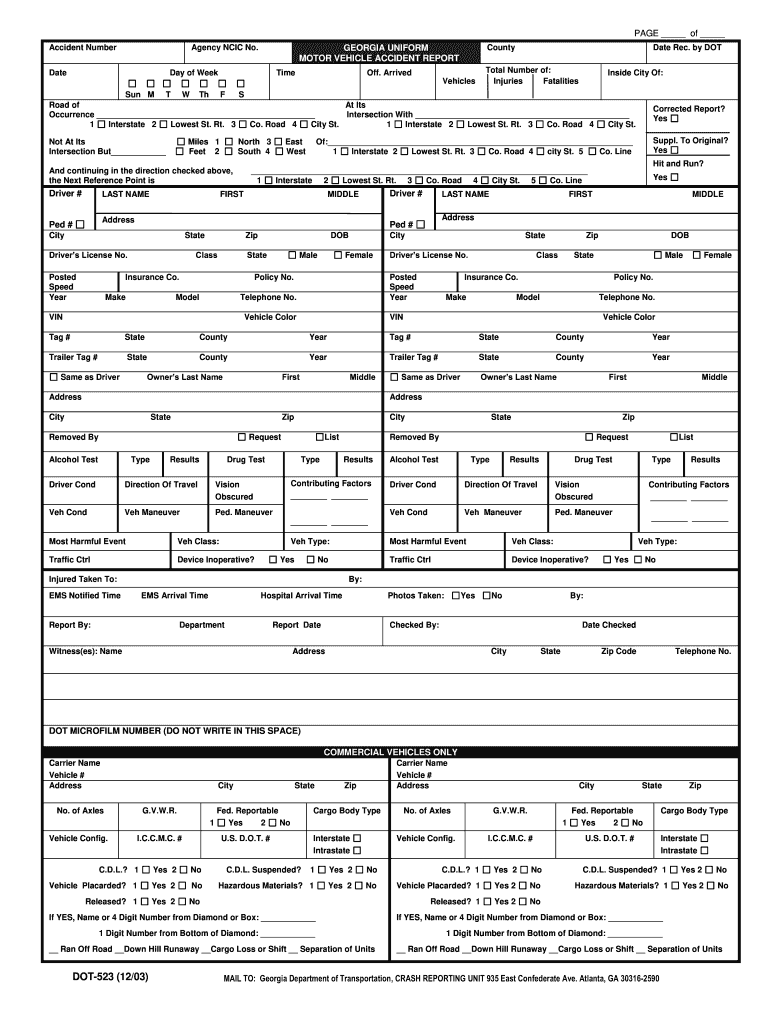
Click ‘Get Form’ to open the accident report in the editor.
Begin by filling in the Accident Number, Agency NCIC No., Date, and County at the top of the form. This information is crucial for identifying your report.
Next, provide details about the incident such as Day of Week, Time, and Total Number of Injuries and Fatalities. Accurate data here helps authorities assess the situation.
In the section for Driver Information, enter details like Last Name, First Name, DOB, and Driver’s License No. Ensure all fields are filled out correctly to avoid delays.
Continue by detailing Vehicle Information including Make, Model, VIN, and Insurance Company. This section is vital for insurance claims.
Finally, review all sections for accuracy before submitting your completed form. Use our platform's features to save or share your document easily.
Start using our platform today to fill out your accident report efficiently and for free!
Incident/Injury Reporting - Insurance and Risk Management
Everyone is encouraged to be alert to and report any unsafe practices and conditions that may present an imminent danger to individuals or property.Read more
In 2018 and 2019 coal production in Georgia was affected by the suspension of operations following the tragic accidents at the Mindeli mine in 2018. In 2020Read more
Police crash reports are available through Buycrash. Crash reports can be purchased directly via the BuyCrash website or by mailing a request to GDOT via theRead more
Cookie consent notice
This site uses cookies to enhance site navigation and personalize your experience.
By using this site you agree to our use of cookies as described in our Privacy Notice.
You can modify your selections by visiting our Cookie and Advertising Notice.