Type text, add images, blackout confidential details, add comments, highlights and more.
02. Sign it in a few clicks
Draw your signature, type it, upload its image, or use your mobile device as a signature pad.
03. Share your form with others
Send it via email, link, or fax. You can also download it, export it or print it out.
How to use or fill out IFTA Texas 2011 form with our platform
Ease of Setup
DocHub User Ratings on G2
Ease of Use
DocHub User Ratings on G2
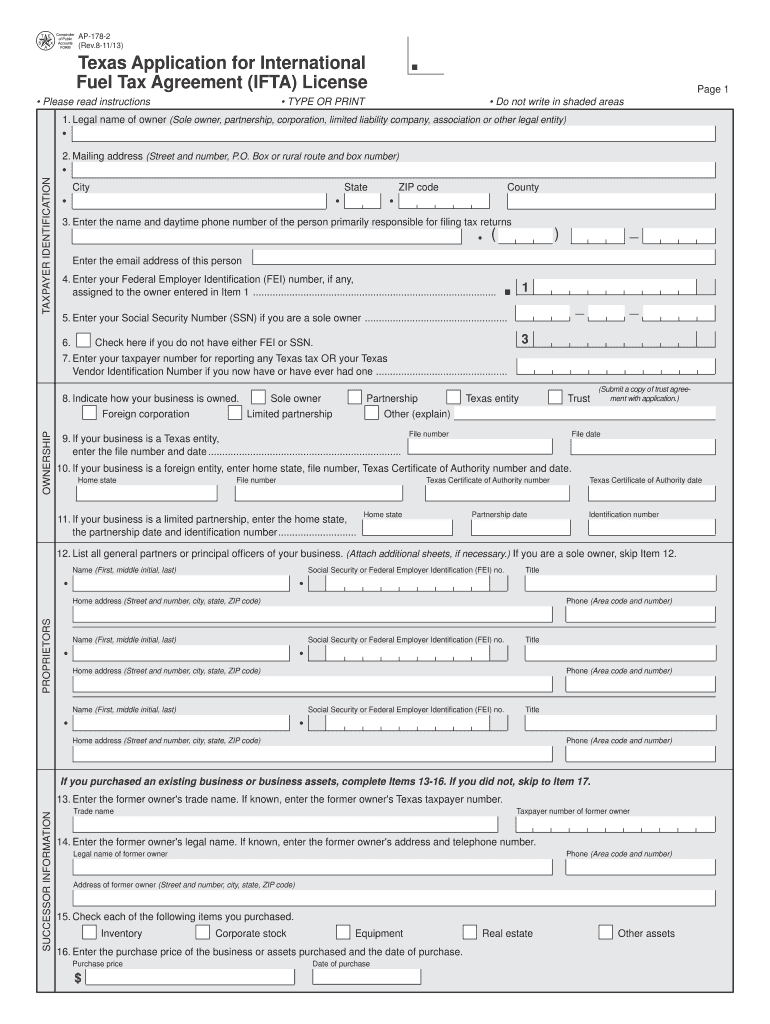
Click ‘Get Form’ to open the IFTA Texas 2011 form in the editor.
Begin by filling out Item 1, entering the legal name of the owner. Ensure you provide the correct designation based on your business type (sole owner, partnership, corporation, etc.).
In Item 2, enter your complete mailing address where you wish to receive correspondence from the Comptroller of Public Accounts.
Proceed to Item 4 and input your Federal Employer Identification (FEI) number. If you are a sole owner, also include your Social Security Number in Item 5.
For Items 30 and 31, check all applicable fuel types used and jurisdictions where you operate qualified motor vehicles.
Complete Items related to ownership structure and any additional partners or officers as required in Items 8 through 12.
Finally, review all entries for accuracy before signing at the end of the form. Ensure that all required fields are filled out correctly.
Start using our platform today for free to streamline your IFTA application process!
We've got more versions of the ifta texas 2011 form form. Select the right ifta texas 2011 form version from the list and start editing it straight away!
Ifta texas 2011 form pdfIfta texas 2011 form onlineIfta texas 2011 form 2022Ifta form 56 102IFTA Texas loginIfta form 56 101How to get IFTA stickers in TexasTexas Comptroller IFTA
Security and compliance
At DocHub, your data security is our priority. We follow HIPAA, SOC2, GDPR, and other standards, so you can work on your documents with confidence.
Tax Type: All Taxes, 911-State Emergency Communication, Amusement Machine Tax, Boat and Motor Sales and Use Tax, Cement Products Tax, Controlled Substances Tax.Read more
by VMTF Assessment 2017 Cited by 7 Texas IFTA licensees submit payment to the Texas Comptroller. An IFTA clearinghouse, used by all IFTA participating entities, uses the data submitted byRead more
Cookie consent notice
This site uses cookies to enhance site navigation and personalize your experience.
By using this site you agree to our use of cookies as described in our Privacy Notice.
You can modify your selections by visiting our Cookie and Advertising Notice.