Type text, add images, blackout confidential details, add comments, highlights and more.
02. Sign it in a few clicks
Draw your signature, type it, upload its image, or use your mobile device as a signature pad.
03. Share your form with others
Send it via email, link, or fax. You can also download it, export it or print it out.
How to use or fill out putative father form with our platform
Ease of Setup
DocHub User Ratings on G2
Ease of Use
DocHub User Ratings on G2
Click ‘Get Form’ to open the putative father form in the editor.
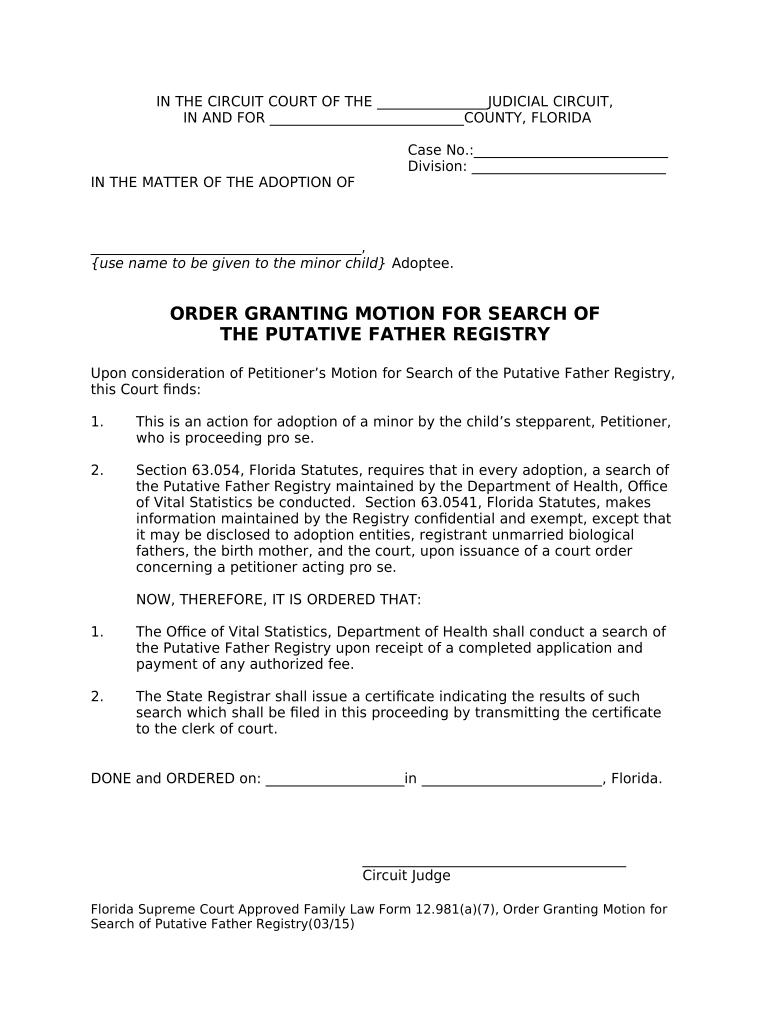
Begin by entering the case number and division at the top of the form. This information is crucial for identifying your specific adoption case.
In the section labeled 'Adoptee', input the name you wish to give to the minor child. Ensure this is accurate as it will be used throughout the legal process.
Review the court's findings regarding the search of the Putative Father Registry. Familiarize yourself with Section 63.054, Florida Statutes, which outlines your rights and responsibilities.
Complete any additional fields required for your application, including your contact information and any authorized fees that may apply.
Finally, certify that a copy of this document has been sent to all relevant parties by checking appropriate boxes and providing dates as necessary.
Start using our platform today to fill out your putative father form online for free!
Putative Father Registry searchWhat is a putative fatherPutative father vs presumed fatherWhat is a Putative Father RegistryDoes a putative father have rightsPutative father registry PAPutative father Registry TNPutative father registry NC
Security and compliance
At DocHub, your data security is our priority. We follow HIPAA, SOC2, GDPR, and other standards, so you can work on your documents with confidence.
922 KAR 1:560 - Putative father registry and operating
(1) A putative father shall request registration on the putative father registry by completing the DPP-1304, Putative Father Registration Form. (2) A putativeRead more
This form must be signed and DocHubd to be valid for filing. Information about you. Name: Address (number and street): City, State, and ZIP Code:.Read more
Cookie consent notice
This site uses cookies to enhance site navigation and personalize your experience.
By using this site you agree to our use of cookies as described in our Privacy Notice.
You can modify your selections by visiting our Cookie and Advertising Notice.