Type text, add images, blackout confidential details, add comments, highlights and more.
02. Sign it in a few clicks
Draw your signature, type it, upload its image, or use your mobile device as a signature pad.
03. Share your form with others
Send it via email, link, or fax. You can also download it, export it or print it out.
How to use or fill out co marriage with our platform
Ease of Setup
DocHub User Ratings on G2
Ease of Use
DocHub User Ratings on G2
Click ‘Get Form’ to open the co marriage document in the editor.
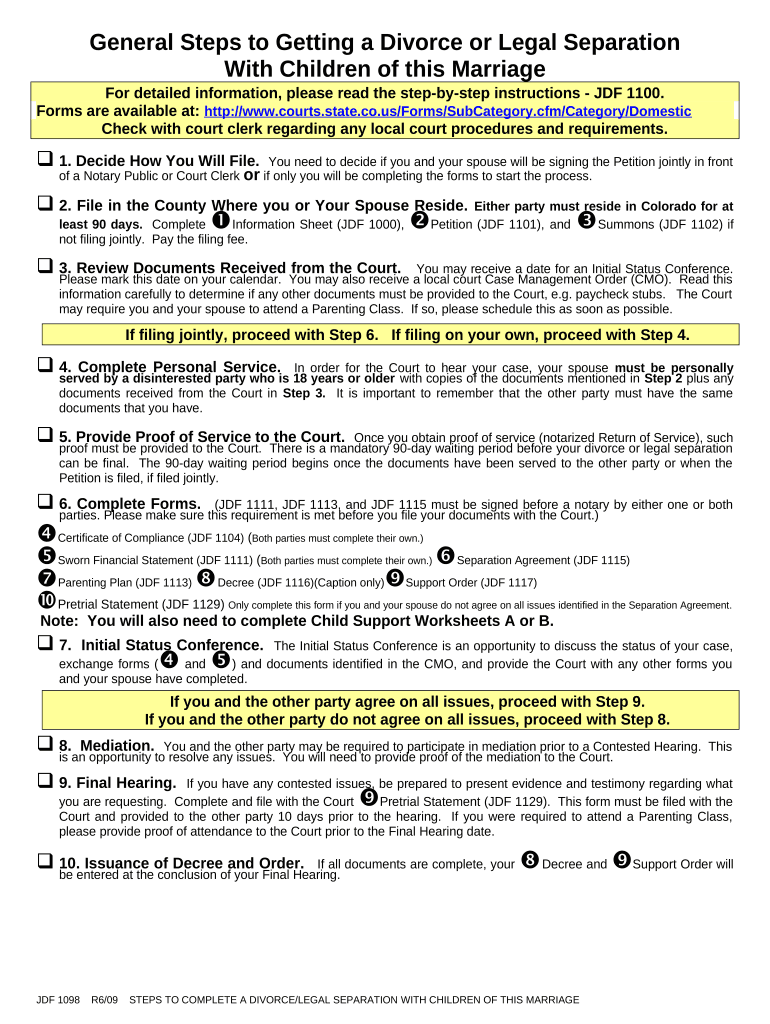
Begin by deciding how you will file. Indicate whether you and your spouse will sign the Petition jointly or if you will complete the forms individually.
Fill in your personal information on the Information Sheet (JDF 1000) and ensure that both parties' details are accurately entered.
Complete the necessary forms, including the Petition (JDF 1101) and Summons (JDF 1102), ensuring all required fields are filled out correctly.
Review any documents received from the court carefully, noting important dates such as Initial Status Conference and any additional requirements.
If filing jointly, ensure that both parties sign required documents before a notary. This includes forms like the Sworn Financial Statement (JDF 1111) and Separation Agreement (JDF 1115).
Prepare for mediation if necessary, providing proof of attendance to the court as required.
Start using our platform today to streamline your co marriage document process for free!
Co marriage lookupCo marriage search by nameCo marriage records onlineMarriage license MNMN marriage license applicationMN marriage license application onlineCo marriage recordsCo marriage search
Security and compliance
At DocHub, your data security is our priority. We follow HIPAA, SOC2, GDPR, and other standards, so you can work on your documents with confidence.
Ludwig Paiste: A marriage made in heaven until it wasn
Apr 27, 2024 Ludwig Paiste: A marriage made in heaven Key in getting the partnership off the ground was Robert Yeager, co-owner of the Pro drum shopRead more
The Los Angeles County Registrar-Recorder/County Clerk (RR/CC) is now offering express marriage ceremonies by appointment ONLY. This service is ideal forRead more
Cookie consent notice
This site uses cookies to enhance site navigation and personalize your experience.
By using this site you agree to our use of cookies as described in our Privacy Notice.
You can modify your selections by visiting our Cookie and Advertising Notice.