Type text, add images, blackout confidential details, add comments, highlights and more.
02. Sign it in a few clicks
Draw your signature, type it, upload its image, or use your mobile device as a signature pad.
03. Share your form with others
Send it via email, link, or fax. You can also download it, export it or print it out.
How to use or fill out medical authorization with our platform
Ease of Setup
DocHub User Ratings on G2
Ease of Use
DocHub User Ratings on G2
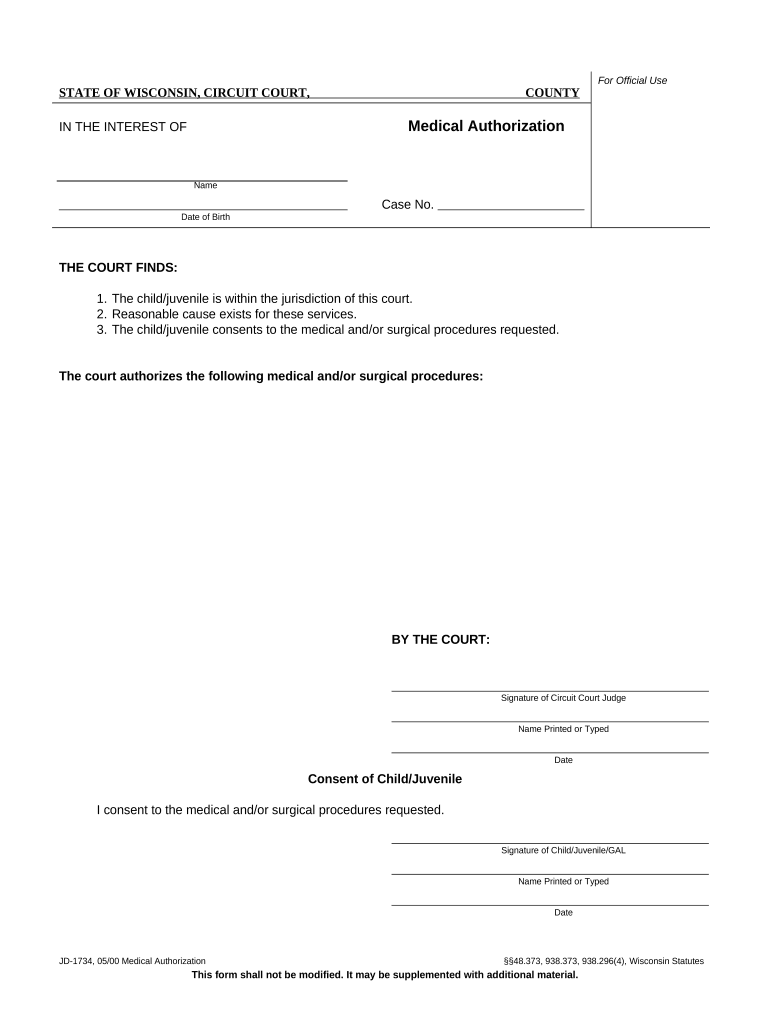
Click ‘Get Form’ to open the Medical Authorization document in the editor.
Begin by entering the child's name and date of birth in the designated fields. This information is crucial for identifying the individual involved.
Review the court findings section, which confirms that the child is under the court's jurisdiction and consents to the requested medical procedures. Ensure all details are accurate.
In the authorization section, specify the medical and/or surgical procedures being authorized. Be clear and precise to avoid any misunderstandings.
The Circuit Court Judge will need to sign and print their name along with the date. Make sure this section is completed accurately.
Finally, obtain consent from the child/juvenile or their Guardian Ad Litem (GAL) by having them sign, print their name, and date it in the provided fields.
Start using our platform today for free to streamline your medical authorization process!
Medical authorization templateMedical authorization form pdfMedical Prior Authorization phone NumberMedical authorization form for minorMedical authorization jobsHIPAA authorization form TexasMedical authorization californiaHIPAA authorization form for family members
Security and compliance
At DocHub, your data security is our priority. We follow HIPAA, SOC2, GDPR, and other standards, so you can work on your documents with confidence.
Aug 22, 2025 All requests for CCS diagnostic and treatment services must be submitted using a Service Authorization Request (SAR) form except Orthodontic and DentalRead more
The patient or legally authorized representative must sign and date the form. Generally, only a patient may authorize release of his/her medical information.Read more
Cookie consent notice
This site uses cookies to enhance site navigation and personalize your experience.
By using this site you agree to our use of cookies as described in our Privacy Notice.
You can modify your selections by visiting our Cookie and Advertising Notice.