Continuing garnishment 2026

Get Form
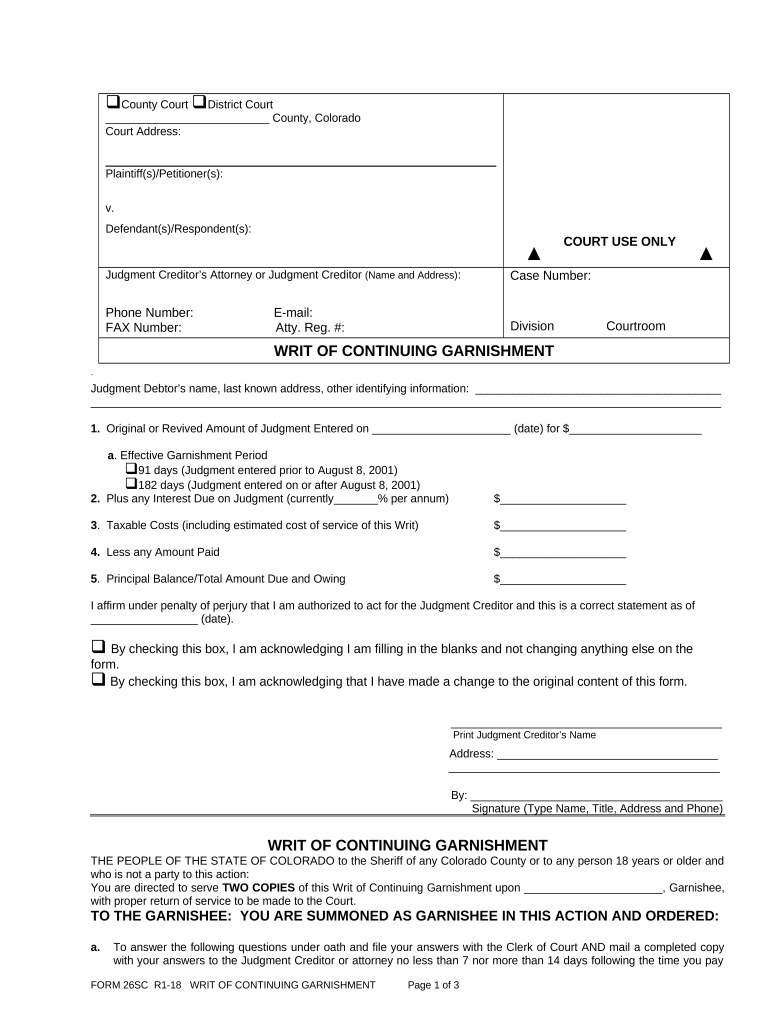
continuing garnishment Preview on Page 1

Here's how it works

01. Edit your form online
Type text, add images, blackout confidential details, add comments, highlights and more.
02. Sign it in a few clicks
Draw your signature, type it, upload its image, or use your mobile device as a signature pad.
03. Share your form with others
Send it via email, link, or fax. You can also download it, export it or print it out.

How to use or fill out continuing garnishment with our platform

Form edit decoration
9.5
Ease of Setup
DocHub User Ratings on G2
9.0
Ease of Use
DocHub User Ratings on G2
  1. Click ‘Get Form’ to open the continuing garnishment document in the editor.
  2. Begin by entering the court name and address at the top of the form. This is essential for proper identification.
  3. Fill in the plaintiff(s) and defendant(s) names, ensuring accuracy as this information is crucial for legal proceedings.
  4. Provide the case number and contact details for the judgment creditor’s attorney or creditor, including phone and email.
  5. In Section 1, indicate the original amount of judgment entered along with the effective garnishment period by checking the appropriate box.
  6. Complete Sections 2 through 5 by calculating any interest due, taxable costs, and amounts paid to determine the total amount due.
  7. Affirm your authority to act for the judgment creditor by signing and dating at the bottom of the form.

Start using our platform today to streamline your document editing and ensure a hassle-free experience!

be ready to get more

Complete this form in 5 minutes or less

Get form

Got questions?

We have answers to the most popular questions from our customers. If you can't find an answer to your question, please contact us.
Contact us
The Garnishment Process Explained 2 For example, if John Smith owes $10,000 in unpaid taxes, the IRS can garnish his wages. The IRS would then direct Smiths employer to remit a portion of his salary for a certain amount of time until Smiths tax obligation is fully paid.
The person or business who owes money to the debtor is called the garnishee. Generally there are three different types of garnishment: garnishing wages, garnishing bank accounts, and garnishing rent owed to a landlord, where the landlord is also the debtor.
Continuing Writ of Garnishment Against Salary or Wages: This type of Writ is served on a person or other entity that owes the Defendant Salary or Wages - the Defendants employer.
What is another word for garnishment? decorationadornment garniture embellisher beautifier trimming doodad caparison setoff beautification97 more rows
Federal law limits how much judgment creditors can take. The garnishment amount is limited to 25% of your disposable earnings for that week (whats left after mandatory deductions) or the amount by which your disposable earnings for that week exceed 30 times the federal minimum hourly wage, whichever is less.

Security and compliance

At DocHub, your data security is our priority. We follow HIPAA, SOC2, GDPR, and other standards, so you can work on your documents with confidence.

Learn more
ccpa2
pci-dss
gdpr-compliance
hipaa
soc-compliance

People also ask

Child support is the most common wage garnishment in the United States, but its not the only reason an employer may receive a garnishment order. Other examples include: Creditor garnishments. Bankruptcy.
A continuing garnishment is filed against employers only, and is used to attach wages. A continuing garnishment lasts for 179 days, with an additional 15 days for the court to receive the last check. The case closes on the 195th day after the garnishee was served.

Related links