Type text, add images, blackout confidential details, add comments, highlights and more.

02. Sign it in a few clicks
Draw your signature, type it, upload its image, or use your mobile device as a signature pad.

03. Share your form with others
Send it via email, link, or fax. You can also download it, export it or print it out.

How to use or fill out ca exemption with our platform
Ease of Setup
DocHub User Ratings on G2
Ease of Use
DocHub User Ratings on G2
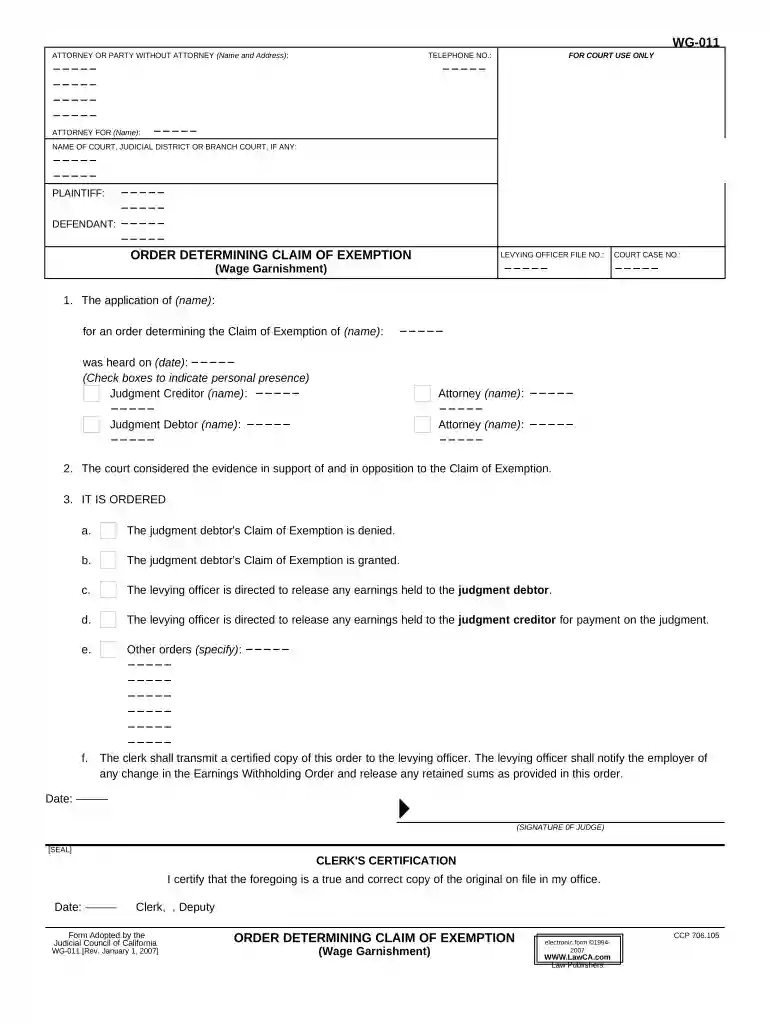
Click ‘Get Form’ to open the ca exemption document in the editor.
Begin by entering your name and address in the 'Attorney or Party Without Attorney' section. Ensure that your contact information is accurate for any follow-up communications.
Fill in the telephone number for easy reference. This is crucial for any court-related inquiries.
In the 'For Court Use Only' section, leave it blank as this will be filled out by court personnel.
Complete the 'Defendant' and 'Plaintiff' fields with the respective names involved in the case.
Provide details regarding the application, including names and dates, ensuring all information is precise to support your claim effectively.
Review options under 'IT IS ORDERED' to indicate whether the Claim of Exemption is granted or denied, and make sure to check any applicable boxes.
Finally, sign and date where indicated, ensuring that all required signatures are present before submission.
Start using our platform today to fill out your ca exemption form online for free!
Ca exemption formCovered ca ExemptionCa exempt employeeWho can get CA exempt plates4 hour rule for exempt employeesCa exempt employee minimum salaryHow to get a CA exempt license plateCa exempt salary 2026
Security and compliance
At DocHub, your data security is our priority. We follow HIPAA, SOC2, GDPR, and other standards, so you can work on your documents with confidence.
Exemptions from the overtime laws ; Orders 4 and 7, Employees (except minors) whose earnings exceed one and one-half times the minimum wage and more than halfRead more
Aug 14, 2023 3.1 Types of information covered under 7(E). 3.1.1 Law enforcement techniques and procedures; 3.1.2 Law enforcement guidelines; 3.1. 3.2Read more
Cookie consent notice
This site uses cookies to enhance site navigation and personalize your experience.
By using this site you agree to our use of cookies as described in our Privacy Notice.
You can modify your selections by visiting our Cookie and Advertising Notice.