Type text, add images, blackout confidential details, add comments, highlights and more.
02. Sign it in a few clicks
Draw your signature, type it, upload its image, or use your mobile device as a signature pad.
03. Share your form with others
Send it via email, link, or fax. You can also download it, export it or print it out.
How to use or fill out ky dispute with our platform
Ease of Setup
DocHub User Ratings on G2
Ease of Use
DocHub User Ratings on G2
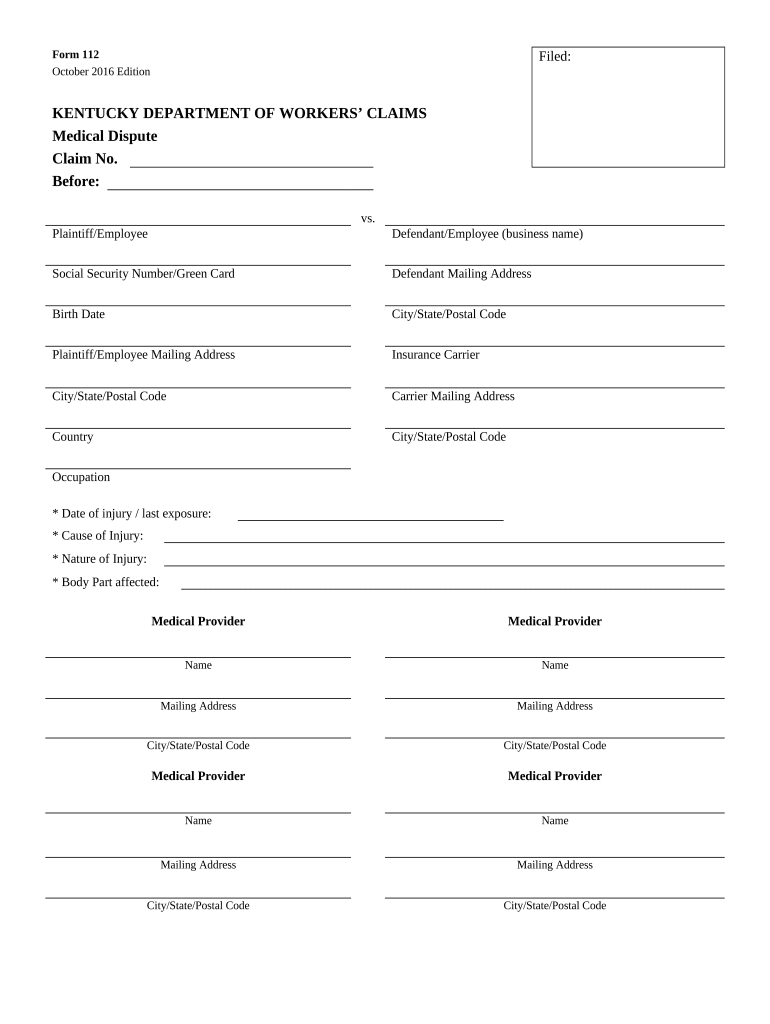
Click ‘Get Form’ to open the ky dispute in the editor.
Begin by entering the Claim Number at the top of the form. This is essential for tracking your dispute.
Fill in the Plaintiff/Employee and Defendant/Employee sections, including names, Social Security Numbers, and mailing addresses.
Provide details about the injury: Date of injury, Cause of Injury, Nature of Injury, and Body Part affected. This information is crucial for understanding your case.
List all Medical Providers involved by entering their names and mailing addresses in the designated fields.
Indicate whether a workers’ compensation claim has been filed and provide the claim number if applicable.
Describe the nature of your dispute clearly in the provided section, attaching any necessary supporting documentation as required.
Complete your contact information at the bottom of the form, ensuring accuracy for follow-up communication.
Start filling out your ky dispute form online for free today!
KY Attorney General complaintKY Court of AppealsKentucky Court of Appeals Case searchKY Attorney General Consumer ProtectionKentucky complaint formKentucky Court of Appeals eFilingKY Attorney General OfficeKentucky Supreme Court Minutes
Security and compliance
At DocHub, your data security is our priority. We follow HIPAA, SOC2, GDPR, and other standards, so you can work on your documents with confidence.
On April 14, 2011, the Tennessee Valley Authority (TVA) and North Carolina ended a longstanding dispute over TVAs compliance with air pollution laws in its
Dispute Resolution Process - Kentucky Department of Education
Apr 17, 2026 A due process hearing is an adversarial process in which a hearing officer resolves IDEA disagreements between parents and the school districts.Read more
Cookie consent notice
This site uses cookies to enhance site navigation and personalize your experience.
By using this site you agree to our use of cookies as described in our Privacy Notice.
You can modify your selections by visiting our Cookie and Advertising Notice.