Type text, add images, blackout confidential details, add comments, highlights and more.
02. Sign it in a few clicks
Draw your signature, type it, upload its image, or use your mobile device as a signature pad.
03. Share your form with others
Send vermont estate tax via email, link, or fax. You can also download it, export it or print it out.
How to use or fill out Vermont for Estate with Our Platform
Ease of Setup
DocHub User Ratings on G2
Ease of Use
DocHub User Ratings on G2
Click ‘Get Form’ to open the Vermont for Estate document in the editor.
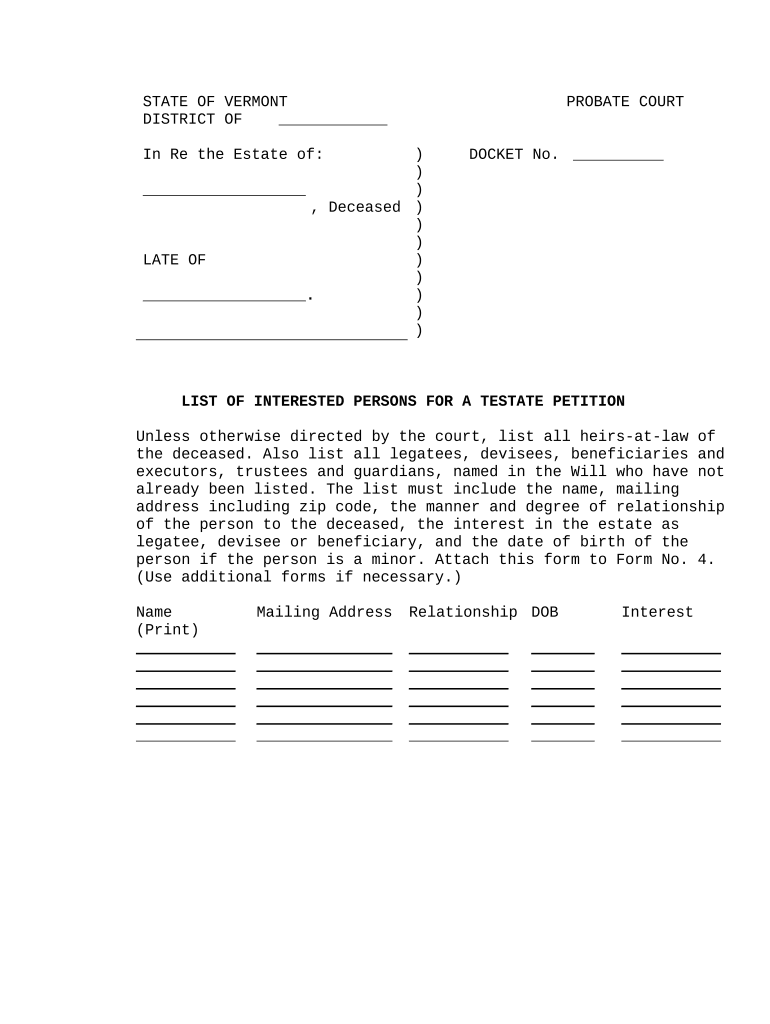
Begin by filling in the 'In Re the Estate of' section with the name of the deceased. Ensure accuracy as this is crucial for identification.
Next, locate the 'List of Interested Persons' section. Here, you will need to provide details about all heirs-at-law, legatees, devisees, beneficiaries, executors, trustees, and guardians associated with the estate.
For each individual listed, include their full name, mailing address (including zip code), relationship to the deceased, interest in the estate (as legatee or beneficiary), and date of birth if they are a minor.
If necessary, use additional forms to ensure all interested persons are documented. Once completed, attach this form to Form No. 4 as required by court instructions.
Start using our platform today to streamline your estate documentation process for free!
Vermont for estate attorneysVermont for estate reviewsVermont for estate costVermont estate tax for non residentsVT estate tax exemption 2026Estate planning attorney Burlington, VTVermont inheritance lawsVermont Form E2A
Security and compliance
At DocHub, your data security is our priority. We follow HIPAA, SOC2, GDPR, and other standards, so you can work on your documents with confidence.
The Heart of the Village Inn is an adults-only, pet-free bed and breakfast located in Shelburne, Vermont. The Victorian-style home was originally built in 1886Read more
Cookie consent notice
This site uses cookies to enhance site navigation and personalize your experience.
By using this site you agree to our use of cookies as described in our Privacy Notice.
You can modify your selections by visiting our Cookie and Advertising Notice.