Quitclaim Deed from Individual to Corporation - Indiana 2026

Get Form
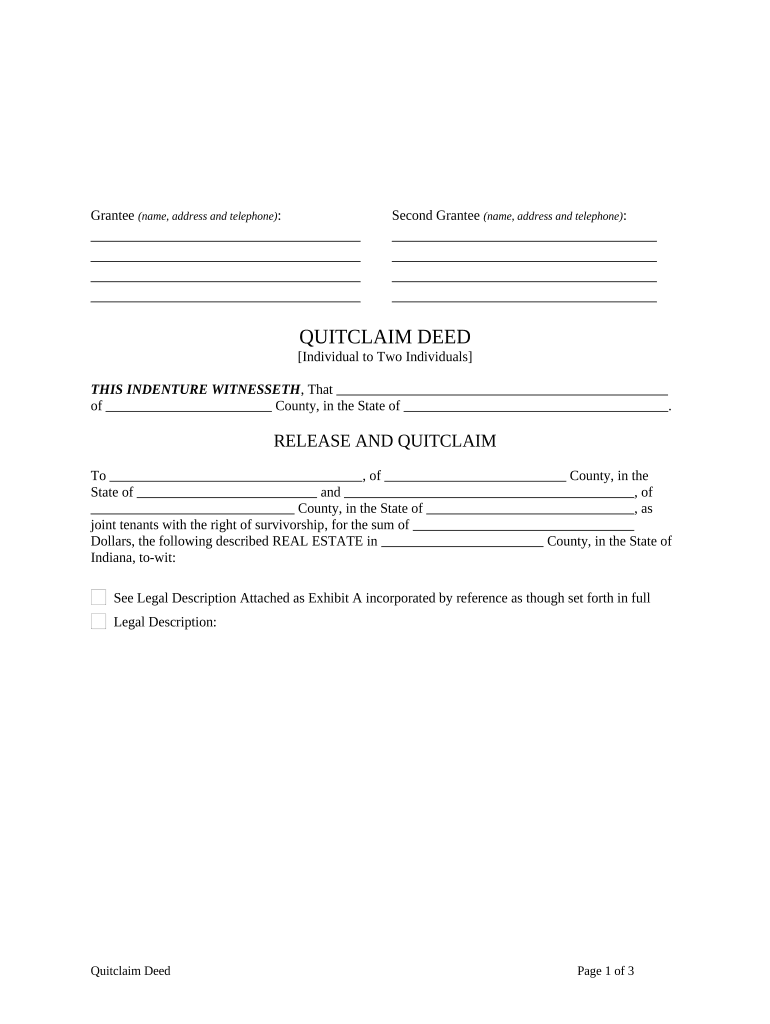
indiana quitclaim deed Preview on Page 1

Here's how it works

01. Edit your indiana quitclaim deed online
Type text, add images, blackout confidential details, add comments, highlights and more.
02. Sign it in a few clicks
Draw your signature, type it, upload its image, or use your mobile device as a signature pad.
03. Share your form with others
Send indiana quick claim deed form via email, link, or fax. You can also download it, export it or print it out.

How to use or fill out Quitclaim Deed from Individual to Corporation - Indiana with DocHub

Form edit decoration
9.5
Ease of Setup
DocHub User Ratings on G2
9.0
Ease of Use
DocHub User Ratings on G2
  1. Click ‘Get Form’ to open the Quitclaim Deed in our editor.
  2. Begin by entering the Grantee's name, address, and telephone number in the designated fields. Ensure accuracy as this information is crucial for legal purposes.
  3. If applicable, fill in the Second Grantee's details using the same format as step 2.
  4. In the section labeled 'THIS INDENTURE WITNESSETH', input the Grantor's name and county of residence. This identifies who is transferring ownership.
  5. Specify the sum of money involved in the transaction in the appropriate field. This amount should reflect any consideration exchanged for the property.
  6. Provide a detailed legal description of the real estate being transferred. If you have an Exhibit A, attach it as instructed.
  7. Have the Grantor sign and date the document where indicated. Ensure that all signatures are clear and legible.
  8. Complete notary sections by having a Notary Public witness and sign, confirming that all parties acknowledged their signatures.

Start using our platform today to easily complete your Quitclaim Deed for free!

be ready to get more

Complete this form in 5 minutes or less

Get form

Got questions?

We have answers to the most popular questions from our customers. If you can't find an answer to your question, please contact us.
Contact us

You should use only trusted software solutions with strong security compliance to sign your documents electronically. DocHub is just the type of service you need! It stores data on Amazon Web Servers and complies with all required security requirements and eSignature regulations, so it’s a trustworthy way to eSign your quit claim deed form indiana or other forms with this tool.

If you are using Chrome, there are two simple ways to modify your indiana quit claim deed online. First, go to the DocHub website, add your file, and modify it utilizing our toolbar. You can also set up our Chrome extension and modify any document by dragging and dropping it in your web browser tab.

A quit claim deed to LLC transfers property ownership but does not guarantee the property is free from liens or encumbrances. LLCs provide liability protection for real estate owners, but transferring property using a quit claim deed does not remove personal liability from an existing mortgage.
0:09 1:54 A quick claim deed is a legal document that transfers ownership interest in real estate. It does notMoreA quick claim deed is a legal document that transfers ownership interest in real estate. It does not guarantee that the branch. Valit. Companies often handle real estate transactions.
A quitclaim deed is a legal instrument used in California to transfer ownership interest in real property from one party to another. Unlike other deeds, a quitclaim deed does not guarantee that the grantor holds a valid title to the property.

Security and compliance

At DocHub, your data security is our priority. We follow HIPAA, SOC2, GDPR, and other standards, so you can work on your documents with confidence.

Learn more
ccpa2
pci-dss
gdpr-compliance
hipaa
soc-compliance
be ready to get more

Complete this form in 5 minutes or less

Get form