California motion 2026

Get Form
california motion Preview on Page 1

Here's how it works

01. Edit your form online
Type text, add images, blackout confidential details, add comments, highlights and more.

02. Sign it in a few clicks
Draw your signature, type it, upload its image, or use your mobile device as a signature pad.

03. Share your form with others
Send it via email, link, or fax. You can also download it, export it or print it out.

How to use or fill out California Motion with Our Platform

Form edit decoration
9.5
Ease of Setup
DocHub User Ratings on G2
9.0
Ease of Use
DocHub User Ratings on G2
  1. Click ‘Get Form’ to open the California Motion document in the editor.
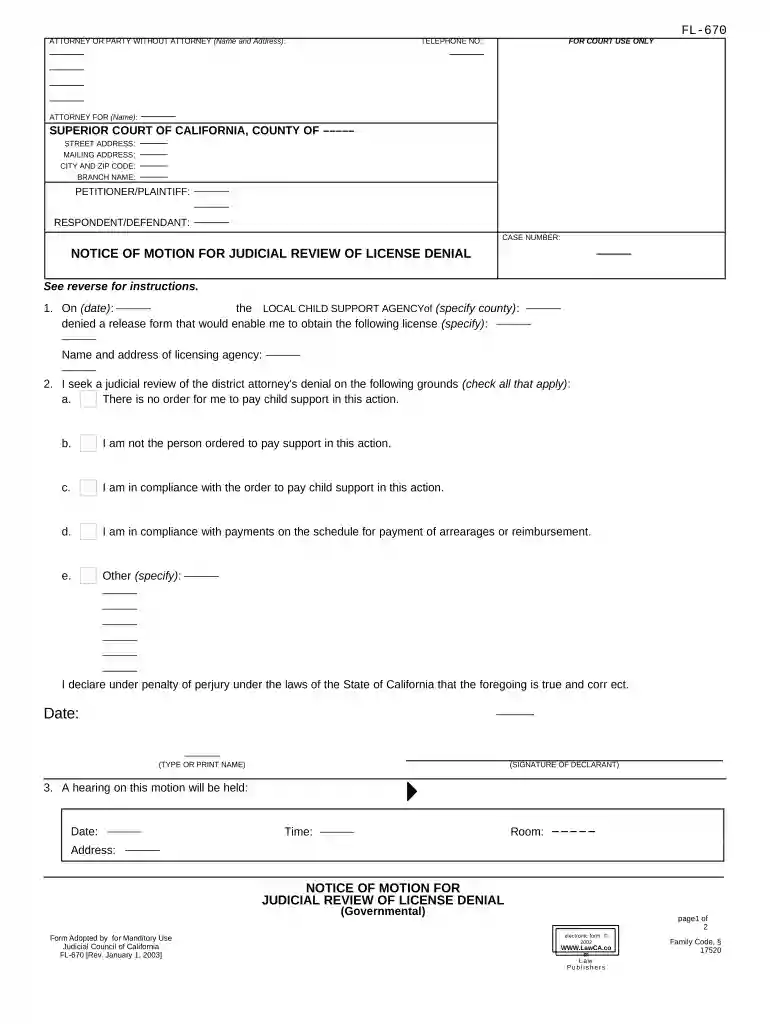
  2. Begin by filling in your name and address as the attorney or party without an attorney at the top of the form. Ensure all details are accurate for proper identification.
  3. In the section labeled 'FOR COURT USE ONLY', leave it blank as this will be filled by the court.
  4. Next, enter the petitioner/plaintiff's and respondent/defendant's information, including their addresses and case number. This is crucial for linking your motion to the correct case.
  5. Specify the date of denial from the local child support agency and detail which license you are seeking a judicial review for.
  6. Check all applicable grounds for your motion regarding child support compliance. Be thorough in your selections to strengthen your case.
  7. Sign and date the declaration at the bottom of the form, affirming that all information provided is true under penalty of perjury.
  8. Schedule a hearing by contacting the court clerk, then fill in that information in box 3 on the reverse side of your form.
  9. File your completed motion with two copies for your records, and serve one copy to the local child support agency within seven days of filing.

Start using our platform today to streamline your California Motion process for free!

be ready to get more

Complete this form in 5 minutes or less

Get form

Got questions?

We have answers to the most popular questions from our customers. If you can't find an answer to your question, please contact us.
Contact us
A motion is an oral or written request made by a party to the court for a ruling or order directing some type of act or action to be taken.
It is a request to the judge (or judges) to make a decision about the case. Motions may be made at any point in administrative, criminal or civil proceedings, although that right is regulated by court rules which vary from place to place. The party requesting the motion is the moving party or movant.
A motion or petition is a request for the court to make a decision. A hearing or trial is the time when the court (a judge, general magistrate, or a hearing officer) makes the decision on a partys motion or petition. Generally, motions are decided at a hearing and petitions are decided at a trial.
Learn how to file a motion (a written request for some type of relief) to get your case or part of your case - in front of the judge for a decision. You can use motions to try to resolve the case completely. Or you can use them to resolve some specific issue before trial.
A motion is an application to the court made by the prosecutor or defense attorney, requesting that the court make a decision on a certain issue before the trial begins. The motion can affect the trial, courtroom, defendants, evidence, or testimony. Only judges decide the outcome of motions.

Security and compliance

At DocHub, your data security is our priority. We follow HIPAA, SOC2, GDPR, and other standards, so you can work on your documents with confidence.

Learn more
ccpa2
pci-dss
gdpr-compliance
hipaa
soc-compliance
be ready to get more

Complete this form in 5 minutes or less

Get form

People also ask

A motion is simply a request to the court for some action. An example is a motion for an extension of time to file something.

Related links