Findings law 2026

Get Form
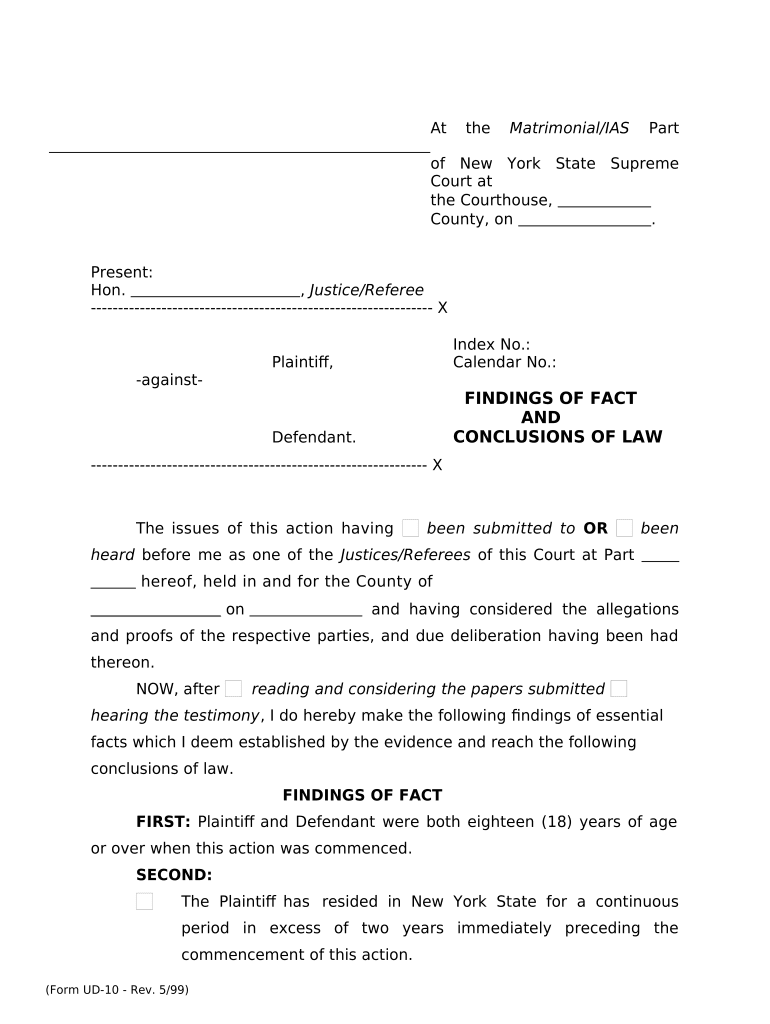
findings law Preview on Page 1

Here's how it works

01. Edit your form online
Type text, add images, blackout confidential details, add comments, highlights and more.
02. Sign it in a few clicks
Draw your signature, type it, upload its image, or use your mobile device as a signature pad.
03. Share your form with others
Send it via email, link, or fax. You can also download it, export it or print it out.

How to use or fill out findings law with our platform

Form edit decoration
9.5
Ease of Setup
DocHub User Ratings on G2
9.0
Ease of Use
DocHub User Ratings on G2
  1. Click ‘Get Form’ to open the findings law document in the editor.
  2. Begin by filling in the court details, including the name of the county and the index number. This information is crucial for proper identification of your case.
  3. In the 'FINDINGS OF FACT' section, provide essential details about both parties, such as their ages and residency status. Ensure accuracy as this establishes jurisdiction.
  4. Continue through each finding, detailing marriage dates, any prior divorce actions, and military service status. Use our platform’s text fields to input this information clearly.
  5. For allegations of grounds for divorce, select from options like 'Cruel and Inhuman Treatment' or 'Abandonment.' Provide specific facts supporting your claims in the designated areas.
  6. Complete sections regarding child custody and support if applicable. Input names, addresses, and financial obligations accurately to avoid future disputes.
  7. Review all entries for completeness and correctness before saving or exporting your document. Utilize our platform's features to ensure everything is in order.

Start using our platform today to streamline your findings law document editing process for free!

be ready to get more

Complete this form in 5 minutes or less

Get form

Got questions?

We have answers to the most popular questions from our customers. If you can't find an answer to your question, please contact us.
Contact us
Factual findings refer to the conclusions drawn by a trial court based on the evidence presented during the proceedings. These findings are critical as they establish the underlying facts of a case, which can docHubly affect the outcome during appeals.
Legal finding means a court or administrative finding, judgment, order, stipulation, plea, or verdict that determines who was responsible for the abuse that is the subject of a CPS founded disposition. Successful completion of a diversion program is not a legal finding.
A finding, also known as a finding of fact, is the determination of a factual question contributing to a decision in a case by the trier of fact after a trial of a lawsuit. Depending on the circumstances, the finding can be made by a judge or a jury.
No finding means that the information contained in a report that met criteria to open an investigation has been found to be false or erroneous and no longer meets acceptance cri- teria.
A finding of fact, also known as a conclusion of fact, refers to decisions made by the trier of fact on questions of fact in a case. Questions of fact arise when parties disagree on facts, and after presenting evidence, the trier of fact must decide what the facts actually are.

Security and compliance

At DocHub, your data security is our priority. We follow HIPAA, SOC2, GDPR, and other standards, so you can work on your documents with confidence.

Learn more
ccpa2
pci-dss
gdpr-compliance
hipaa
soc-compliance