Type text, add images, blackout confidential details, add comments, highlights and more.
02. Sign it in a few clicks
Draw your signature, type it, upload its image, or use your mobile device as a signature pad.
03. Share your form with others
Send it via email, link, or fax. You can also download it, export it or print it out.
How to use or fill out co repossession with our platform
Ease of Setup
DocHub User Ratings on G2
Ease of Use
DocHub User Ratings on G2
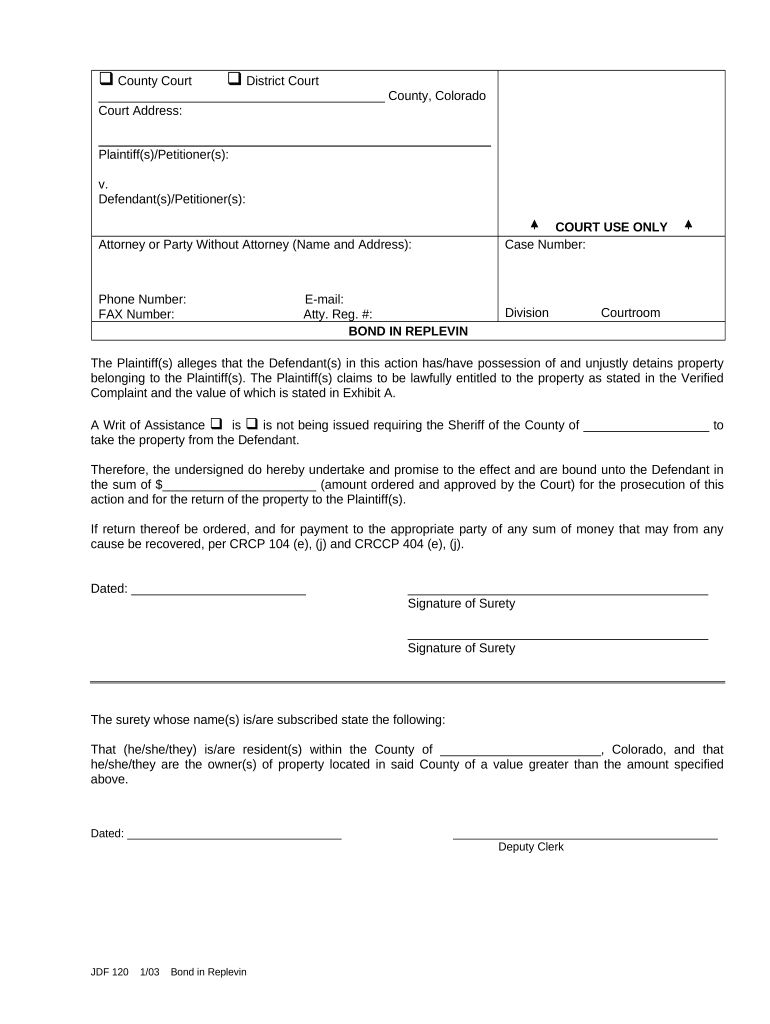
Click ‘Get Form’ to open the co repossession document in the editor.
Begin by entering the court information, including the County and Court Address. This ensures that your document is properly filed.
Fill in the Plaintiff(s)/Petitioner(s) and Defendant(s)/Petitioner(s) sections with the relevant names. Accurate identification is crucial for legal proceedings.
Provide contact details for the Attorney or Party Without Attorney, including name, address, phone number, fax number, and email. This facilitates communication throughout the process.
In the 'BOND IN REPLEVIN' section, specify whether a Writ of Assistance is being issued. This indicates if law enforcement will be involved in retrieving property.
Enter the amount of bond required by the court in the designated field. Ensure this matches what has been ordered to avoid delays.
Sign and date where indicated to validate your commitment to return any property as required by law.
Start using our platform today to streamline your co repossession process for free!
Car repossession loopholesCar repossession loopholes IllinoisColorado repossession lawsStatute of limitations on car repossession in IllinoisIllinois repossession lawsCar repossession IllinoisFree car repossession lookupHow much are repossession fees in Illinois
Security and compliance
At DocHub, your data security is our priority. We follow HIPAA, SOC2, GDPR, and other standards, so you can work on your documents with confidence.
Sam decides to repossess the car when Betty defaults on her monthly payment. He hires a professional repo company to take the car from her driveway in theRead more
Even non-warranty related tows, like accidents or getting stuck in the mud or snow, are covered (some exclusions apply, such as impound towing or repossession).Read more
Cookie consent notice
This site uses cookies to enhance site navigation and personalize your experience.
By using this site you agree to our use of cookies as described in our Privacy Notice.
You can modify your selections by visiting our Cookie and Advertising Notice.