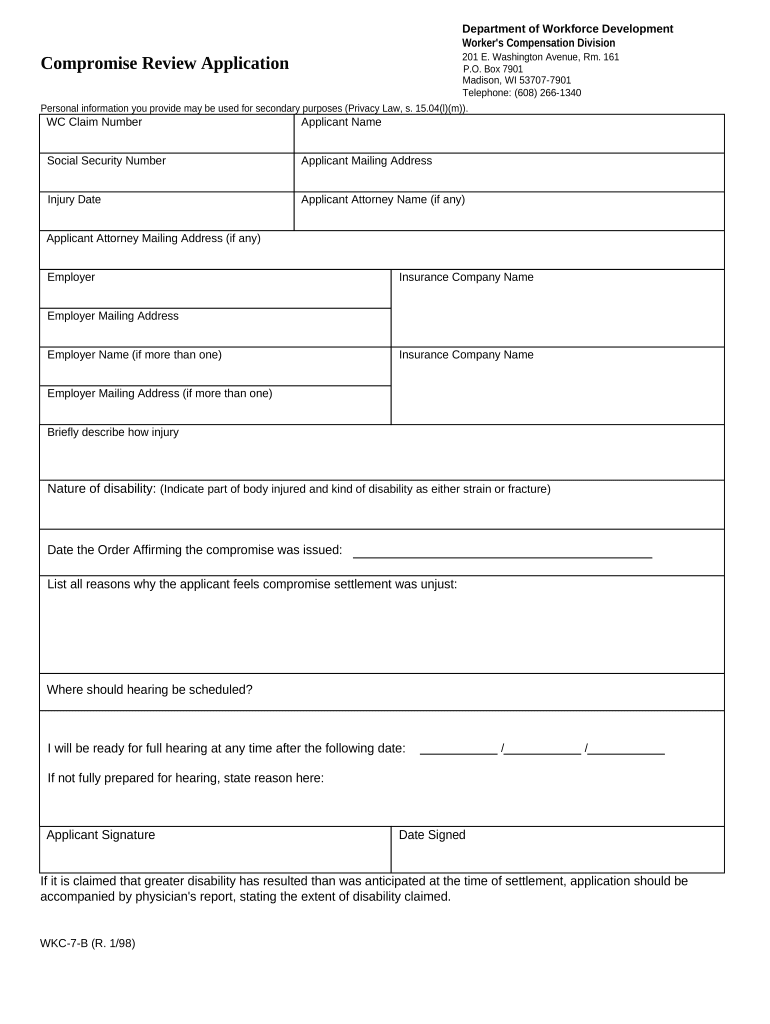
Compromise and Review Application for Workers' Compensation - Wisconsin 2026

Get Form
order approving compromise and release Preview on Page 1

Here's how it works

01. Edit your order approving compromise and release online
Type text, add images, blackout confidential details, add comments, highlights and more.
02. Sign it in a few clicks
Draw your signature, type it, upload its image, or use your mobile device as a signature pad.
03. Share your form with others
Send it via email, link, or fax. You can also download it, export it or print it out.

How to use or fill out Compromise and Review Application for Workers' Compensation - Wisconsin with our platform

Form edit decoration
9.5
Ease of Setup
DocHub User Ratings on G2
9.0
Ease of Use
DocHub User Ratings on G2
  1. Click ‘Get Form’ to open the Compromise and Review Application in the editor.
  2. Begin by entering your WC Claim Number at the top of the form. This is essential for identifying your case.
  3. Fill in your personal information, including your name, Social Security Number, and mailing address. Ensure accuracy to avoid delays.
  4. Provide details about your injury, including the date it occurred and a brief description of how it happened.
  5. Indicate the nature of your disability by specifying the affected body part and whether it is a strain or fracture.
  6. If applicable, include information about your attorney, such as their name and mailing address.
  7. List reasons why you believe the compromise settlement was unjust in the designated section.
  8. Finally, sign and date the application at the bottom before submitting it through our platform for processing.

Start using our platform today to complete your Compromise and Review Application efficiently and for free!

be ready to get more

Complete this form in 5 minutes or less

Get form

Got questions?

We have answers to the most popular questions from our customers. If you can't find an answer to your question, please contact us.
Contact us

Microsoft Word doesn’t have signing tools to create legitimate eSignatures and enforceable forms. Fortunately, DocHub is an online eSignature-compliant editor that supports different document formats, including .doc files. Sign in to your account and add the Word edition of your Compromise and Review Application for Workers' Compensation - Wisconsin from your device and cloud, or URL - our editor will automatically turn it into an editable PDF. Make all necessary alterations in your form and click Sign to create your own legally-binding eSignature. There are four signing options from which to choose.

You can find the latest and most relevant version of the Compromise and Review Application for Workers' Compensation - Wisconsin in our DocHub forms collection. Browse it by categories or utilize the search field to get the exact template that suits your situation. You may open this form for editing after you find it.

Wisconsin Employers that meet specific requirements are required to carry Workers Compensation insurance unless they qualify for Self-Insured status. Employers receive the assurance they will not be sued for damages, medical care and lost wages if their employees get injured while working.
Three-Day Waiting Period For Temporary Disability To eliminate minor claims for temporary disability, the law requires a three-day waiting period for all disabilities lasting seven days or less. (Sundays are not included in the three days unless the employee usually works on Sundays.)
insurance under the Wisconsin Workers Compensation Act? Conditions of liability. Exclusive remedy, prevents an injured employee from suing an employer who has the required insurance in force at the time a work- related injury occurs.

Security and compliance

At DocHub, your data security is our priority. We follow HIPAA, SOC2, GDPR, and other standards, so you can work on your documents with confidence.

Learn more
ccpa2
pci-dss
gdpr-compliance
hipaa
soc-compliance
be ready to get more

Complete this form in 5 minutes or less

Get form

People also ask

The ultimate answer to how long you can receive workers compensation benefits, of course, is that you can receive them for life if your injury qualifies. You really dont want your injury to qualify for lifetime benefits, though, because that means you have suffered an injury resulting in permanent total disability.
Three-Day Waiting Period For Temporary Disability To eliminate minor claims for temporary disability, the law requires a three-day waiting period for all disabilities lasting seven days or less. (Sundays are not included in the three days unless the employee usually works on Sundays.)
For temporary disability calculations involving the 3-day waiting period, indemnity is due for the first 3 days after the injury only if temporary disability exists for more than 7 calendar days after the day of injury.
While workers cannot be fired in Wisconsin while on workers compensation, there are also protections when it comes to returning to the job. For example, employers need reasonable cause to refuse to rehire a worker from their previous job.
Wisconsin workers compensation law requires many employers to have workers compensation insurance, which covers the medical expenses of a work-related injury and awards an employee 2/3 of their average weekly wage for the time they are not able to work due to the injury, among other coverages.

Related links