Notice default against 2026

Get Form
notice default against Preview on Page 1

Here's how it works

01. Edit your form online
Type text, add images, blackout confidential details, add comments, highlights and more.
02. Sign it in a few clicks
Draw your signature, type it, upload its image, or use your mobile device as a signature pad.
03. Share your form with others
Send it via email, link, or fax. You can also download it, export it or print it out.

How to use or fill out notice default against with our platform

Form edit decoration
9.5
Ease of Setup
DocHub User Ratings on G2
9.0
Ease of Use
DocHub User Ratings on G2
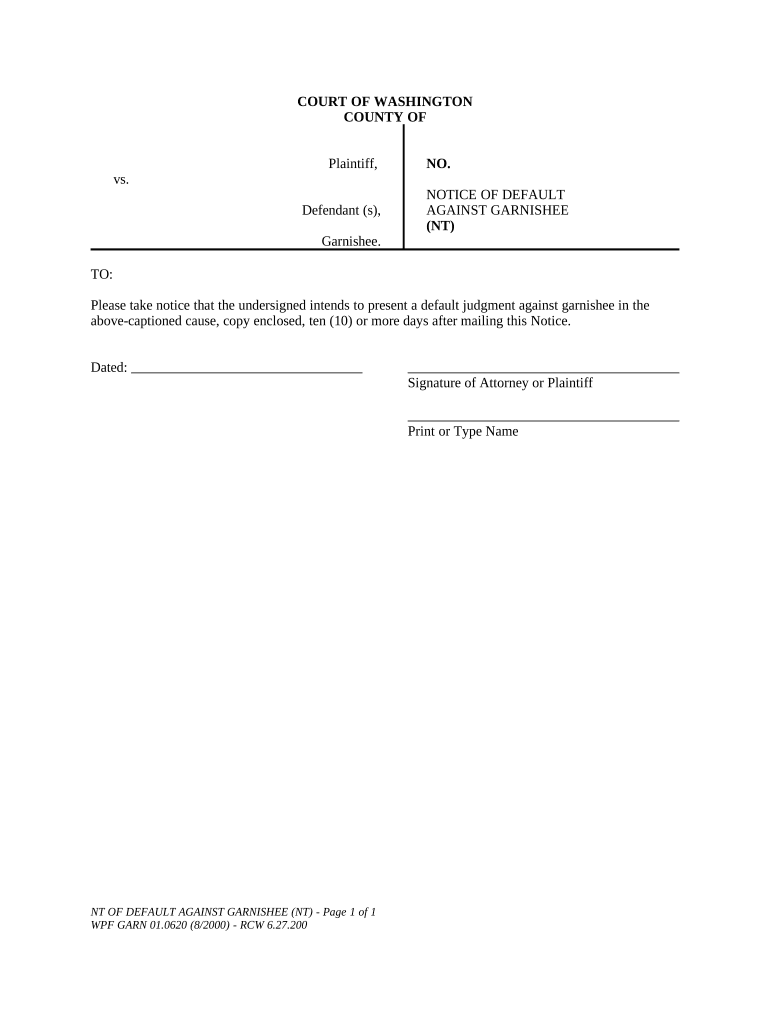
  1. Click ‘Get Form’ to open the notice default against in the editor.
  2. Begin by entering the court name and county at the top of the form. This identifies where your case is being heard.
  3. Fill in the plaintiff's name and the defendant(s) involved in the case. Ensure accuracy to avoid any legal complications.
  4. Enter the case number (NO.) assigned to your matter, which helps in tracking your case within the court system.
  5. In the 'TO:' section, specify the garnishee's name, as this is who you are notifying about the default judgment.
  6. Indicate that you intend to present a default judgment against the garnishee, ensuring clarity on your intentions.
  7. Date your notice appropriately and provide your signature or that of your attorney, followed by printing or typing your name for verification.

Start using our platform today for free to streamline your document editing and signing process!

be ready to get more

Complete this form in 5 minutes or less

Get form

Got questions?

We have answers to the most popular questions from our customers. If you can't find an answer to your question, please contact us.
Contact us
What happens when you get a default judgment against you. After a default judgment, the Plaintiff will try to collect the money you owe. The Plaintiff may be able to take money from your paycheck or bank account and put a lien on your property. If you dont have any assets to pay the debt, you can let the Plaintiff.
You will typically receive a default notice if youve not kept up-to-date on your payments for between three and six months. It is effectively a nudge from the lender to make your payments within a certain period of time, before things get more serious. Lenders legally have to give you at least 14 days to respond.
Of course you can ignore it as long as youre willing to accept the consequences. A default judgment against you, meaning you lose and depending on your state laws, you may end up with your wages garnished, or perhaps a lien against your property.
The consequences of default, which can be severe, include the following: The entire unpaid balance of your loan and any interest you owe becomes immediately due. You can no longer receive a deferment or forbearance, and you lose eligibility for other benefits, such as the ability to choose a repayment plan.
A default looks like bad news to lenders, as it shows youve struggled to repay credit in the past. So, you may find it hard to get approved, particularly for mortgages since lenders must meet strict rules to ensure you can afford one. However, its still possible to borrow money with a default on your record.

People also ask

How Do You Respond to a Notice of Default? Read through the default notice carefully and contact your lender to discuss steps you may be able to take to get caught up with your loan. In some cases, the lender may work with you to modify the loan terms.
The creditor will then be legally entitled to demand early repayment of the whole outstanding balance. They can begin the legal process that could result in you being taken to court for a County Court Judgment (CCJ) which orders you to immediately pay the whole outstanding debt in full, or by instalments.

Related links