




Here's how it works

01. Edit your most co online
Type text, add images, blackout confidential details, add comments, highlights and more.

02. Sign it in a few clicks
Draw your signature, type it, upload its image, or use your mobile device as a signature pad.

03. Share your form with others
Send colorado most form via email, link, or fax. You can also download it, export it or print it out.
How to use or fill out Colorado MOST form with our platform

- Click ‘Get Form’ to open the Colorado MOST form in the editor.
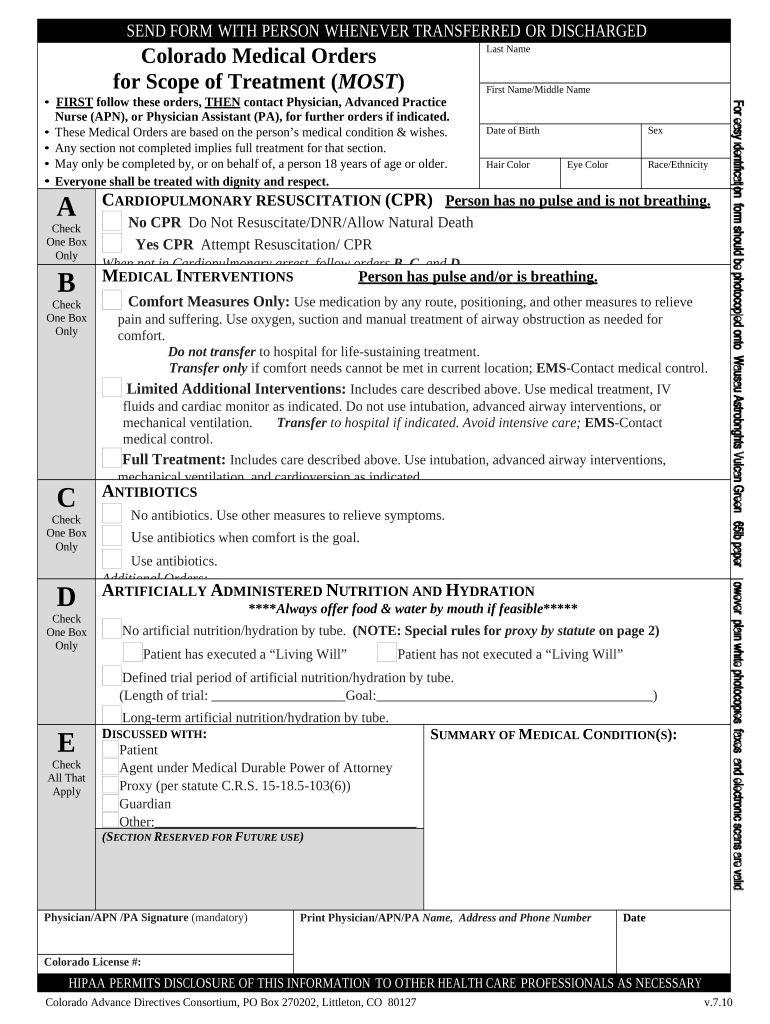
- Begin by entering the patient's Last Name, First Name, and Middle Name in the designated fields. Ensure accuracy as this information is crucial for identification.
- Fill in the patient's Date of Birth, Sex, Hair Color, Eye Color, and Race/Ethnicity. This demographic information helps healthcare providers understand the patient better.
- In Section A regarding Cardiopulmonary Resuscitation (CPR), check one box to indicate whether CPR should be attempted or if a Do Not Resuscitate (DNR) order is preferred.
- Proceed to Section B for Medical Interventions. Choose between Comfort Measures Only, Limited Additional Interventions, or Full Treatment based on the patient's wishes.
- Complete Section C regarding Antibiotics by selecting the appropriate option that aligns with the patient's treatment goals.
- In Section D about Artificially Administered Nutrition and Hydration, indicate preferences clearly and discuss any trial periods if applicable.
- Ensure all mandatory signatures are obtained at the end of the form from either the patient or their authorized representative.
Start using our platform today to easily fill out your Colorado MOST form online for free!
Fill out colorado most form online
It's free
It's free
Security and compliance
At DocHub, your data security is our priority. We follow HIPAA, SOC2, GDPR, and other standards, so you can work on your documents with confidence.
Learn more


