




Here's how it works

01. Edit your form 77 online
Type text, add images, blackout confidential details, add comments, highlights and more.

02. Sign it in a few clicks
Draw your signature, type it, upload its image, or use your mobile device as a signature pad.

03. Share your form with others
Send form tsp 17 via email, link, or fax. You can also download it, export it or print it out.
How to use or fill out tsp form 77 2008 with our platform

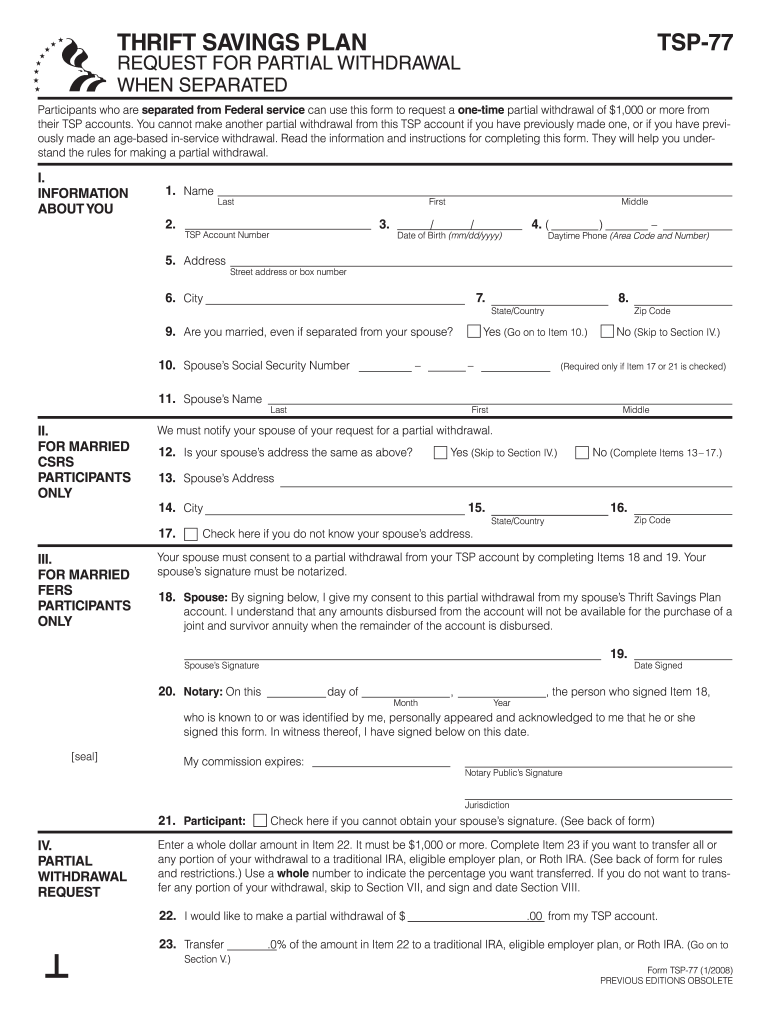
- Click ‘Get Form’ to open the TSP Form 77 in the editor.
- Begin by filling out Section I, which includes your name, TSP account number, and date of birth. Ensure all information is accurate for proper identification.
- If you are married, complete Items 9 through 11 with your spouse's details. If your spouse's address differs from yours, provide that information in Items 13 to 17.
- In Section IV, specify the amount you wish to withdraw (minimum $1,000) in Item 22. If you want to transfer part of this amount to an IRA or employer plan, fill out Item 23.
- Complete Section VIII by signing and dating the certification statement to confirm the accuracy of your information and your eligibility for withdrawal.
Start using our platform today for free to streamline your TSP Form completion!
Fill out tsp form 77 2008 online
It's free
It's free
See more tsp form 77 2008 versions
We've got more versions of the tsp form 77 2008 form. Select the right tsp form 77 2008 version from the list and start editing it straight away!
Security and compliance
At DocHub, your data security is our priority. We follow HIPAA, SOC2, GDPR, and other standards, so you can work on your documents with confidence.
Learn more


Related forms
Example b307 notice of termination form
The document is a request for a COBRA application submitted to the New York Department of Civil Service by an individual ...

HMO REFERRAL REQUEST FORM - buckinghamdocs
The document is an HMO Referral Request Form from Buckingham Family Medicine, providing details for patients to request ...

New Hampshire Inventory of Fiduciary
The document is an 'Inventory of Fiduciary' form used in the New Hampshire Judicial Branch for reporting the assets of a ...

FINANCE and GENERAL PURPOSES COMMITTEE - morpeth-tc uk
The document is an allotment application form for residents of Morpeth Town Council, outlining the process for applying ...

Texas Commission on Law Enforcement Austin opening hours
The document outlines the procedures and requirements for the separation of law enforcement licensees in Texas, specific ...

Virginia Auto Recycler License Application
The document is an application form for obtaining, renewing, or changing a license for Auto Recyclers, Salvage Pools, an ...