Testamentary 2026

Get Form
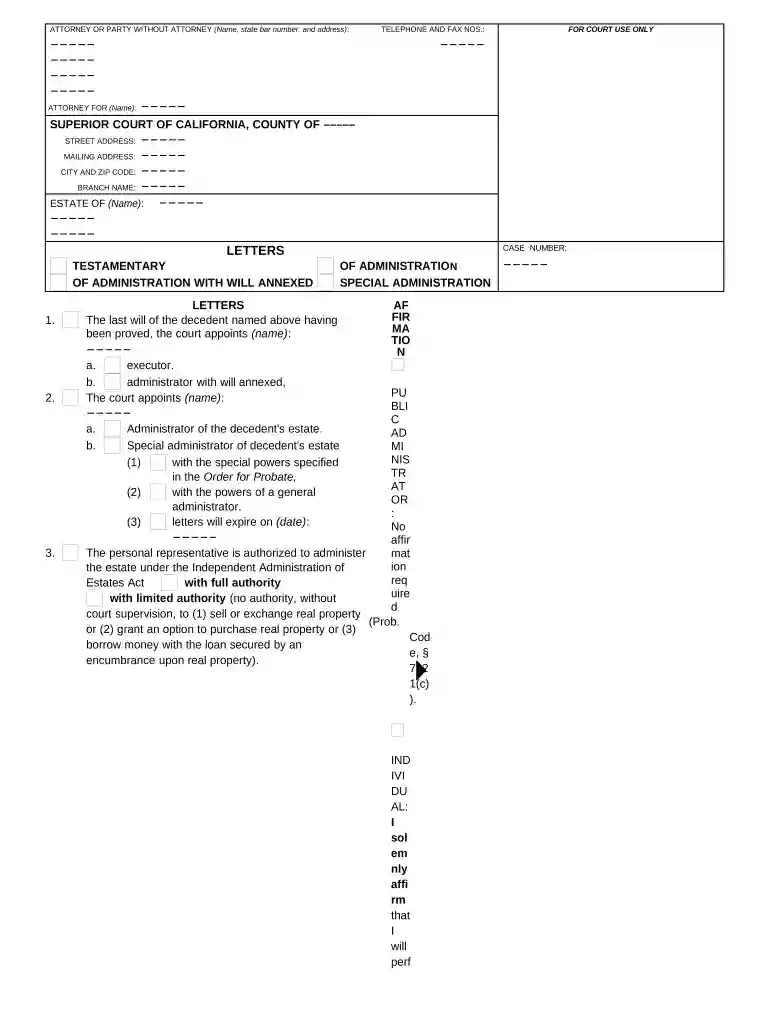
testamentary Preview on Page 1

Here's how it works

01. Edit your form online
Type text, add images, blackout confidential details, add comments, highlights and more.

02. Sign it in a few clicks
Draw your signature, type it, upload its image, or use your mobile device as a signature pad.

03. Share your form with others
Send it via email, link, or fax. You can also download it, export it or print it out.

How to use or fill out testamentary with our platform

Form edit decoration
9.5
Ease of Setup
DocHub User Ratings on G2
9.0
Ease of Use
DocHub User Ratings on G2
  1. Click ‘Get Form’ to open the testamentary document in the editor.
  2. Begin by filling in the attorney or party's name, state bar number, and address at the top of the form. This information is crucial for identification purposes.
  3. Next, enter the name of the individual for whom you are applying for letters testamentary. Ensure that all names are spelled correctly to avoid any legal issues.
  4. In the section labeled 'Letters of Administration,' specify whether you are applying as an executor or administrator with will annexed. Fill in the name of the appointed representative.
  5. Complete details regarding special administration if applicable, including any specific powers granted by the court.
  6. Affirm your duties as a personal representative by signing and dating where indicated. Make sure to include your title if representing an institution.
  7. Finally, review all entries for accuracy before submitting your completed form through our platform.

Start using our platform today to streamline your testamentary process for free!

be ready to get more

Complete this form in 5 minutes or less

Get form

Got questions?

We have answers to the most popular questions from our customers. If you can't find an answer to your question, please contact us.
Contact us
Disadvantages of a Testamentary Trust Will Cost: These types of Wills can be more costly to prepare, and cost is often dependent on the level of complexity. Administration of an estate where the Will is a Testamentary Trust Will is also a more complex process.
A testamentary trust is a provision in the will that both names the executor of the estate and instructs that individual to create the trust. After the persons death, the will must go through the probate process to determine its authenticity.
The Trustee of a testamentary Trust legally owns the assets the Testator places in the trust. The beneficiaries who the Testator nominates do not legally own the assets. Therefore, the assets placed in the Trust may be protected from the beneficiaries creditors in the event a beneficiary declares bankruptcy.
In summary, the primary difference between Letters of Administration and Letters Testamentary in California lies in whether there is a valid will. Letters of Administration are issued when there is no will, and an administrator is appointed to handle the estate according to intestacy laws.
Testamentary is of or relating to a will or testament. The term is often used to denote that something was provided for, appointed by or created by a will.

Security and compliance

At DocHub, your data security is our priority. We follow HIPAA, SOC2, GDPR, and other standards, so you can work on your documents with confidence.

Learn more
ccpa2
pci-dss
gdpr-compliance
hipaa
soc-compliance
be ready to get more

Complete this form in 5 minutes or less

Get form

People also ask

Letters testamentary or letters of administration are legal documents issued by the court.
A last will and testament is a legal document that outlines how you want your assets distributed after your death. A power of attorney is a legal document that names who you want to handle your medical, legal, or financial decisions during your lifetime.

Related links