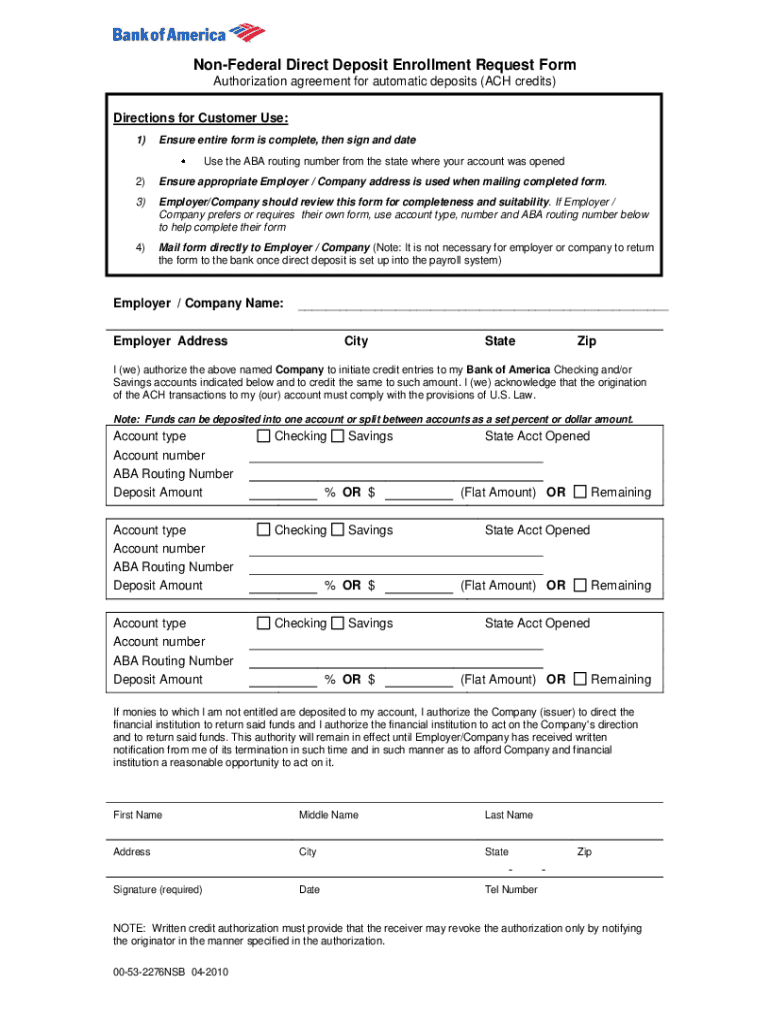
Direct deposit enrollment request form 2026

Get Form
deposit form bank of america Preview on Page 1

Here's how it works

01. Edit your deposit form bank of america online
Type text, add images, blackout confidential details, add comments, highlights and more.
02. Sign it in a few clicks
Draw your signature, type it, upload its image, or use your mobile device as a signature pad.
03. Share your form with others
Send direct deposit form bank of america via email, link, or fax. You can also download it, export it or print it out.

How to use or fill out direct deposit enrollment request form with our platform

Form edit decoration
9.5
Ease of Setup
DocHub User Ratings on G2
9.0
Ease of Use
DocHub User Ratings on G2
  1. Click ‘Get Form’ to open the direct deposit enrollment request form in the editor.
  2. Begin by filling in your Employer/Company Name and Address, including City, State, and Zip Code. Ensure accuracy as this information is crucial for processing.
  3. In the account section, specify the Account Type (Checking/Savings), Account Number, ABA Routing Number, and Deposit Amount for each account you wish to enroll. You can split deposits between accounts if needed.
  4. Complete your personal information by entering your First Name, Middle Name, Last Name, Address, City, State, Zip Code, and Telephone Number.
  5. Finally, sign and date the form to authorize the transactions. Review all entries for completeness before submission.

Start using our platform today to easily complete your direct deposit enrollment request form online for free!

See more direct deposit enrollment request form versions

We've got more versions of the direct deposit enrollment request form form. Select the right direct deposit enrollment request form version from the list and start editing it straight away!
Versions Form popularity Fillable & printable
2010 4.8 Satisfied (155 Votes)
2008 4.3 Satisfied (70 Votes)
be ready to get more

Complete this form in 5 minutes or less

Get form

Got questions?

We have answers to the most popular questions from our customers. If you can't find an answer to your question, please contact us.
Contact us
Direct Deposit Authorization Form. A direct deposit authorization form authorizes a third party, usually an employer for payroll, to send money to a bank account.
To set up or change your direct deposit, you will need the following information: your social insurance number. the name of your bank or financial institution. the branch transit number. your account number.
What is a Direct Deposit Authorization Form? Direct deposit authorization forms authorize employers to send money directly into an individuals bank account. In times past, employers would print out and distribute physical checks on pay day for each employee to deposit into their bank accounts themselves.
Get a direct deposit form from your employer. Ask for a written or online direct deposit form. Fill in account information. You typically need to provide the following personal and bank details: Confirm the deposit amount. Attach a voided check or deposit slip, if required. Submit the form.
Employers require a direct deposit authorization form for several key reasons: Ensure payroll accuracy: The form provides written authorization and correct bank details to avoid payment errors. Improve efficiency: Eliminates the need for paper checks, reducing administrative workload.

Security and compliance

At DocHub, your data security is our priority. We follow HIPAA, SOC2, GDPR, and other standards, so you can work on your documents with confidence.

Learn more
ccpa2
pci-dss
gdpr-compliance
hipaa
soc-compliance

People also ask

Download, print or email the form to your employer.
Direct Deposit is a program that allows for the automatic deposit of your net earnings in the financial institution of your choice. What are some reasons for enrolling in Direct Deposit? Direct Deposit of your payroll net offers several benefits to participants, including: Fewer trips to your financial institution.

non federal direct deposit enrollment request form