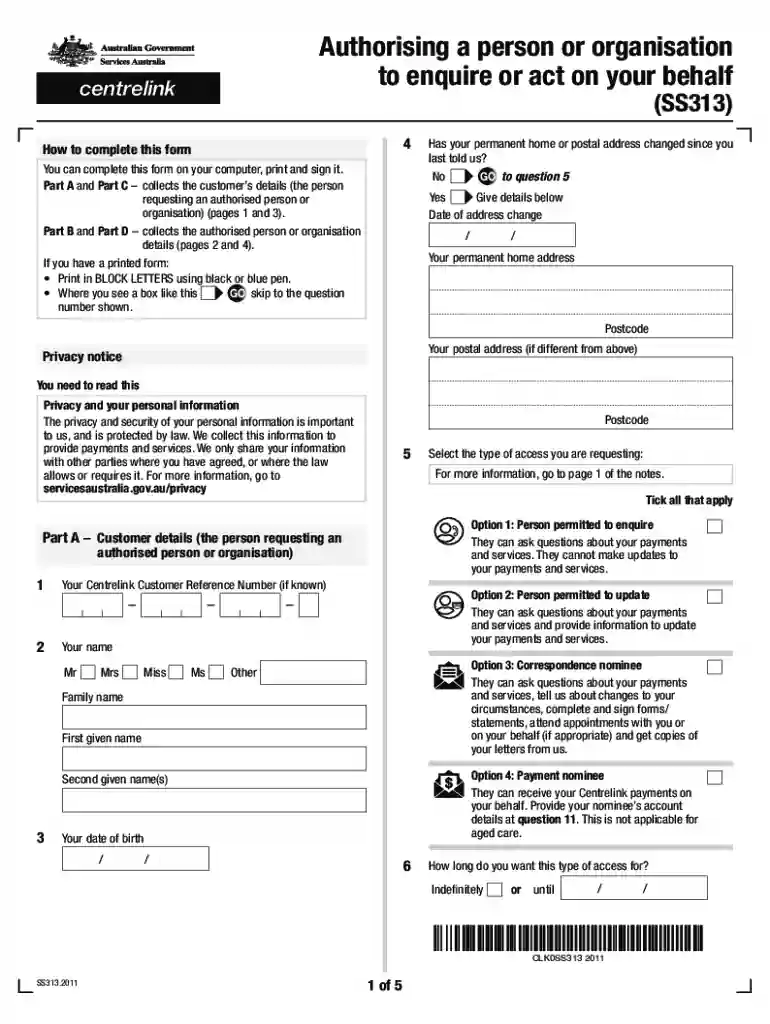
Definition and Purpose of Human Services SS313 Authorising Form
The SS313 form is a critical document used for authorizing a person or organization to act on behalf of an individual regarding Centrelink payments and services, including Aged Care. It allows individuals to grant access to their personal information and the ability to make inquiries or manage matters concerning their social security benefits. Such authorization can be vital when individuals require assistance in navigating the complexity of social services.
Key Features of the SS313 Form
- Types of Access: The SS313 form allows for different levels of access, including the ability to inquire about payment details or make decisions on behalf of the individual.
- Identity Verification: To complete the process, proper identification is necessary, ensuring that the right individual is granting the authorization.
- Privacy Considerations: The form emphasizes the importance of safeguarding personal information, ensuring that only authorized parties can access sensitive data.
How to Complete the SS313 Form
Filling out the SS313 form involves specific steps to ensure that all necessary information is accurately provided. This section outlines the procedure for completing the form effectively.
Steps for Completing the SS313 Form
- Download the Form: Obtain the SS313 form from an official source, typically available as a PDF for free download.
- Provide Personal Information: Enter your details, including your full name, address, date of birth, and Centrelink Customer Reference Number (CRN).
- Specify the Authorized Person: Fill in the details of the person or organization you are authorizing, including their name, relationship to you, and any identifying information required.
- Select Access Type: Indicate the type of access you are granting. This could range from simply inquiring about your payments to managing your entire account.
- Signature and Date: Sign and date the form to validate the authorization.
Additional Considerations
- Ensure you have completed all fields; missing information can delay the authorization process.
- Double-check the identity of the person being authorized to prevent granting access to the wrong individual.
Submission Methods for the SS313 Form
Submissions of the SS313 form can be done through various methods, depending on convenience and preference. Understanding these methods facilitates timely processing.
Ways to Submit the SS313 Form
- Online Submission: If you have a MyGov account linked to Centrelink, you can submit the SS313 form electronically. This is often the fastest method for processing.
- Mail Submission: Print the completed form and mail it to the appropriate Centrelink address. Ensure it is sent to a location that processes SS313 forms to avoid delays.
- In-Person Submission: Visit a Centrelink office to hand in the form directly. Bring proper identification to verify your identity during the submission.
Tracking Submission Status
- After submitting online, you can check the status through your MyGov account.
- For mailed submissions, it is advisable to send the form using a trackable service to confirm delivery.
Important Terms Related to the SS313 Form
Familiarizing yourself with the terms associated with the SS313 form can aid in understanding the scope and implications of the authorization being granted.
Relevant Terminology
- Authorised Representative: An individual or organization granted the authority to act on behalf of the individual concerning their Centrelink matters.
- Centrelink Customer Reference Number (CRN): A unique identifier assigned to each beneficiary, crucial for processing the form.
- Privacy Act: Legislation that governs how personal information must be handled, ensuring the confidentiality of the individual’s data during the authorization process.
Understanding the Impact of Privacy
The privacy of an individual's information is paramount, and any unauthorized access can lead to complications. The SS313 form includes stipulations regarding the protection and proper handling of this sensitive information.
Common Scenarios for SS313 Form Usage
The SS313 form is utilized in various situations where individuals need assistance managing their Centrelink benefits. Exploring these scenarios can clarify the practical application of the form.
Scenarios Where the SS313 Form is Useful
- Elderly Care: Family members may use the form to assist elderly relatives in managing their Aged Care payments and services.
- Disability Support: Individuals with disabilities may require a trusted person to handle their Centrelink matters, necessitating the use of the SS313 form.
- Complex Financial Situations: Those navigating complex financial difficulties might authorize a financial advisor to act on their behalf with Centrelink.
By understanding these scenarios, individuals can see how the SS313 authorisation form bridges the gap between those who require assistance and the services available to them.