Content26 mutual disclosure search 2026

Get Form
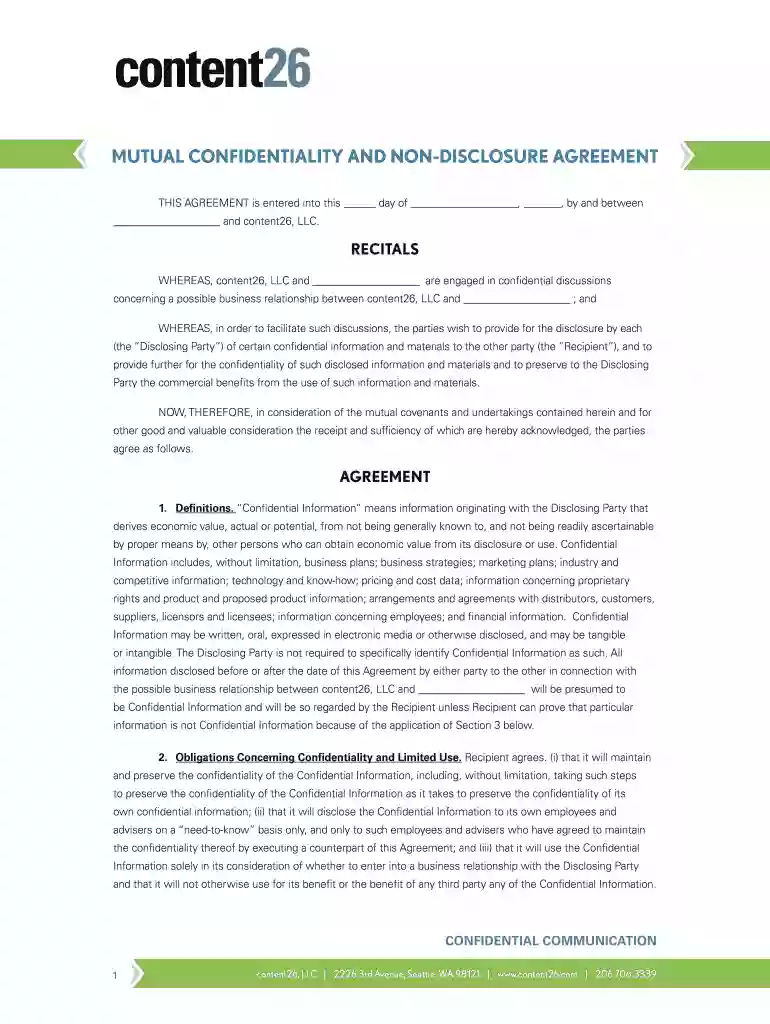
content26 mutual disclosure search Preview on Page 1

Here's how it works

01. Edit your form online
Type text, add images, blackout confidential details, add comments, highlights and more.

02. Sign it in a few clicks
Draw your signature, type it, upload its image, or use your mobile device as a signature pad.

03. Share your form with others
Send it via email, link, or fax. You can also download it, export it or print it out.

How to use or fill out content26 mutual disclosure search with our platform

Form edit decoration
9.5
Ease of Setup
DocHub User Ratings on G2
9.0
Ease of Use
DocHub User Ratings on G2
  1. Click ‘Get Form’ to open the content26 mutual disclosure search in the editor.
  2. Begin by filling in the date at the top of the form. This is essential for establishing when the agreement takes effect.
  3. Next, enter the name of the other party involved in the agreement alongside content26, LLC. Ensure accuracy to avoid any legal complications.
  4. Proceed to review and understand each section of the agreement, particularly focusing on definitions and obligations concerning confidentiality.
  5. Fill out your name and title in the designated areas at the end of the document, ensuring that all parties sign where indicated.
  6. Finally, save your completed document. You can easily export it or share it directly from our platform for further processing.

Start using our platform today to streamline your document editing and signing process for free!

be ready to get more

Complete this form in 5 minutes or less

Get form

Got questions?

We have answers to the most popular questions from our customers. If you can't find an answer to your question, please contact us.
Contact us

With DocHub, it’s quite simple. The editor offers users an add-on called DocHub for Gmail, which you can find in the Google Workspace Marketplace free of charge. Set it up and grant it access to your Google account. Open your email with your content26 mutual disclosure search attached and click on the add-on button in the right-side panel. Log in to your DocHub account, and import the file to our editor, where you can fill it out and sign.

You can easily edit and complete your content26 mutual disclosure search on any iOS device. Open an internet browser of your choice, go to the DocHub website, authorize or create a new account, add your file for editing, and make your required alterations. Our service is mobile-friendly, so utilizing its features on your phone will be a no-brainer, even on the first try.

A bilateral NDA (sometimes referred to as a mutual NDA, MNDA, or a two-way NDA) involves two parties where both parties anticipate disclosing information to one another that each intends to protect from further disclosure.
A CDA is a legally binding contract that requires a high level of proactive secrecy. CDAs are often used when entering into a professional business relationship where sensitive information must be shared with a number of parties, but kept out of the public eye.
A mutual confidentiality agreement (also known as a non-disclosure agreement or NDA) where both parties will be disclosing confidential information to each other for general commercial purposes.

Security and compliance

At DocHub, your data security is our priority. We follow HIPAA, SOC2, GDPR, and other standards, so you can work on your documents with confidence.

Learn more
ccpa2
pci-dss
gdpr-compliance
hipaa
soc-compliance

People also ask

Mutual NDAs are commonly titled as such, while one-way NDAs rarely state that they are one-way. You may need to read the language of the NDA carefully to determine if it is only protecting one partys confidential information. 2. If youve been provided with a one-way NDA, consider asking for a mutual NDA.

Related links