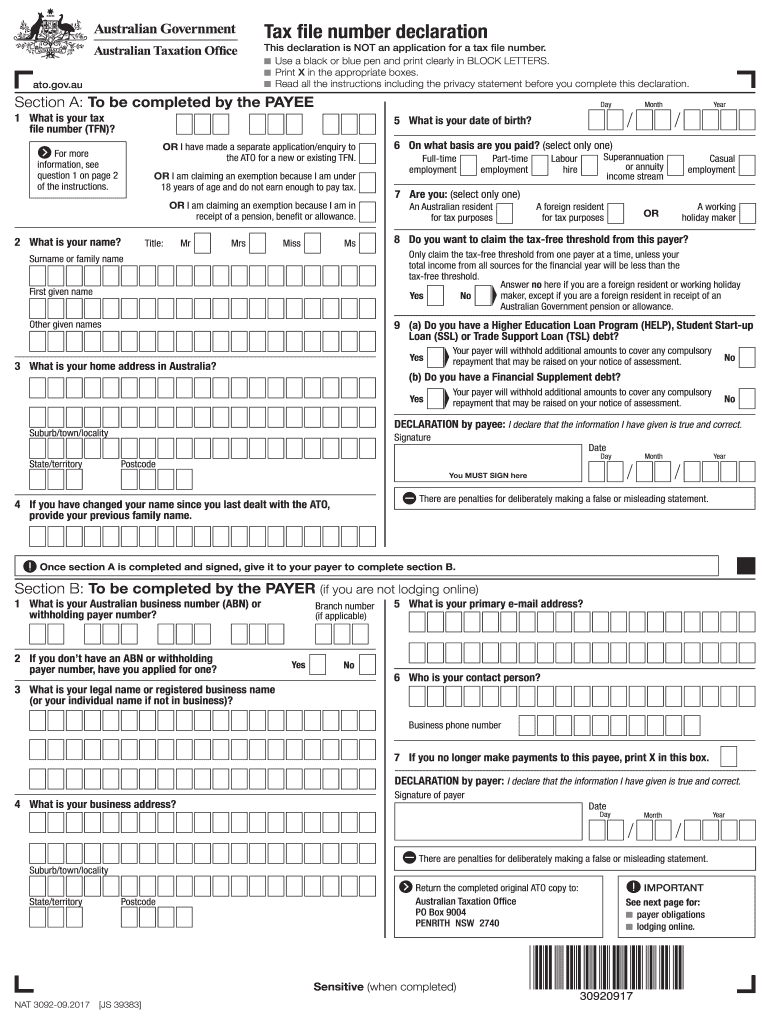







Definition and Importance of the Tax File Declaration Form
The tax file declaration form, often referred to as the TFN declaration form, serves a crucial role in tax administration. It is primarily used to declare an individual's Tax File Number (TFN) to their employer or payer, ensuring the correct amount of tax is withheld from earnings or payments. This form is essential for compliance with tax obligations and can affect the amount of tax withheld based on residency status and other financial considerations.
Accurate completion of the tax file declaration form is vital because it helps prevent over-withholding or under-withholding of taxes. Over-withholding can result in a significant tax refund at the end of the financial year, while under-withholding may lead to tax liabilities and potential penalties. Therefore, understanding and using this form correctly is critical for maintaining financial health.
Key Components of the Tax File Declaration Form
- Personal Information: Includes name, address, and TFN, which must be accurate to ensure proper tax processing.
- Residency Status: This section helps determine the applicable tax rates based on whether the individual is an Australian resident for tax purposes.
- Exemptions: Some individuals may qualify for tax exemptions or specific withholding rates, which must be declared correctly on the form.
- Signature: The form must be signed by the taxpayer, indicating that the information provided is true and correct.
Steps to Complete the Tax File Declaration Form
Completing the tax file declaration form is straightforward. However, careful attention must be given to ensure accuracy. Below are the steps to effectively fill out the form.
-
Gather Required Information: Start by collecting necessary details, including your TFN, full name, address, and information about your employment or payments.
-
Fill in Personal Information: Accurately enter your name and address, ensuring these details match official identification documents to prevent processing delays.
-
Declare Residency Status: Choose the appropriate residency status (resident, non-resident) to dictate the withholding tax level.
-
Indicate Exemptions: If applicable, specify any exemptions you are claiming to ensure correct withholding rates.
-
Review and Sign the Form: Double-check all entered information for accuracy before signing. Your signature confirms that the information is correct and that you understand the implications of your declarations.
-
Submit the Form: Depending on your employer or payer’s preferences, submit the form either online, via email, or in person.
Common Mistakes to Avoid
- Incorrect TFN: Double-check your TFN to ensure it is accurate, as errors can lead to significant issues with the tax office.
- Wrong Residency Status: Misclassifying your residency status can result in incorrect tax withholding.
- Omitting Required Fields: Ensure all mandatory fields are completed to avoid processing delays or rejections.
How to Obtain the Tax File Declaration Form
There are several methods to access the tax file declaration form. Each method provides a reliable way to ensure you have the most current version necessary for submission.
- Online Download: The form is typically available in PDF format directly through the official tax administration websites. Look for the ‘tax file declaration form’ or 'TFN declaration form PDF' link.
- Through Employers: Many employers provide the form as part of the hiring process or payroll setup. Request a copy if you do not receive one.
- Tax Preparation Software: If using software like TurboTax or similar, the tax file declaration form is often integrated into the program, allowing for seamless completion and submission.
- Local Tax Offices: Physical forms can also be obtained from local tax offices or via appointment.
Accessibility Features
- Fillable PDF: Many versions of the form are fillable PDFs, allowing taxpayers to input information digitally before printing.
- Mobile Access: Certain tax administration websites may offer mobile-friendly versions for easy access on smartphones.
Who Typically Uses the Tax File Declaration Form
The tax file declaration form is primarily utilized by various individuals within the workforce. Understanding the range of users can help in recognizing its significance.
- Employees: All new employees must fill out this form to ensure correct tax withholding based on their TFN.
- Self-Employed Individuals: Freelancers and contractors often use the form when establishing payment arrangements with their clients.
- Students: Part-time workers or internships frequently require completion of the form for correct tax management.
- Pension Recipients: Individuals receiving pensions or government benefits may need to declare TFN for proper taxation.


Special Scenarios
- Multiple Jobs: Individuals with more than one job must submit the tax file declaration form to each employer to ensure accurate tax withholding.
- Changes in Personal Status: If your residency status, exemption eligibility, or personal information changes, you must complete a new form.
Legal Use of the Tax File Declaration Form
The tax file declaration form is a legal document recognized by tax authorities. Understanding its legal implications is essential.
- Requirement Under Tax Regulations: Completing this form is mandated under various tax laws, ensuring compliance with local revenue collection policies.
- Audit Trails: Properly executed forms create an audit trail that is beneficial during tax assessments or disputes. This documentation can substantiate claims made in case of inquiries from the IRS or other authorities.
- Potential Penalties: Failing to complete or accurately submit the form can lead to penalties, including adjustments for under-withholding, fines, or back taxes owed.
Compliance and Record-Keeping
- Maintaining Copies: Taxpayers should keep copies of their completed forms for at least five years in case of future inquiries or audits.
- Updates on Regulations: Stay informed regarding changes to tax regulations that may affect how the form is used or the requirements involved in its completion.
Examples of Using the Tax File Declaration Form
Practical examples can clarify how the tax file declaration form is used in real-world situations. These scenarios can help in understanding the form's function and importance.
-
A New Employee: John starts a new job and completes the tax file declaration form during onboarding. This ensures his employer withholds the correct tax amount based on his residency status and exemption eligibility.
-
Freelancer: Sarah, a freelance graphic designer, provides her TFN declaration form to a client to ensure that appropriate tax rates are withheld from payment, aligning with her reporting obligations as a self-employed individual.
-
Student Worker: Michael works part-time at a university and fills out the form upon hiring. This process allows the university to comply with tax regulations as they withhold taxes from his paycheck.
Real-World Relevance
Understanding these examples underlines the diversity of scenarios wherein the tax file declaration form is relevant, highlighting its importance across various sectors and employment types.
IRS Guidelines and Filing Deadlines
Taxpayers must be aware of IRS guidelines regarding the tax file declaration form and any filing deadlines.
-
IRS Requirements: The IRS requires the form to be submitted for any employment that leads to taxable payments. It serves as a basis for the tax withholdings that will be reported annually.
-
Filing Deadlines: While the filing of the form itself does not usually have a distinct deadline, it is essential to submit it at the beginning of your employment or as soon as the employment status changes to ensure proper withholding for the fiscal year.
End-of-Year Considerations
- Review Tax Statements: At the end of the fiscal year, employees should review their W-2 forms to ensure the withheld amounts align with the information provided in the tax file declaration form, thereby preventing surprises during tax season.