




Here's how it works



How to use or fill out temperature control log sheet with our platform

- Click ‘Get Form’ to open the temperature control log sheet in the editor.
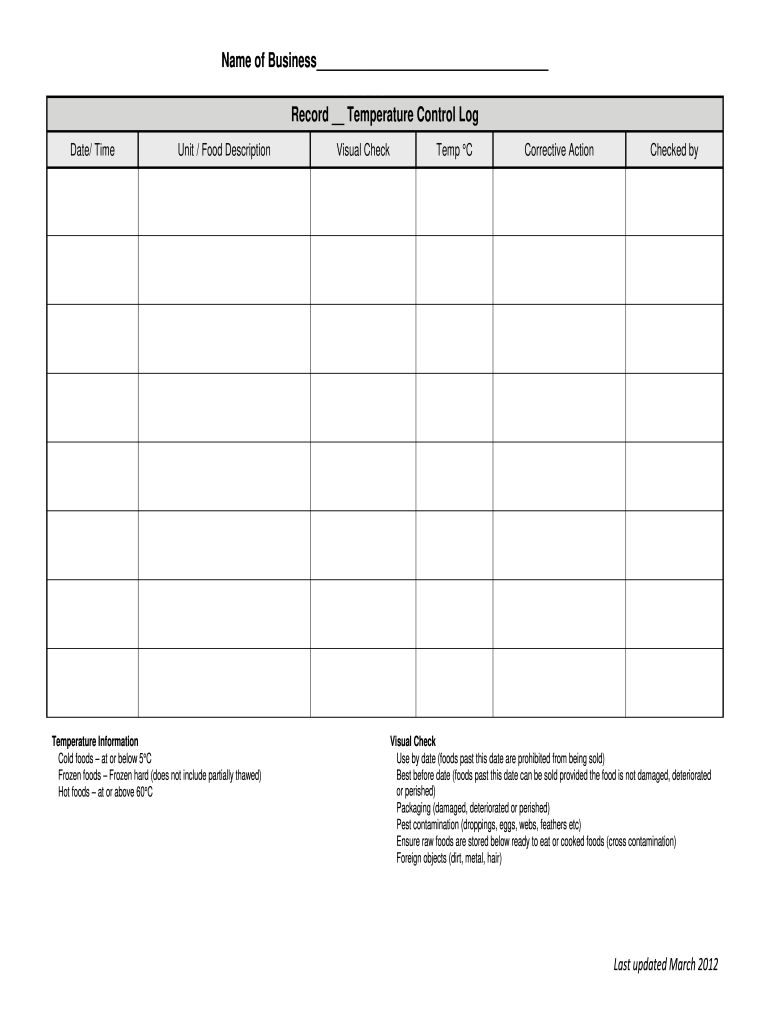
- Begin by entering your business name at the top of the form. This identifies your records clearly.
- In the 'Date/Time' section, input the relevant date and time for each temperature check. This is crucial for tracking compliance.
- Fill in the 'Unit/Food Description' field with details about the food items being monitored, ensuring clarity on what is being logged.
- Record temperatures in the 'Temperature Information' section, making sure cold foods are at or below 5°C and hot foods are at or above 60°C.
- Use the 'Visual Check' area to note any observations regarding food safety, such as packaging condition and pest contamination.
- Complete the 'Corrective Action' field if any issues arise during checks, documenting actions taken to ensure food safety.
Start using our platform today to streamline your temperature logging process for free!
It's free
See more temperature control log sheet versions
| Versions | Form popularity | Fillable & printable |
|---|---|---|
| 2012 | 4.8 Satisfied (121 Votes) |
Got questions?
How do I sign my refrigerator temperature log sheet pdf free of charge?
Most eSignature solutions require users to have a paid subscription. With DocHub, there are two options for you to create an electronic signature to your refrigerator temperature log sheet pdf free of charge:
- You can do it during a 7-day trial period;
- You can sign up for a free plan.
The second option, though, has restrictions on the number of signatures, sign requests, emails, and forms for adjusting available per month. You can check for full information here.
Do I need to install software to modify my body temperature log sheet pdf?
When you edit your body temperature log sheet pdf with DocHub, you merely require a steady web connection and virtually any browser installed on your device. No need to install any third-party applications or study tutorials. Just open a tab with DocHub, drag and drop your file, and edit it immediately.
What is the purpose of a temperature log?
How long a temperature log is kept when tracking data?
How often should the temperature log be completed?
Security and compliance
At DocHub, your data security is our priority. We follow HIPAA, SOC2, GDPR, and other standards, so you can work on your documents with confidence.
Learn more


