




Here's how it works



How to use or fill out dna base pairing worksheet with our platform

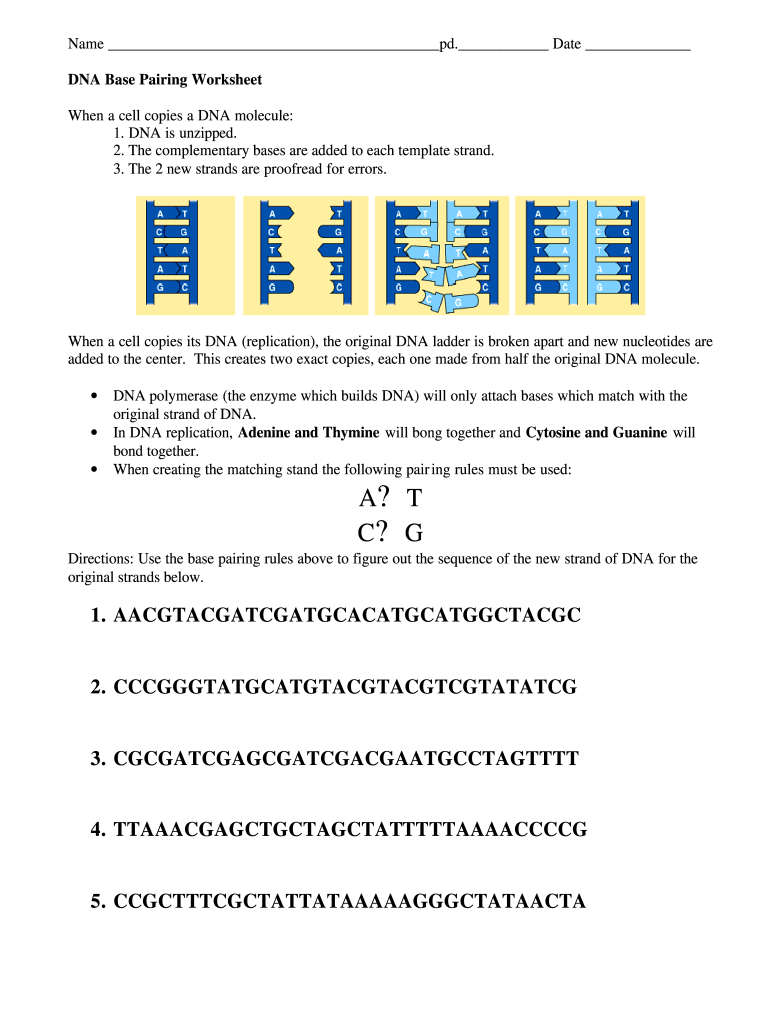
- Click ‘Get Form’ to open the DNA Base Pairing Worksheet in the editor.
- Begin by entering your name and date at the top of the worksheet. This personalizes your document and helps keep track of submissions.
- Review the instructions provided on the worksheet. Familiarize yourself with the base pairing rules: Adenine pairs with Thymine, and Cytosine pairs with Guanine.
- For each original DNA strand listed, use the base pairing rules to determine the complementary sequence. Click on each line to type in your answers directly.
- Once you have filled in all sequences, double-check your work for accuracy. Utilize our platform's editing tools to make any necessary adjustments easily.
Start using our platform today for free to complete your DNA Base Pairing Worksheet effortlessly!
It's free
Got questions?
How can I sign my dna base pairing worksheet pdf without printing?
Electronic signatures are a perfect alternative to traditional signing, as they save time, effort, and costs people spend on printing, scanning, and paper delivery. You can eSign your dna base pairing worksheet pdf utilizing a trustworthy and powerful online document processing tool like DocHub. It complies with primary eSignature regulations (ESIGN and UETA), so all forms approved there are legally binding and have the same validity as physically signed ones.
How do you edit base pairing rules online?
With DocHub, you have several convenient methods to edit your base pairing rules online. You can drag and drop the form and modify it directly at the DocHub site or use our browser extension to fill out your form immediately. On top of that, you can modify your PDF on your smartphone, as DocHub works with all the accessible mobile platforms.
What is the base pairing of DNA?
How do you find the base sequence of DNA?
What is the complementary bases of DNA?
Security and compliance
At DocHub, your data security is our priority. We follow HIPAA, SOC2, GDPR, and other standards, so you can work on your documents with confidence.
Learn more


