




Here's how it works



How to use or fill out Student Incident Report Form - Ceo Leadership Academy - ceoleadershipacademy with our platform

- Click ‘Get Form’ to open the Student Incident Report Form in the editor.
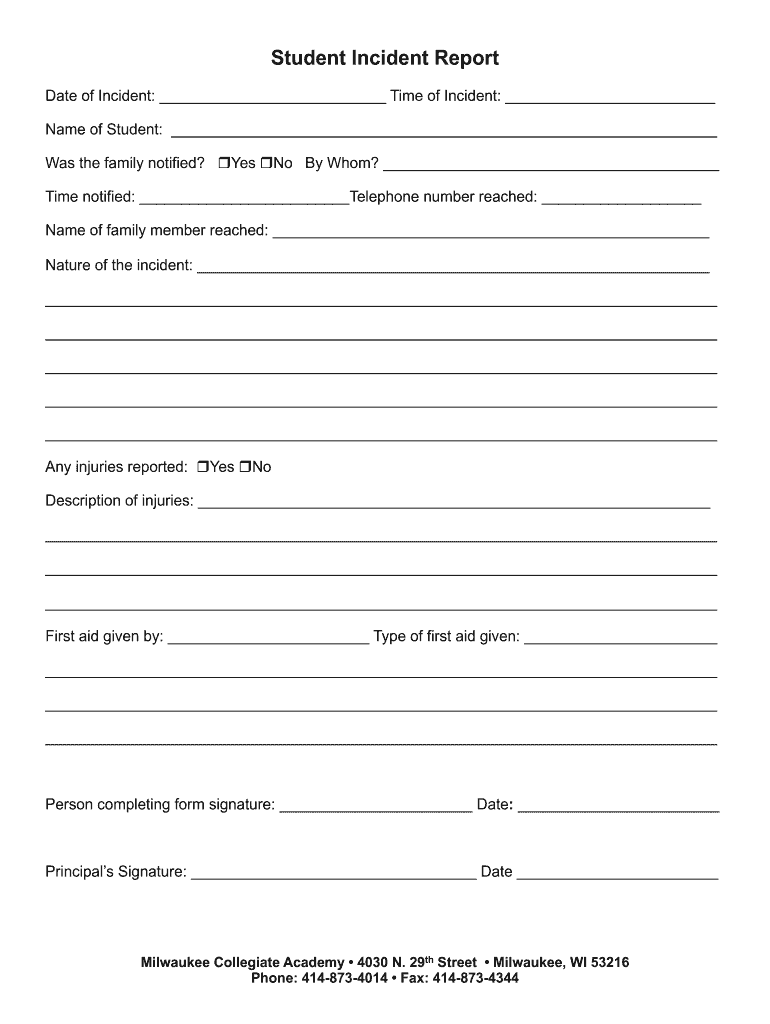
- Begin by entering the 'Date of Incident' and 'Time of Incident' in the designated fields. This information is crucial for accurate record-keeping.
- Fill in the 'Name of Student' section with the full name of the student involved in the incident.
- Indicate whether the family was notified by selecting 'Yes' or 'No'. If yes, provide details such as who notified them and at what time.
- Describe the nature of the incident in detail. Use clear and concise language to ensure all relevant information is captured.
- If there were any injuries reported, check 'Yes' or 'No', and if applicable, describe the injuries and any first aid given.
- Complete the form by signing it in the designated area for both the person completing it and the principal, along with their respective dates.
Start using our platform today to easily fill out your Student Incident Report Form for free!
It's free
See more Student Incident Report Form - Ceo Leadership Academy - ceoleadershipacademy versions
| Versions | Form popularity | Fillable & printable |
|---|---|---|
| 2013 | 4.6 Satisfied (45 Votes) |
Got questions?
Can I type my electronic signature on my Student Incident Report Form - Ceo Leadership Academy - ceoleadershipacademy?
Sure, a typed name is recognized as a valid electronic signature when you create it on your document utilizing a compliant solution like DocHub. Simply upload your Student Incident Report Form - Ceo Leadership Academy - ceoleadershipacademy to our editor, click Sign in the top tool pane → Create your signature → Type your name in the appropriate tab, and select how it will appear on your document.
How do you complete Student Incident Report Form - Ceo Leadership Academy - ceoleadershipacademy on iOS?
You need only an internet connection and a browser to complete your Student Incident Report Form - Ceo Leadership Academy - ceoleadershipacademy by using an iOS phone. Open the DocHub website and authenticate. Then, add your document or select it from the list in your dashboard. Then use our editing instruments to complete your form and preserve all your modifications. You may also send it to a dedicated recipient immediately.
Security and compliance
At DocHub, your data security is our priority. We follow HIPAA, SOC2, GDPR, and other standards, so you can work on your documents with confidence.
Learn more


