Team Contract - George Brown College 2026

Get Form
group contract sample Preview on Page 1

Here's how it works

01. Edit your group contract sample online
Type text, add images, blackout confidential details, add comments, highlights and more.
02. Sign it in a few clicks
Draw your signature, type it, upload its image, or use your mobile device as a signature pad.
03. Share your form with others
Send group contract template via email, link, or fax. You can also download it, export it or print it out.

How to use or fill out Team Contract - George Brown College with our platform

Form edit decoration
9.5
Ease of Setup
DocHub User Ratings on G2
9.0
Ease of Use
DocHub User Ratings on G2
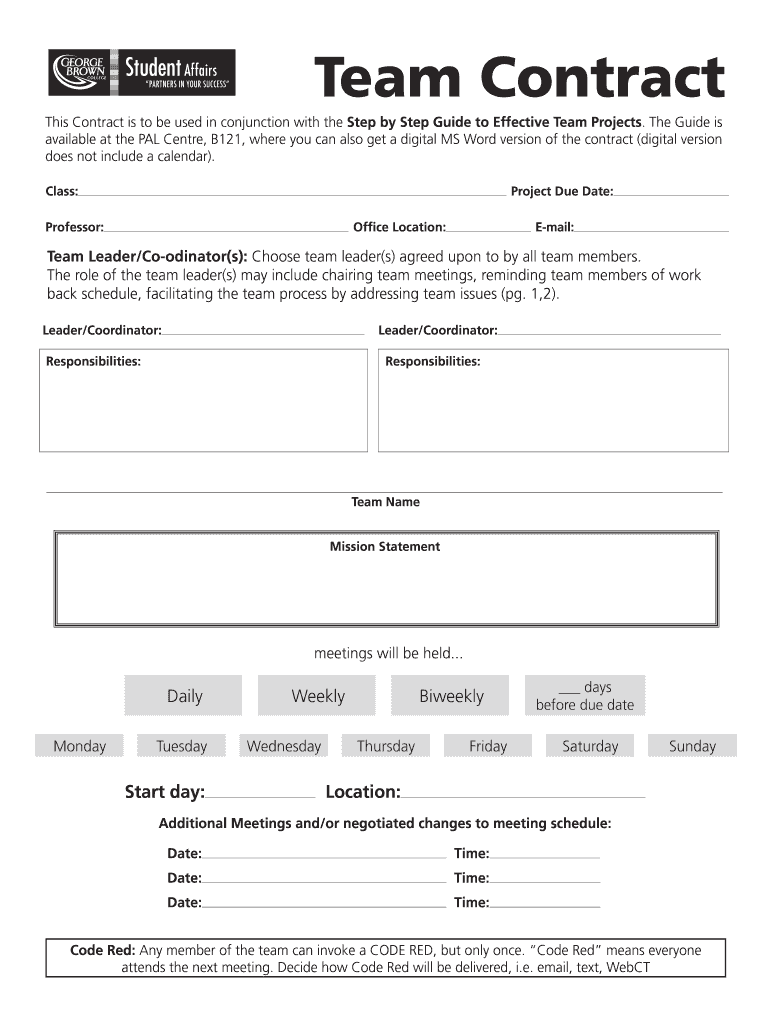
  1. Click ‘Get Form’ to open the Team Contract in the editor.
  2. Begin by filling in the 'Class', 'Project Due Date', and 'Professor' fields at the top of the form. This sets the context for your contract.
  3. Designate your Team Leader/Coordinator(s) by entering their names in the provided fields. Ensure all team members agree on this choice.
  4. Outline responsibilities for each leader/coordinator to clarify roles within your team.
  5. Complete the 'Team Name' and 'Mission Statement' sections, which define your team's identity and purpose.
  6. Schedule meetings by selecting days and times that work for everyone. Use the additional meeting section for any changes.
  7. Discuss and document team expectations, decision-making processes, and conflict resolution strategies as outlined in the guide.
  8. Fill out the Work Schedule section with goals, tasks, deadlines, and individual responsibilities to ensure accountability.
  9. Finally, gather signatures from all team members to confirm agreement on the contract's terms.

Start using our platform today to streamline your Team Contract process for free!

See more Team Contract - George Brown College versions

We've got more versions of the Team Contract - George Brown College form. Select the right Team Contract - George Brown College version from the list and start editing it straight away!
Versions Form popularity Fillable & printable
2016 4.7 Satisfied (65 Votes)
2013 4 Satisfied (36 Votes)
be ready to get more

Complete this form in 5 minutes or less

Get form

Got questions?

We have answers to the most popular questions from our customers. If you can't find an answer to your question, please contact us.
Contact us
A team contract is a formal document that sets clear expectations, roles, responsibilities, and operational norms within a team to guide collaboration, communication, decision-making, and overall conduct.
Benefits of establishing a team agreement It provides clarity of purpose. A clearly stated goal and steps to its achievement give team members a sense of focus, keeping them motivated. It creates team alignment. It increases accountability. It helps mitigate conflicts. It strengthens relationships in a team.
A team contract is a set of basic principles and standards for working together in order to create a supportive and productive team environment. Often it is referred to as a set of ground rules.
The Team Contract and Code of Conduct are documents that specify the overall team purpose, the responsibilities of each team member, and the norms or ground rules that each team member agrees to follow.
A team contract outlines the standards that are expected to be met by all team members. It is agreed to at a team meeting and signed by all members. The idea behind it is to encourage a collaborative and supportive environment amongst the team, as well as to clearly set out individual responsibilities.

Security and compliance

At DocHub, your data security is our priority. We follow HIPAA, SOC2, GDPR, and other standards, so you can work on your documents with confidence.

Learn more
ccpa2
pci-dss
gdpr-compliance
hipaa
soc-compliance