Type text, add images, blackout confidential details, add comments, highlights and more.
02. Sign it in a few clicks
Draw your signature, type it, upload its image, or use your mobile device as a signature pad.
03. Share your form with others
Send classification of stem cell via email, link, or fax. You can also download it, export it or print it out.
How to use or fill out concept map about stem cell classification with our platform
Ease of Setup
DocHub User Ratings on G2
Ease of Use
DocHub User Ratings on G2
Click ‘Get Form’ to open it in the editor.
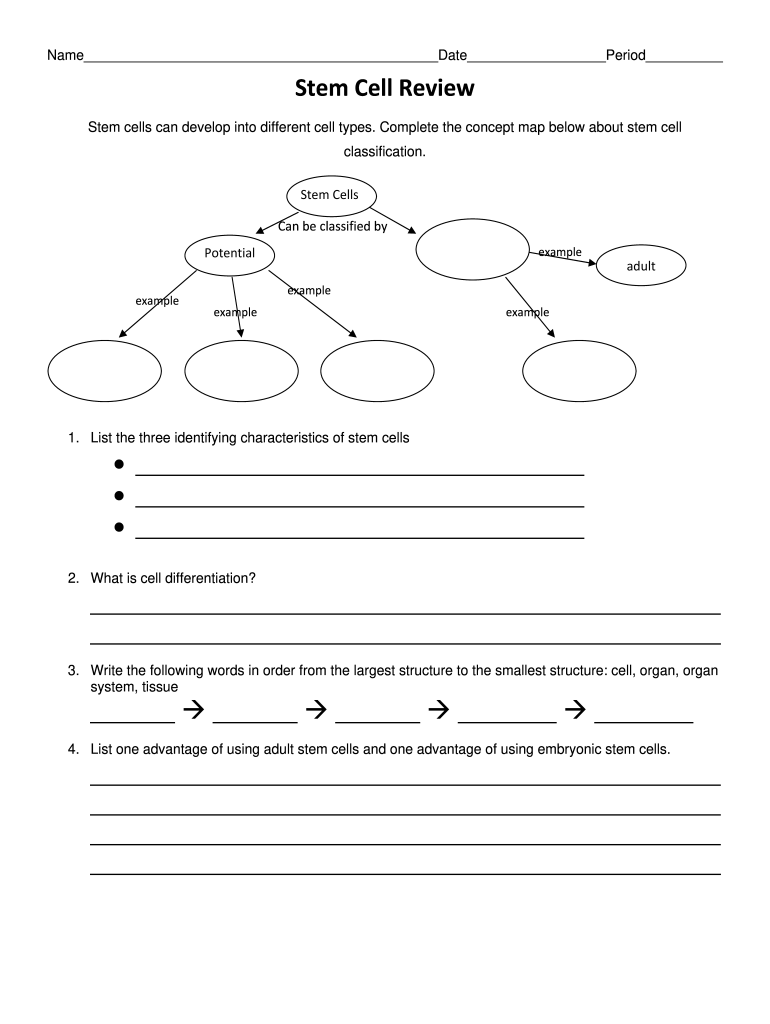
Begin by filling in your name, date, and period at the top of the form. This personalizes your document and helps keep track of submissions.
In the 'Stem Cells' section, identify how stem cells can be classified. Use the provided fields to list examples for each classification type.
For the identifying characteristics of stem cells, write down three key traits in the designated lines. This will help reinforce your understanding of stem cell properties.
Answer the question about cell differentiation in the space provided. This is crucial for grasping how stem cells function.
Complete the ordering task by arranging 'cell', 'organ', 'organ system', and 'tissue' from largest to smallest structure in the appropriate fields.
Finally, list one advantage of using adult stem cells and one for embryonic stem cells in their respective sections to conclude your concept map.
Start editing your concept map today for free and enhance your learning experience!
Fill out concept map about stem cell classification online It's free
We will examine how these diagrams clarify concepts such as pluripotency, multipotency, and lineage commitment, offering a robust understanding for students andRead more
Module map of stem cell genes guides creation of epithelial
by DJ Wong 2008 Cited by 851 Here we construct a gene module map to systematically relate transcriptional programs in embryonic stem cells (ESCs), adult tissue stem cells, and humanRead more
The Parsons Corporation (Parsons) prepared this Principles and Practices document under contract to the Air Force Center for Environmental Excellence (AFCEERead more
Cookie consent notice
This site uses cookies to enhance site navigation and personalize your experience.
By using this site you agree to our use of cookies as described in our Privacy Notice.
You can modify your selections by visiting our Cookie and Advertising Notice.