Reba worksheet excel 2026

Get Form
reba assessment worksheet excel Preview on Page 1

Here's how it works

01. Edit your reba assessment worksheet excel online
Type text, add images, blackout confidential details, add comments, highlights and more.

02. Sign it in a few clicks
Draw your signature, type it, upload its image, or use your mobile device as a signature pad.

03. Share your form with others
Send reba worksheet excel via email, link, or fax. You can also download it, export it or print it out.

Definition and Importance of the REBA Worksheet Excel

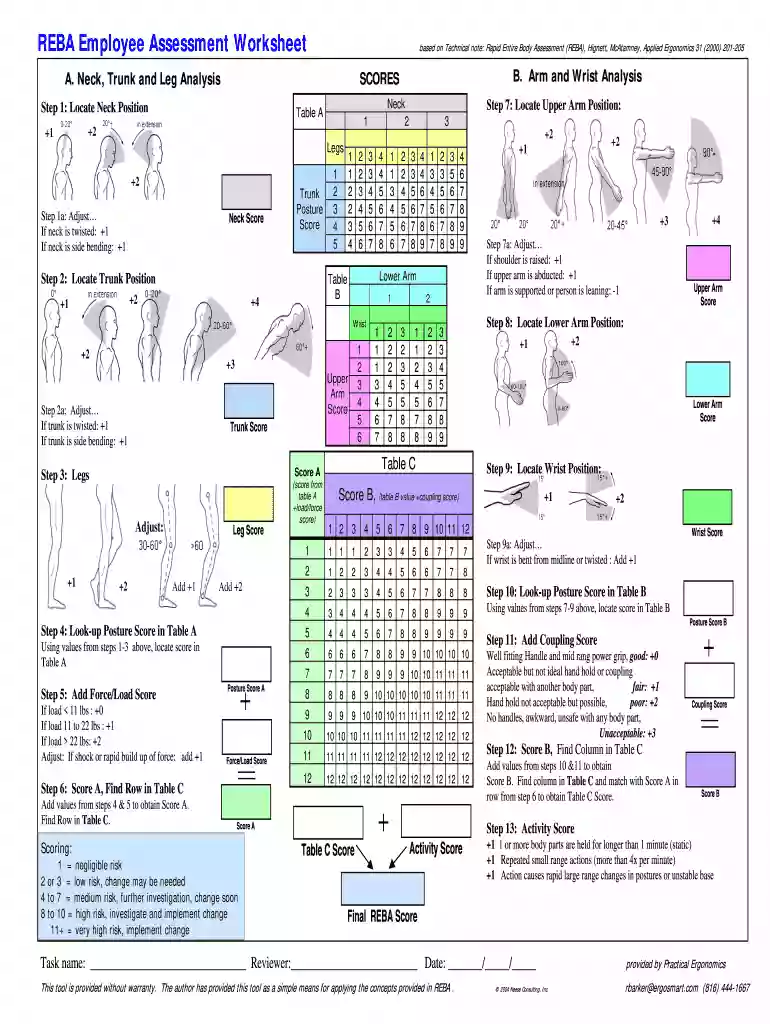
The REBA Worksheet Excel serves as a specialized tool for assessing ergonomic risks in the workplace through a scoring system based on the Rapid Entire Body Assessment (REBA) methodology. This worksheet evaluates the positions of the neck, trunk, arms, wrists, and legs to effectively gauge the risk level associated with specific work tasks. By analyzing these factors, business owners and safety personnel can identify ergonomic hazards and implement necessary improvements to enhance workplace safety and employee wellbeing.

Utilizing the REBA worksheet is vital because it helps organizations recognize areas that may require intervention, reducing the likelihood of workplace injuries that can arise from poor ergonomic practices. Comprehensive assessments can lead to enhanced productivity, reduced workers' compensation costs, and improved employee satisfaction.

How to Use the REBA Worksheet Excel

Using the REBA Worksheet Excel involves a systematic process to ensure accurate assessment of ergonomic risks. Here is a structured step-by-step guide to effectively use the worksheet:

  1. Input Data: Begin by entering relevant data about the work task into the designated fields on the REBA worksheet. This may include descriptions of postures, forces exerted, and types of movements performed.
  2. Evaluate Posture: Assess specific body positions for each component, such as neck, trunk, and limbs. Refer to the scoring criteria provided within the worksheet to assign the appropriate scores based on the observed postures.
  3. Calculate Final Score: After inputting posture and force/load scores, use the built-in formula in Excel to calculate the total REBA score. This score determines the level of risk: negligible, low, medium, high, or very high.
  4. Identify Improvement Areas: Review the calculated score and compare it against REBA benchmarks. Highlight areas that necessitate ergonomic interventions, such as repositioning workstations or providing ergonomic equipment.
  5. Document Findings: Save or print the completed worksheet to maintain records of assessments, which can be useful for compliance reviews or safety audits.

This structured approach optimizes the efficiency of ergonomic assessments and ensures comprehensive tracking of workplace risks.

Steps to Complete the REBA Worksheet Excel

Completing the REBA Worksheet Excel requires careful consideration of several key steps:

  1. Prepare the Environment: Ensure that you have access to the right resources, including a completed task analysis and awareness of specific job functions that need assessment.
  2. Understand the Methodology: Familiarize yourself with the REBA scoring model, which is broken down into various categories. This knowledge is critical for accurate scoring.
  3. Collect Necessary Data: Gather information about the specific tasks being performed, including employee feedback and observational data on movements and postures.
  4. Fill Out the Worksheet: Methodically fill in each section of the REBA worksheet, noting down observations for postures, angles, and loads as per the provided guidelines.
  5. Review and Validate Scoring: Cross-verify the final score with colleagues or safety personnel to ensure accuracy. This collaborative approach can help catch any potential errors.

By following these steps, organizations can systematically evaluate ergonomic risks and make informed decisions to enhance their working environments.

Important Terms Related to the REBA Worksheet Excel

Understanding key ergonomic terms associated with the REBA Worksheet Excel is essential for accurate assessments and communication. Here are some important terms:

  • Posture: Refers to the position of the body or specific body parts during work activity, crucial for determining ergonomic risks.
  • Ergonomic Risk: The potential for injury or discomfort due to poor workplace design or physical demands placed on workers.
  • REBA Score: The numerical value derived from the assessment that categorizes the level of risk as negligible to very high.
  • Task Analysis: A systematic examination of a task to identify the physical demands and requisite postures involved.
  • Interventions: Changes made to work processes, equipment, or environments aimed at improving ergonomics and reducing risks.

Grasping these definitions will enhance the clarity and effectiveness of using the REBA Worksheet Excel.

Examples of Using the REBA Worksheet Excel

Real-world application of the REBA Worksheet Excel can provide valuable insights into its effectiveness. Here are a few scenarios:

  • Office Environment: An organization may discover through the REBA assessment that prolonged computer use leads to high-risk scores due to awkward wrist positions. Interventions might include providing ergonomic keyboards and adjustable chairs.
  • Manufacturing Setting: In a factory, employees lifting heavy materials might show high risk due to improper lifting techniques. The REBA assessment can highlight the need for training and equipment, such as lift assistance devices.
  • Healthcare: A hospital staff might use the worksheet to assess the transfer of patients between beds and wheelchairs. The findings could lead to implementing training on proper lifting techniques, reducing the risk of injury for both staff and patients.

These examples illustrate the versatility of the REBA Worksheet Excel across various work settings, emphasizing its role in enhancing employee safety and health.

be ready to get more

Complete this form in 5 minutes or less

Get form

Got questions?

We have answers to the most popular questions from our customers. If you can't find an answer to your question, please contact us.
Contact us

You should use only reliable software solutions with strong data protection compliance to approve your paperwork electronically. DocHub is just the type of service you need! It stores data on Amazon Web Servers and complies with all essential security criteria and eSignature regulations, so it’s a trusted way to electronically sign your reba calculator excel or other paperwork using this tool.

If you store your paperwork in Google Drive, there is no need to download your reba calculator free on the computer and upload it back to our editor. A significantly simpler way is to install a browser extension developed by DocHub to streamline this flow. The extension allows editing PDFs in your web browser. Alternatively, you can integrate your DocHub and Gmail accounts for more efficient editing.

Score A is the sum of the Table A score and the Load / Force score. Score B is the sum of the Table B score and the Coupling score for each hand. Score C is read from Table C, by entering it with the Score A and the Score B. The REBA score is the sum of the Score C and the Activity score.
- Example: Score 1 for minimal extension, no twisting or side bending; Score 5 for docHub extension with twisting or lateral extension.
Score the Group A (Trunk, Neck and Legs) postures and the Group B (Upper Arms, Lower Arms, and Wrists) postures for left and right. For each region, there is a posture scoring scale plus adjustment notes for additional considerations. Then score the Load / Force and Coupling factors. Finally, score the Activity.

Security and compliance

At DocHub, your data security is our priority. We follow HIPAA, SOC2, GDPR, and other standards, so you can work on your documents with confidence.

Learn more
ccpa2
pci-dss
gdpr-compliance
hipaa
soc-compliance
be ready to get more

Complete this form in 5 minutes or less

Get form

People also ask

The REBA (Rapid Entire Body Assessment) method is an evaluation tool for postural risk assessment of the entire body. It helps quantify biomechanical risks, including uncomfortable postures, repetitive motions, and physical exertion.

reba excel