




01. Edit your st 12 wisconsin online
Type text, add images, blackout confidential details, add comments, highlights and more.

Type text, add images, blackout confidential details, add comments, highlights and more.

Draw your signature, type it, upload its image, or use your mobile device as a signature pad.

Send form st 12 via email, link, or fax. You can also download it, export it or print it out.

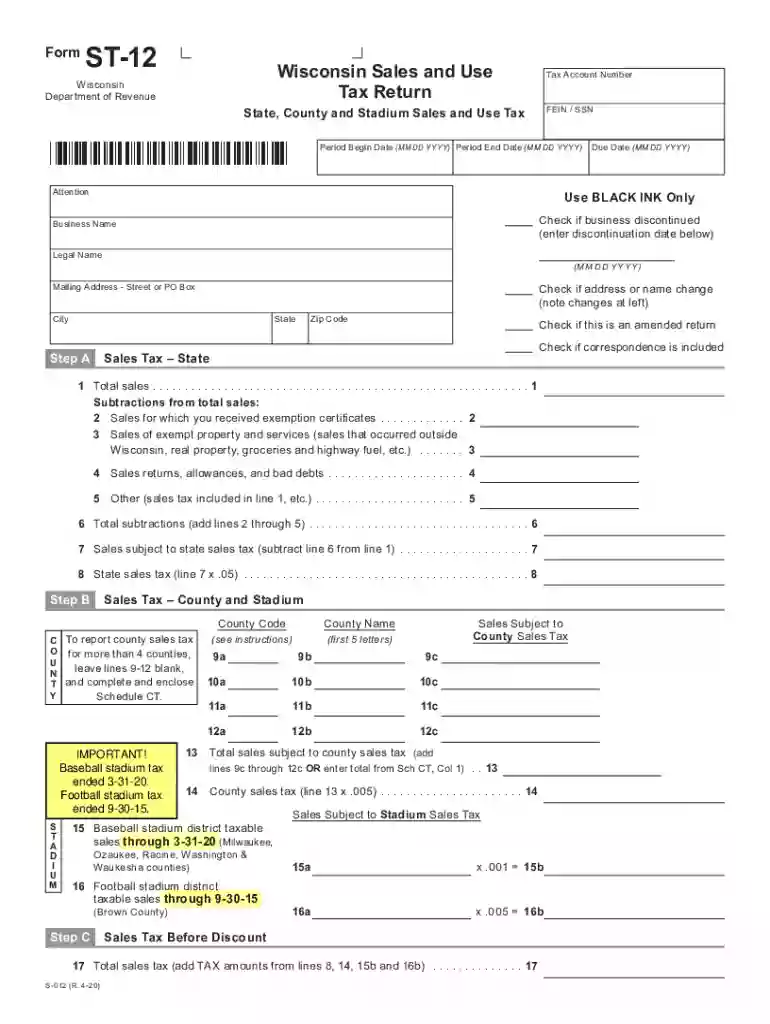
Start using our platform today to easily fill out your Wisconsin Form ST-12 for free!
We've got more versions of the st 12 wisconsin form. Select the right st 12 wisconsin version from the list and start editing it straight away!
Sure, and it’s really easy! DocHub is a web-based PDF editor with advanced document processing capabilities that allow you promptly adjust your paperwork, complete empty fields and drop new ones for others to fill out, and create eSignatures in several ways. Add your st 12 form, provide information as required, and select how you want to eSign your document - by typing your name, drawing your signature, uploading its picture, or using a QR code.
You may easily complete, modify, and even eSign your form st 12 wisconsin using DocHub. Create a new profile and begin your free trial. After that, you can add the file with the form and simply make all the required edits. No need to print on paper or use a third-party application to sign it, as you can place your electronic signature on your document faster via DocHub.
At DocHub, your data security is our priority. We follow HIPAA, SOC2, GDPR, and other standards, so you can work on your documents with confidence.
When filing its sales and use tax return, form ST-12, the tavern may deduct $521.33 of sales tax to arrive at taxable receipts of $9,478.67 ($10,000 1.055 =Read more
The second form of ozone oxidation reactions follows an indirect pathway and results in the production of the hydroxyl radical (OH) for contaminant oxidation.Read more
Date. Code. Code. No County Tax. No County Tax. No County Tax. No County Tax. Enter purchases on line 19, Page 2. Enter sales on line 10, Page 1. Form ST-12.Read more


