Bpi fatca form 2026

Get Form
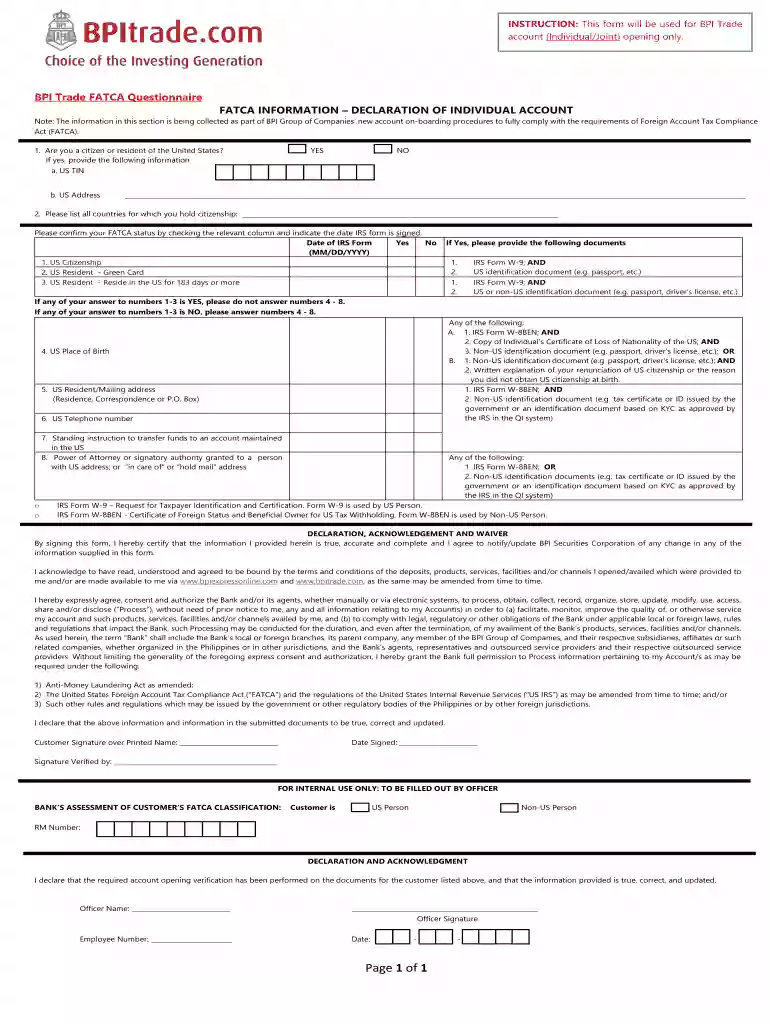
bpi fatca form Preview on Page 1

Here's how it works

01. Edit your bpi fatca form online
Type text, add images, blackout confidential details, add comments, highlights and more.

02. Sign it in a few clicks
Draw your signature, type it, upload its image, or use your mobile device as a signature pad.

03. Share your form with others
Send bpi fatca form download via email, link, or fax. You can also download it, export it or print it out.

How to use or fill out bpi fatca form with our platform

Form edit decoration
9.5
Ease of Setup
DocHub User Ratings on G2
9.0
Ease of Use
DocHub User Ratings on G2
  1. Click ‘Get Form’ to open the BPI FATCA Questionnaire in the editor.
  2. Begin by answering whether you are a citizen or resident of the United States. Select 'YES' or 'NO' and provide your US TIN and address if applicable.
  3. List all countries for which you hold citizenship in the designated field.
  4. Confirm your FATCA status by checking the relevant boxes for US Citizenship, Green Card holder, or US Resident. Indicate the date IRS form is signed.
  5. If applicable, upload required documents such as IRS Form W-9 or W-8BEN using our platform's document upload feature.
  6. Complete sections regarding your US place of birth, mailing address, telephone number, and any standing instructions related to fund transfers.
  7. Review all entered information for accuracy before signing the declaration at the end of the form.

Start filling out your BPI FATCA form online for free today!

be ready to get more

Complete this form in 5 minutes or less

Get form

Got questions?

We have answers to the most popular questions from our customers. If you can't find an answer to your question, please contact us.
Contact us
The consequences of being non-compliant may include the revocation of an entitys FATCA status and, ultimately, the entitys GIIN being removed from the FFI list.
Online Submission of FATCA Self-Certification Log-in to your NPS account (please visit .cra-nsdl.com) Click on sub menu FATCA Self-Certification under the main menu Transaction Submit the required details under FATCA/CRS Declaration Form Click on Submit
FATCA stands for the Foreign Account Tax Compliance Act. RBI has made FATCA declaration mandatory for all bank account holders in India. FATCA is a self-certification provided by the bank account holders about their tax residence for their compliance with FATCA.
FATCA requires U.S. citizens and residents to annually report foreign financial assets over $50,000 to the IRS to prevent tax evasion.
FATCA requires foreign financial institutions (FFIs) to report to the IRS information about financial accounts held by U.S. taxpayers, or by foreign entities in which U.S. taxpayers hold a substantial ownership interest.

Security and compliance

At DocHub, your data security is our priority. We follow HIPAA, SOC2, GDPR, and other standards, so you can work on your documents with confidence.

Learn more
ccpa2
pci-dss
gdpr-compliance
hipaa
soc-compliance

People also ask

The CRS FATCA Self-certification form will ask you to confirm the following: Your full name. Your date of birth. Your country, town/city of birth. Your citizenship. Your current residence, and if applicable, mailing address. Whether you are a US Person. Your country/countries of residence for tax purposes.
Not giving a FATCA declaration can have severe consequences for NRIs and PIOS. The Foreign Account Tax Compliance Act (FATCA) requires US taxpayers to report their foreign financial accounts and assets to the IRS. Failure to do so can result in hefty penalties, including massive fines.

fatcal