




01. Edit your sagicor connect online
Type text, add images, blackout confidential details, add comments, highlights and more.

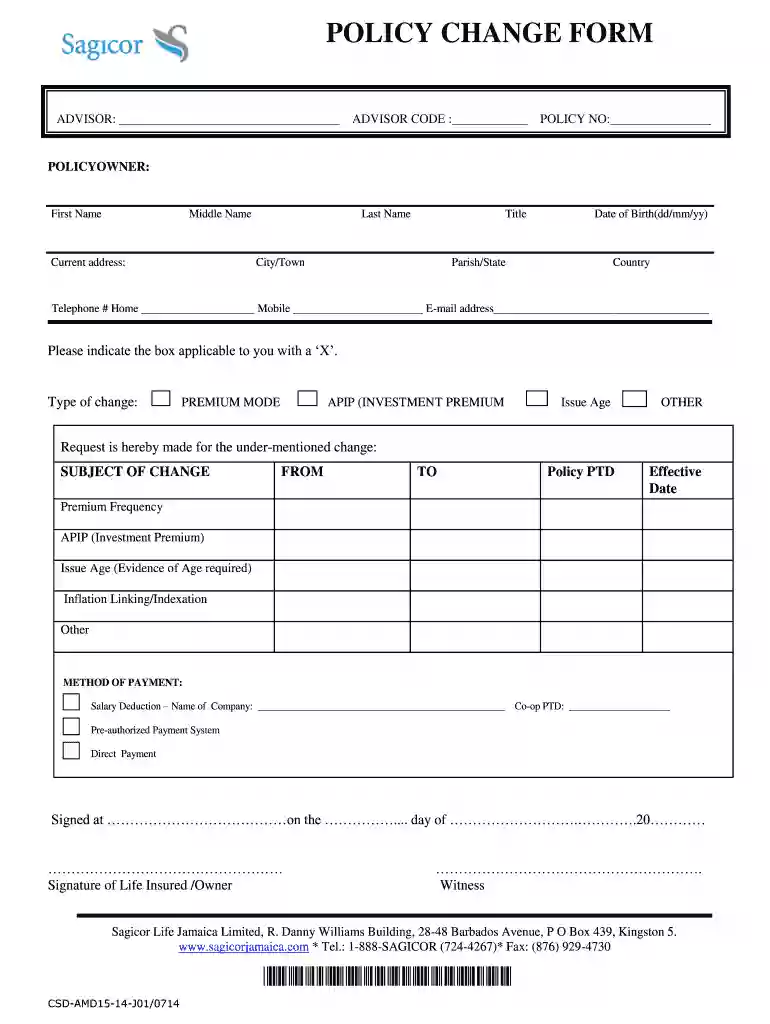
Type text, add images, blackout confidential details, add comments, highlights and more.

Draw your signature, type it, upload its image, or use your mobile device as a signature pad.

Send sagicor connect com proof of life via email, link, or fax. You can also download it, export it or print it out.
The Sagicor policy form is an official document used by policyholders of Sagicor Life Insurance to request changes, updates, or manage their insurance policies. It functions as a communication channel between the policyholder and the insurance provider, covering various aspects such as personal information, types of changes requested, available payment methods, and necessary signatures. Understanding the purpose and significance of this form is crucial for policy owners looking to modify their coverage or manage their policy effectively.
Proper use of the Sagicor policy form helps ensure that policy amendments are processed efficiently and accurately, protecting the interests of the policyholder.
Using the Sagicor policy form requires careful completion and submission through the designated channels. Here are the essential steps to follow:
After completing these steps, you can submit the form according to the specified submission methods, ensuring it reaches the appropriate department for processing.
Completing the Sagicor policy form involves several key steps, which help streamline the process. Here’s a detailed breakdown:
Step One: Download the Form
Step Two: Fill Out Personal Information
Step Three: Specify Changes Requested
Step Four: Sign the Form
Step Five: Submission
The clarity and completeness of the information presented on the form will help facilitate a smoother update process.
Understanding key terms associated with the Sagicor policy form is crucial for effective navigation. Some important terms include:
Familiarity with these terms will enhance your ability to manage your Sagicor policy and understand the implications of the changes you make.
The Sagicor policy form can be submitted through multiple channels, making it easier for policyholders to communicate their requests. Here are the available options:
Selecting the most convenient submission method is important for ensuring that your updates are processed timely and accurately.
The Sagicor policy form serves legally significant functions in managing your policy. Adhering to relevant legal considerations is necessary to maintain compliance and protect your rights. Key aspects include:
Understanding the legal weight of your submissions ensures that you are aware of the ramifications of your modifications and provides a layer of protection for your interests.
Practical examples can help clarify how the Sagicor policy form functions in real-world situations. Here are a few scenarios:
Changing Beneficiary Information: A policyholder recently experienced a life event such as a marriage or divorce. This may necessitate changes to their designated beneficiary. Completing the Sagicor policy form enables them to update this critical information legally.
Adjusting Coverage Amount: A policyholder may decide that their initial coverage amount is no longer sufficient due to changes in financial circumstances or dependents' needs. They utilize the policy form to request an increase in coverage.
Payment Method Change: If a policyholder wants to change their premium payment method from annual to monthly, filling out the Sagicor policy form allows for this adjustment to be recorded efficiently.
These examples demonstrate the versatility and importance of the Sagicor policy form in managing various aspects of insurance coverage.
We've got more versions of the sagicor connect form. Select the right sagicor connect version from the list and start editing it straight away!
| Versions | Form popularity | Fillable & printable |
|---|---|---|
| 2014 | 4.8 Satisfied (234 Votes) |
Most eSignature solutions require users to have a paid subscription. With DocHub, there are two options for you to add an electronic signature to your sagicor proof of life form online login free of charge:
The second option, however, has restrictions on the number of signatures, sign requests, emails, and documents for editing available per month. You can check for full details here.
It is a no-brainer on a computer or via a mobile device to complete a sagicor plus proof of life with DocHub. All you need to do is open any installed internet browser on your smartphone and proceed to the DocHub website. Once authenticated, add your document and open it in editing mode. Use our toolbar to make your edits and save changes. Optionally, keep your file in your files or send it to a recipient on the spot.
At DocHub, your data security is our priority. We follow HIPAA, SOC2, GDPR, and other standards, so you can work on your documents with confidence.
Apr 2, 2015 (a) Respondent is Sagicor Life Insurance Company, which maintains its home address at (including advertising materials), policy forms andRead more
The Sagicor CariCARE Medical Assistance Plan GB1000768 is a Comprehensive Major Medical Plan which assists students in the payment of medical expenses.Read more
Jan 4, 2021 DISTRIBUTION POLICY: The REIT expects to generate returns to Unitholders through both current income and long-term appreciation of its assetsRead more


