Tax commission expense 2017 form-2026

Get Form
commission expense Preview on Page 1

Here's how it works

01. Edit your commission expense online
Type text, add images, blackout confidential details, add comments, highlights and more.
02. Sign it in a few clicks
Draw your signature, type it, upload its image, or use your mobile device as a signature pad.
03. Share your form with others
Send it via email, link, or fax. You can also download it, export it or print it out.

How to use or fill out tax commission expense 2017 form with our platform

Form edit decoration
9.5
Ease of Setup
DocHub User Ratings on G2
9.0
Ease of Use
DocHub User Ratings on G2
  1. Click ‘Get Form’ to open the tax commission expense 2017 form in the editor.
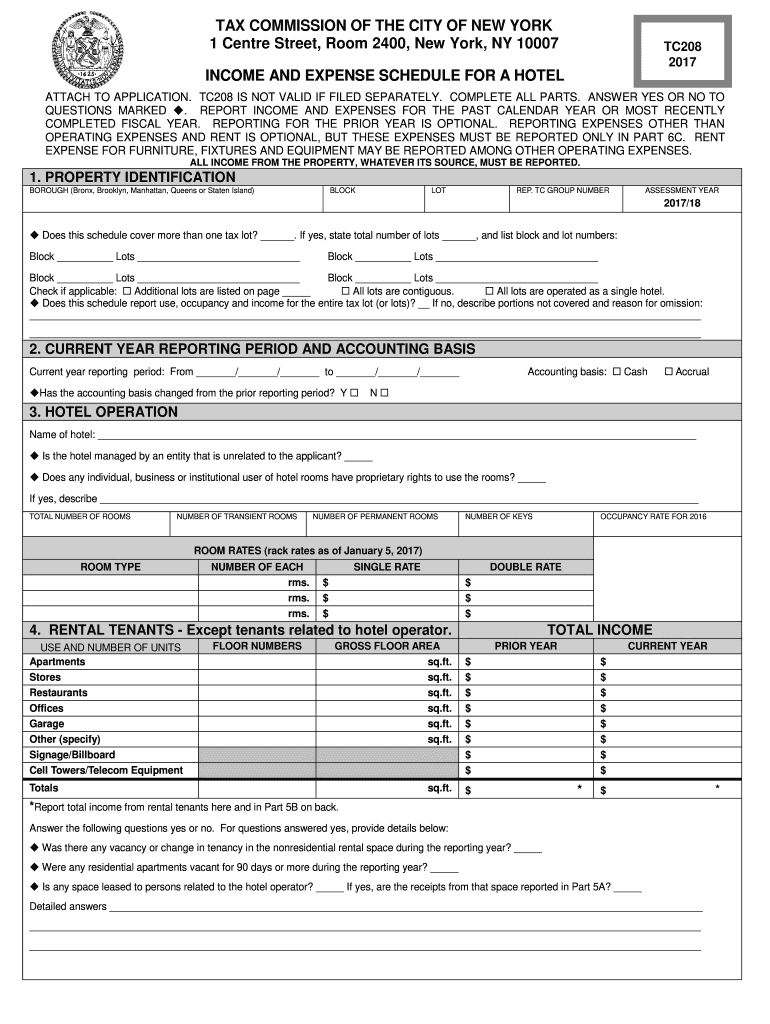
  2. Begin by filling out the 'Property Identification' section. Enter the borough, block, lot, and assessment year. If applicable, indicate if this schedule covers multiple tax lots and provide details.
  3. In the 'Current Year Reporting Period and Accounting Basis' section, select your accounting basis (Cash or Accrual) and specify the reporting period dates.
  4. Complete the 'Hotel Operation' section by entering your hotel name, occupancy details, and room rates. Answer any questions regarding management and proprietary rights.
  5. Fill in the 'Rental Tenants' section with information about non-hotel tenants. Report total income from these tenants in the designated fields.
  6. Proceed to report income in Section 5. Break down departmental income and total it up for both prior and current years.
  7. In Section 6, detail all expenses incurred during the year. Categorize them into departmental expenses, undistributed operating expenses, and financial expenses.
  8. Finally, complete Sections 7 through 9 regarding recapitation of income and lease information as required.

Start using our platform today to fill out your tax commission expense form easily and for free!

See more tax commission expense 2017 form versions

We've got more versions of the tax commission expense 2017 form form. Select the right tax commission expense 2017 form version from the list and start editing it straight away!
Versions Form popularity Fillable & printable
2023 4.4 Satisfied (45 Votes)
2022 4.8 Satisfied (21 Votes)
2021 4.2 Satisfied (84 Votes)
2020 4.4 Satisfied (153 Votes)
2019 4.3 Satisfied (142 Votes)
2018 4.3 Satisfied (70 Votes)
2017 4.4 Satisfied (339 Votes)
2016 4.4 Satisfied (616 Votes)
2015 4.4 Satisfied (223 Votes)
be ready to get more

Complete this form in 5 minutes or less

Get form

Got questions?

We have answers to the most popular questions from our customers. If you can't find an answer to your question, please contact us.
Contact us
The 2018 Form 1040 replaces Forms 1040,1040A and 1040EZ with one 2018 Form 1040 that all taxpayers will file. Forms 1040A and 1040EZ are no longer available. Taxpayers who used one of these forms in the past will now file Form 1040.
Form 2106 is for employees to deduct job-related expenses. Only Armed Forces reservists, qualified performing artists, fee-based government officials, and employees with impairment-related expenses can use the form.
Open or continue your return. Navigate to the 2106 section: TurboTax Online/Mobile: Go to 2106. TurboTax Desktop: Search for 2106 and then select the Jump to link.
Download individual federal tax forms Form (click to download)Title 1040 Individual Income Tax Return 1040-X Amended U.S. Individual Income Tax Return 1040V Payment Voucher Schedule 8812 Additional Child Tax Credit63 more rows
Use Schedule C (Form 1040) to report income or (loss) from a business you operated or a profession you practiced as a sole proprietor. An activity qualifies as a business if your primary purpose for engaging in the activity is for income or profit and you are involved in the activity with continuity and regularity.

Security and compliance

At DocHub, your data security is our priority. We follow HIPAA, SOC2, GDPR, and other standards, so you can work on your documents with confidence.

Learn more
ccpa2
pci-dss
gdpr-compliance
hipaa
soc-compliance

People also ask

You can deduct unreimbursed employee expenses only if you qualify as an Armed Forces reservist, a qualified performing artist, a fee-basis state or local government official, or an employee with impairment-related work expenses.
Form 2106-EZ was discontinued after the Tax Cuts and Jobs Act of 2017. The IRS now requires employees in certain professions to use the more detailed Form 2106, which is still available for specific groups like Armed Forces reservists, performing artists, and individuals with impairment-related work expenses.

Related links