Type text, add images, blackout confidential details, add comments, highlights and more.
02. Sign it in a few clicks
Draw your signature, type it, upload its image, or use your mobile device as a signature pad.
03. Share your form with others
Send va form 40 4987 via email, link, or fax. You can also download it, export it or print it out.
How to use or fill out VA Form 40-40007. Preneed Burial Planning - reginfo with our platform
Ease of Setup
DocHub User Ratings on G2
Ease of Use
DocHub User Ratings on G2
Click ‘Get Form’ to open it in the editor.
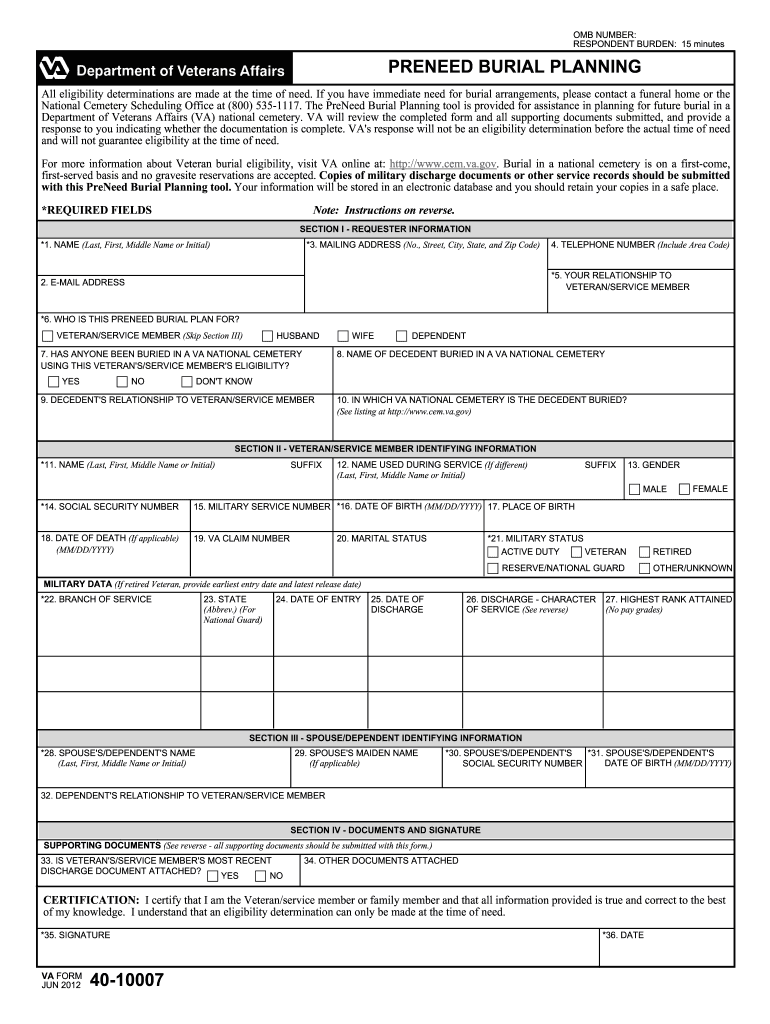
Begin with Section I: Requester Information. Fill in your name, mailing address, email, and telephone number. Ensure all required fields marked with an asterisk are completed.
In Field 5, indicate your relationship to the veteran/service member. If applicable, provide details about any decedents buried in a VA national cemetery in Fields 8 and 9.
Proceed to Section II: Veteran/Service Member Identifying Information. Enter the veteran's name, social security number, military service details, and discharge information as required.
Next, complete Section III for Spouse/Dependent Identifying Information by providing the necessary details of the spouse or dependent using the veteran's eligibility.
Finally, review Section IV: Supporting Documents. Attach any relevant documents that support eligibility claims and ensure you sign and date the form before submission.
Start filling out your VA Form 40-40007 today for free using our platform!
Fill out VA Form 40-40007. Preneed Burial Planning - reginfo online It's free
See more VA Form 40-40007. Preneed Burial Planning - reginfo versions
We've got more versions of the VA Form 40-40007. Preneed Burial Planning - reginfo form. Select the right VA Form 40-40007. Preneed Burial Planning - reginfo version from the list and start editing it straight away!
va form 40 4987 agreement for burial of cremated remains
VA Form 40-10007 PDFVA Form 40-10007 downloadVA Form 40-10007 Application for pre need determination of eligibilityApplication for pre need determination of eligibility for burial in a VA national CemeteryVA Form 40-1330VA Form for burial benefitsVA burial benefits form PDFVA burial benefits fact sheet
Security and compliance
At DocHub, your data security is our priority. We follow HIPAA, SOC2, GDPR, and other standards, so you can work on your documents with confidence.
Burial in a national cemetery is on a first-come, first- served basis and no gravesite reservations are accepted. Copies of military discharge documents orRead more
Removal of Sexual Orientation and Gender Identity from
Feb 11, 2026 NCA PreNeed Burial Planning [VA FORM 40-40007]. VA. GI. NOAA Research Related Personal Data Applicant/Project Director/. PrincipalRead more
Cookie consent notice
This site uses cookies to enhance site navigation and personalize your experience.
By using this site you agree to our use of cookies as described in our Privacy Notice.
You can modify your selections by visiting our Cookie and Advertising Notice.