Statement monthly income calculation 2026

Get Form
b22c Preview on Page 1

Here's how it works

01. Edit your b22c online
Type text, add images, blackout confidential details, add comments, highlights and more.

02. Sign it in a few clicks
Draw your signature, type it, upload its image, or use your mobile device as a signature pad.

03. Share your form with others
Send 13 statement via email, link, or fax. You can also download it, export it or print it out.

How to use or fill out statement monthly income calculation

Form edit decoration
9.5
Ease of Setup
DocHub User Ratings on G2
9.0
Ease of Use
DocHub User Ratings on G2
  1. Click ‘Get Form’ to open the statement monthly income calculation in our editor.
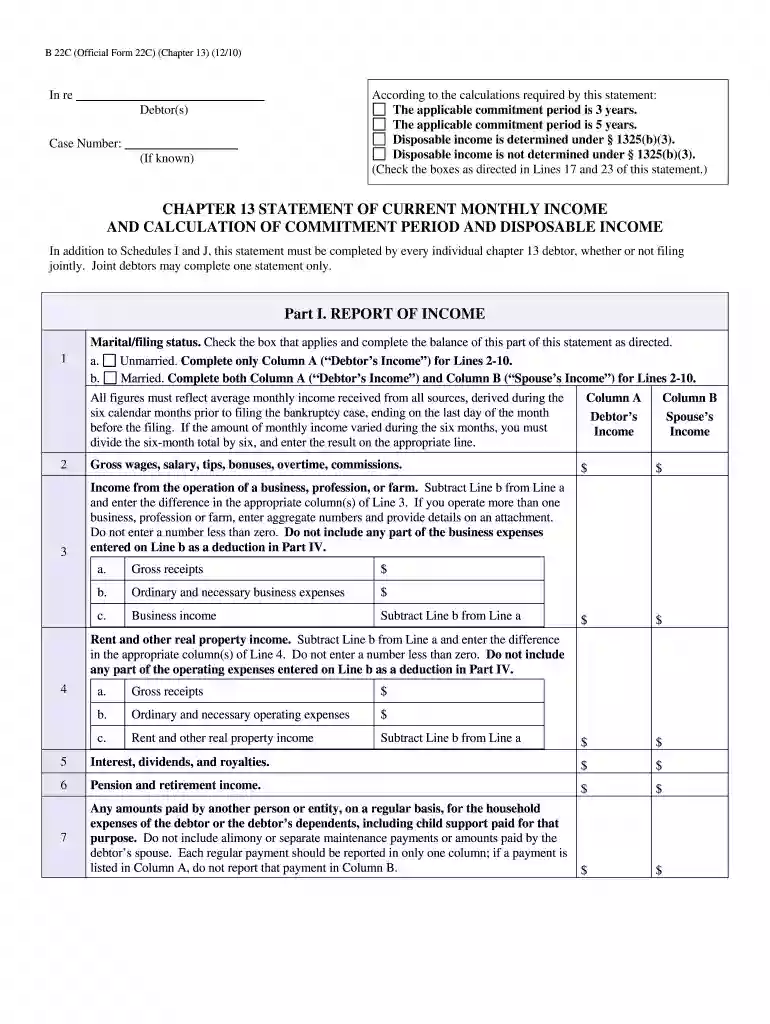
  2. Begin with Part I, where you will report your income. Check the appropriate marital/filing status box and complete Columns A and B as directed for each source of income.
  3. For each line item (Lines 2-10), enter your average monthly income from all sources over the past six months. Ensure that you do not enter negative figures.
  4. Proceed to Part II to calculate the commitment period. Enter the total from Line 11 and follow the instructions for marital adjustments if applicable.
  5. In Part III, determine disposable income by entering amounts from previous sections and checking the relevant boxes based on your calculations.
  6. Complete Parts IV through VI for deductions and additional expense claims, ensuring all entries reflect your actual expenses accurately.
  7. Finally, verify all information is correct before signing at the end of the document.

Start using our platform today to fill out your statement monthly income calculation easily and for free!

See more statement monthly income calculation versions

We've got more versions of the statement monthly income calculation form. Select the right statement monthly income calculation version from the list and start editing it straight away!
Versions Form popularity Fillable & printable
2010 4.8 Satisfied (145 Votes)
be ready to get more

Complete this form in 5 minutes or less

Get form

Got questions?

We have answers to the most popular questions from our customers. If you can't find an answer to your question, please contact us.
Contact us
Calculating Schedule C Income Net Profit (or Loss) (Line 31) + Plus Depletion (Line 12) + Plus Depreciation (Line 13) Minus Meals Entertainment (Line 24B) + Plus Business Use of Home (Line 30) = Qualifying Income.
First, find the amount of money you make in a week by multiplying your hourly rate by the number of hours you work in a week. Then, multiply the result by 52, the total number of weeks in a year. Finally, divide the result by 12 to learn your monthly gross income.
How to Calculate Monthly Loan Payments If your rate is 5.5%, divide 0.055 by 12 to calculate your monthly interest rate. Calculate the repayment term in months. Calculate the interest over the life of the loan. Divide the loan amount by the interest over the life of the loan to calculate your monthly payment.
The net income is calculated by subtracting revenue by operating costssuch as cost of goods sold (COGS) and selling, general, and administrative (SGA)and non-operating costs, like interest expense and taxes.
Steps to Prepare an Income Statement Choose Your Reporting Period. Calculate Total Revenue. Calculate the Cost of Goods Sold (COGS) Calculate Gross Profit. Calculate Operating Expenses. Calculate Income. Calculate Interest and Taxes. Calculate Net Income.

Security and compliance

At DocHub, your data security is our priority. We follow HIPAA, SOC2, GDPR, and other standards, so you can work on your documents with confidence.

Learn more
ccpa2
pci-dss
gdpr-compliance
hipaa
soc-compliance
be ready to get more

Complete this form in 5 minutes or less

Get form

People also ask

Total Revenues Total Expenses = Net Income If your total expenses are more than your revenues, you have a negative net income, also known as a net loss.

13 current monthly income