Loss report online report 2026

Get Form
loss report form Preview on Page 1

Here's how it works

01. Edit your loss report form online
Type text, add images, blackout confidential details, add comments, highlights and more.

02. Sign it in a few clicks
Draw your signature, type it, upload its image, or use your mobile device as a signature pad.

03. Share your form with others
Send police loss report form via email, link, or fax. You can also download it, export it or print it out.

How to use or fill out loss report online report with our platform

Form edit decoration
9.5
Ease of Setup
DocHub User Ratings on G2
9.0
Ease of Use
DocHub User Ratings on G2
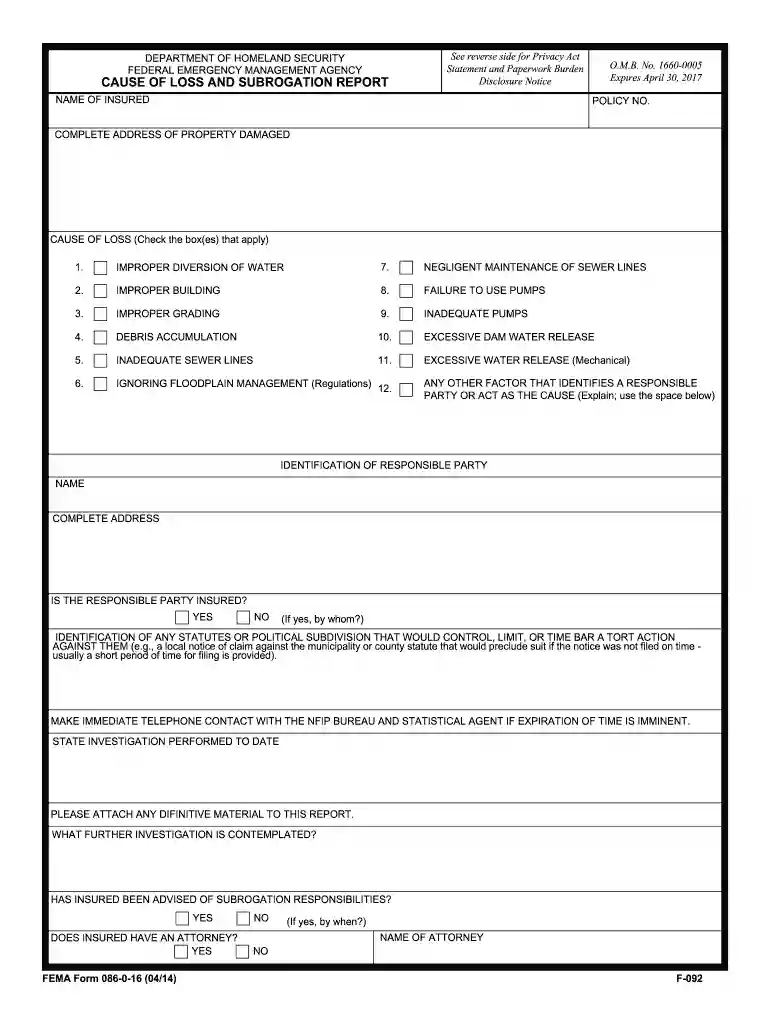
  1. Click ‘Get Form’ to open the loss report online report in the editor.
  2. Begin by entering the 'Name of Insured' and 'Policy No.' in the designated fields. Ensure that all information is accurate to avoid processing delays.
  3. Fill in the 'Complete Address of Property Damaged' section. This should include the full address where the loss occurred.
  4. In the 'Cause of Loss' section, check all applicable boxes that describe how the damage occurred. If there are additional factors, use the space provided to explain.
  5. Identify any responsible parties by filling out their name and complete address. Indicate whether they are insured and provide details if applicable.
  6. Complete any relevant sections regarding statutes or political subdivisions that may affect your claim, ensuring you attach any necessary documentation.
  7. Review all entered information for accuracy before submitting your form through our platform for processing.

Start using our platform today to fill out your loss report online for free and streamline your claims process!

See more loss report online report versions

We've got more versions of the loss report online report form. Select the right loss report online report version from the list and start editing it straight away!
Versions Form popularity Fillable & printable
2017 4.8 Satisfied (123 Votes)
2014 4.3 Satisfied (168 Votes)
be ready to get more

Complete this form in 5 minutes or less

Get form

Got questions?

We have answers to the most popular questions from our customers. If you can't find an answer to your question, please contact us.
Contact us

Managing your forms with DocHub this way is very straightforward after you have downloaded its extension for Google Chrome. Go to the Chrome Web Store and set up DocHub - Sign PDF from Gmail to get it. Give our tool access to your Google account, and then open an email containing how to print loss report as an attachment and point to the file with your cursor - the DocHub extension key will automatically show up there. Click on it to open your form in our editor. Make any essential modifications, fill out the blanks, and click Sign to create your legally-binding eSignature.

With a swift editing platform like DocHub, you do not require anything but a web browser and internet connection to edit your download loss report pdf free on the internet easily. Add your document or get the relevant form in DocHub’s catalog, open our editor with one click, and finish it digitally. To revise your forms at any time, sign up a free account with DocHub.

Loss Run reports provide a summary of a small business' insurance claims history, including the types of claims filed in the past, the frequency of past claims filed and the related costs. This data is used by insurers to help figure out how risky a business is to insure.
A loss run is a report generated by your insurance company showing the claim activity on each of your insurance policies. The loss run serves a number of purposes, including the following: Informational: Gives you a detailed account of the claims activity on your policy during a given policy term or terms.
Loss Run reports provide a summary of a small business' insurance claims history, including the types of claims filed in the past, the frequency of past claims filed and the related costs. This data is used by insurers to help figure out how risky a business is to insure.

Security and compliance

At DocHub, your data security is our priority. We follow HIPAA, SOC2, GDPR, and other standards, so you can work on your documents with confidence.

Learn more
ccpa2
pci-dss
gdpr-compliance
hipaa
soc-compliance

People also ask

Tips on Reading Loss Runs Look for trends. Do most of your claims happen on a certain day of the week? ... Pinpoint the status of claims. Get a better understanding of claims that have been closed out and what claims are still open, so you can work towards a resolution. Examine the numbers.
How to Request a Loss Run Report. Loss run reports are created by your insurance carrier. If you want to request a report, all you need to do is contact your insurance agent or broker with a loss run request, and they'll contact your carrier.
A loss history report is a record of insurance losses associated with a home or car. These reports provide a record of the type of loss on the home, the date of the loss and the amount and status of each claim going back five years.
As the name implies, a loss run request is what's submitted when a loss run, or report, is requested. You may need to provide a loss runs report to a new insurance provider, or you may just want to get a closer look at your insurance information. In any case, you request a loss runs report from your current provider.
Much like credit scores allow banks to determine whether you're a good candidate for a bank loan or credit card, loss runs allow insurers to assess how risky your business will be to insure. By requesting your loss runs, an insurer can review: The type of claims you've filed in the past.

download loss report pdf